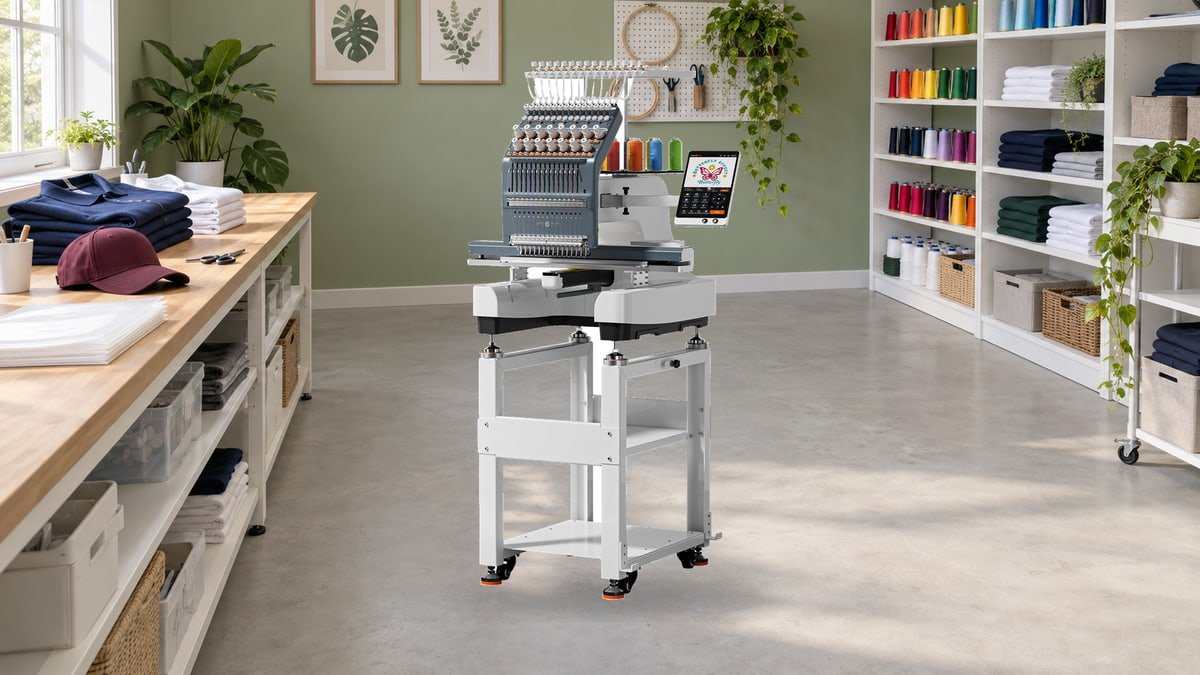
HTVRONT E15 Review: Is a 15-Needle Machine Right for Your Small Business?
The first order for a few embroidered caps is exciting. The next one, with a five-color logo and a deadline, can make the limits of a small embroidery setup feel rather less charming. That is the opening HTVRONT is aiming for with the E15: a 15-needle machine for makers who want to move beyond occasional personalization and take on repeat work.
It is an appealing idea. Keep the colors threaded, prepare the next garment, and spend less of the evening waiting to change a spool. But an embroidery business needs more than a machine that looks impressive in a demonstration. The logo has to stitch cleanly, the second cap has to look like the first, and the equipment needs to suit the room, the computer, and the person using it.
Our buying verdict: the HTVRONT E15 is worth shortlisting for repeat multicolor garment and cap orders, especially when manual color changes are already slowing you down. It is a much harder purchase to justify for occasional gifts or an untested business idea. The strongest reasons to consider it are the ready-threaded colors and included cap equipment; the biggest questions are digitizing costs, practical training, service arrangements, and its still-short independent ownership record.
The E15 makes most sense when you can point to a job you already do and explain exactly where the current setup slows you down. That is a better place to begin than the biggest number on the specification sheet.
What 15 needles actually change
The E15 is a single-head, 15-needle embroidery machine. Those terms describe different things. Fifteen needles let you keep multiple thread colors ready and switch between them during a design. A single head still works on one item at a time. It is not a machine that embroiders 15 shirts simultaneously.
That distinction makes the value proposition much clearer. If a logo repeatedly asks you to stop and rethread a single-needle machine, E15 addresses a real interruption. If most of your work is a small one-color monogram, the advantage is less dramatic. Hooping, placement, bobbin changes, trimming, and quality checks remain part of the day.
| Specification | E15 / EMB03 | Why it matters |
|---|---|---|
| Needles | 15, with automatic color changes | More colors ready without repeated manual rethreading |
| Flat embroidery speed | 500-1,200 stitches per minute | A speed range, not a promise of finished items per hour |
| Cap speed | Up to 850 stitches per minute | Do not budget cap orders at the flat-work maximum |
| Large flat frame | 500 x 250 mm, approximately 19.7 x 9.8 inches | Different from the ordinary garment-hoop limit |
| Maximum garment hoop | 300 x 238 mm in the manual | Check the actual hoop and usable placement for your garment |
| Cap design height | 65 mm, approximately 2.56 inches | A tall logo may need redesigning, not simply shrinking |
| Controls and transfer | 10.1-inch touchscreen; Wi-Fi or USB drive | Wireless convenience with an offline file-transfer option |
| Embroidery files | DST and DSB | A customer-supplied picture is not automatically stitch-ready |
Manufacturer specifications checked October 15, 2026. The manual distinguishes the large flat frame from garment and cap hoops. A garment’s shape can restrict usable space further.
The Standard Kit includes the stand, bobbin winder, garment-hooping equipment, large flat frame, extension table, cap driver, cap hoops, and a cap-hooping station. Starter thread, bobbins, fabric, and stabilizer are included too. That is a useful starting package, although it is not a supply inventory for a month of paid orders.
Start your comparison with that kit. A heat press or DTF bundle only earns its place if you actually plan to sell those decoration methods as well. Embroidery itself does not require buying a printer and oven alongside the E15.

Caps are the attractive opportunity, and the tougher test
A neat logo on a cap looks simple from a few feet away. Up close, the job is less forgiving: the surface curves, the center seam interrupts the fabric, and the brim leaves little room for mistakes. The included cap hardware makes E15 interesting for this work, but owning the attachment is only the beginning.
HTVRONT advertises 270-degree cap-frame rotation. Treat that as a capability of the setup, not permission to place any design anywhere on any hat. The modest vertical space matters more than the sweeping rotation figure when a customer sends a tall crest or stacked lettering.
There is also a specification detail worth asking about. The manual lists a 370 x 65 mm cap embroidery area but a 360 x 65 mm maximum cap hoop. Do not promise a customer a full-width wraparound design from those figures alone. Have the seller demonstrate the usable area on your chosen blank and confirm the frame limits.
Ask to see the cap you intend to sell
A structured cap and a soft, unstructured cap are not interchangeable test pieces. Nor does a successful flat shirt logo prove that its stitch order will suit a curved cap. Send the demonstrator your intended blank and design details, including whether the logo crosses the center seam.
HTVRONT’s cap embroidery lesson recommends starting at 500 stitches per minute and using cap-appropriate designs. That is a much more useful starting point than treating 850 SPM as the correct setting for every job. It also shows that switching between caps and garments involves changing the driver or brackets and selecting the correct frame on screen.
For a small shop, batching similar jobs can therefore make sense. Finish the planned cap run before changing to shirts, rather than repeatedly rebuilding the setup for individual orders. Leave room in the schedule for that changeover.
A polished front is only half the inspection
Look at lettering, outlines, the fabric surrounding the embroidery, and the reverse side. Can you still read the smallest text? Do outlines meet filled areas? Does the garment lie naturally after it comes out of the hoop? A design can look sharp while tensioned and pull the fabric into ripples afterward.
The E15 manual recommends cut-away support for stretchy fabrics and water-soluble topping for textured surfaces such as terry. Those are material-specific decisions, not optional extras that 15 needles make unnecessary. Use the manual’s guidance as a starting point, then approve a sample on the actual garment.
For workwear, add a practical step: wash a sample according to the blank’s care label before offering that combination to customers. Keep the sample, its design file, and a note of the materials together. Reordering becomes easier when you are reproducing an approved combination rather than trying to remember how the attractive sample was made.
IdeaStudio is convenient, but it is not a complete digitizing service
Here is the distinction most likely to surprise someone moving from vinyl or printed transfers. A logo image tells you what the finished artwork should look like. An embroidery file tells the machine how to build it in thread. Stitch order, underlay, density, and compensation for fabric movement all affect the result.
The E15 accepts DST and DSB files, not a promise that any JPEG or SVG will become good embroidery. In an October 13 reply on the HTVRONT community, the brand clarified that professional digitizing currently requires separate software. IdeaStudio handles basic editing and combining of existing embroidery files, along with wireless transfer.
That does not make the E15 a poor choice. It means a buying budget needs a plan for artwork. You can learn a dedicated digitizing program, pay a specialist, or begin with suitable licensed embroidery designs. Each route has a cost, whether in money, learning time, or limits on customization.
For a customer logo, ask the digitizer for a file prepared for the intended size and substrate. Keep the original editable design where available, not just the exported stitch file. A left-chest polo logo and a cap version may need separate preparation even when the artwork looks identical.
Mac owners should check the E15-specific workflow
Do not assume that general IdeaStudio availability means every connected machine has the same operating-system support. The current E15 wireless-import instructions require Windows, with the computer and machine on the same Wi-Fi network. A Mac-only workspace needs a deliberate alternative.
USB-drive import gives you an offline route for compatible files. HTVRONT’s USB lesson explains how those files enter the machine’s pattern library. That can suit a shop receiving finished files from a digitizer without needing the full wireless workflow.
One small habit can prevent expensive confusion: include the design size and garment type in the filename. Keep approved production files separate from experiments. The touchscreen preview is helpful, but a tidy file library is what stops yesterday’s test version from going onto today’s customer shirt.
Be cautious with large resizes of DST or DSB files. Changing the displayed dimensions does not guarantee that density and other stitch decisions remain suitable. Ask for a properly prepared size variant rather than assuming that dragging a corner is the embroidery equivalent of resizing a photograph.
How long will an order really take?
The maximum speed is useful for comparing machines, but it is a weak way to quote a customer. Stitch count gives you a starting point; elapsed time tells you whether the job fits your day.
Consider a hypothetical 12,000-stitch design. Dividing stitch count by speed gives the following arithmetic. These are illustrations, not E15 test results or recommended speed settings.
| Assumed constant rate | Stitching time alone | With an illustrative 5 minutes of handling |
|---|---|---|
| 1,200 SPM | 10.0 minutes | 15.0 minutes |
| 850 SPM | 14.1 minutes | 19.1 minutes |
| 600 SPM | 20.0 minutes | 25.0 minutes |
Calculation: 12,000 divided by the assumed stitches per minute. Real running time also includes acceleration, trims, color changes, pauses, and any corrective work. The five-minute handling allowance is an example, not a measured average.
The useful lesson is not that one row predicts your output. It is that even a machine running faster cannot remove every other task. If it takes a long time to position a difficult garment or tidy the finished piece, that work can outweigh a small improvement in stitching speed.
During a demonstration, time a complete repeat cycle: load the prepared item, position it, stitch, remove it, and inspect the result. Then repeat. A second person might hoop the next garment while the machine runs; a solo operator may also need to answer messages and pack orders. Plan around the workflow you actually have.
For pricing, separate the one-time design preparation from the per-item work. A repeat order using an approved file is different from a first order that needs digitizing, revisions, and several samples. Count replacement blanks and rejected samples too. Revenue from a cap is not the same thing as profit from a cap.
What early E15 discussions do, and do not, tell us
HTVRONT launched E15 sales in September 2026, so the ownership story is still young. Early enthusiasm is understandable, but it is too soon to treat launch demonstrations as evidence of years of dependable production.
The most useful questions in the early E15 discussion concern recovering from interruptions, preparing original designs, and learning the machine. Those are sensible buyer concerns. They are not proof that owners are experiencing widespread failures, and they are not a substitute for independent long-term reviews.
At this stage, the missing evidence is as important as the excitement: how consistently the machine handles repeat customer work, how quickly replacement parts arrive, and what happens when remote troubleshooting is not enough. Someone with a flexible hobby schedule can absorb a learning delay more easily than a shop with a team order due on Friday.
That is why a careful E15 purchase should involve a demonstration and a conversation about service, not just a comparison of needle counts.
A better demonstration: bring a small job, not just questions
HTVRONT offers a one-to-one pre-purchase live demo with a deposit equal to 10% of the product price. Its stated terms allow a full deposit refund if you decide not to buy after the demo. Confirm the booking and refund arrangements in writing before paying; this is a demo deposit, not a promise that a used machine can later be returned freely.
Ask whether the session can cover your designs and blanks. A useful short test plan would include:
- A small multicolor chest logo. Include the smallest lettering you genuinely need to sell. Inspect the finished piece after unhooping, not only while it is stretched in the frame.
- A cap with a center seam. Use the intended cap style and a cap-ready file. Watch the hooping and setup, then look closely at registration around the seam.
- Three repeats of one design. Compare placement and stitch quality across all three. Ask to see any adjustment between pieces instead of only the best result.
- A supported pause-and-resume demonstration. Have the specialist explain the recovery procedure and show it safely. Do not deliberately cause a jam or damage a needle to test support.
Ask who supplies replacement parts, which repairs are user-serviceable, and how an unresolved problem is handled in your location. Remote video guidance can be valuable, but it is not the same service arrangement as a local technician who can visit your shop.
Read the return conditions before installing it
Important for a first-time buyer: the E15-specific policy checked in October 2026 gives 15 calendar days to request a return, but personal-reason returns require an unused machine. Installation, powering on, or test embroidery counts as use. Customer-paid return shipping and a restocking fee of up to 20% may apply. Confirmed quality issues, shipping damage, and applicable legal rights are handled separately.
In other words, do not interpret the return window as a home trial. Get the questions about fabric, software, and workspace answered before committing. Keep a copy of the terms that apply to your order and document the delivery condition before assembly.
The listed warranty is 365 days for the machine and electronics, with 90 days for accessories and exclusions for wear items. Ask how a claim would work in practice, including freight, diagnosis, and expected downtime. A warranty duration alone does not tell you how soon a stopped order can resume.
Make room for the machine, and for the work around it
E15 is not a compact appliance to put away after dinner. HTVRONT lists a net weight of 116 kg, approximately 256 lb, and a crated weight of 170 kg, approximately 375 lb. Plan the delivery route, doorway clearance, and safe handling before it arrives. For stairs or awkward access, arrange suitable professional assistance rather than improvising a lift.
The installation guide calls for at least one meter clear in front and half a meter behind and on each side. The machine also needs a stable, level installation and unobstructed hoop movement. A floor plan that fits the stand but blocks the moving frame is not enough.
Leave another usable surface for hooping, scissors, backing, and finished pieces. Keep thread and approved samples organized. These unglamorous details make a difference when the order is more than a single gift.
Before installation, ask HTVRONT to confirm the electrical rating for the exact unit being shipped. The current manual contains conflicting power entries: 0.4 kW and 50/60 Hz in one place, but 200 W and 50 Hz elsewhere. Do not size the electrical supply from the lower figure or assume away the discrepancy; use the unit’s rating plate and qualified advice where needed.
Maintenance belongs in the schedule
A production machine should not have to wait until a thread problem interrupts an order before someone cleans it. HTVRONT’s daily care instructions call for checking the bobbin case at each bobbin change and cleaning and lubricating the rotary-hook area at the end of the day or after four to six hours of continuous use.
Follow the specified oil and lubrication points, not a general-purpose spray. Power off, disconnect as directed in the manual, and wait for all motion to stop before inspection or cleaning. Needles, hoops, and thread paths deserve a quick check before starting a job.
The separate weekly maintenance guidance covers the trimmer area and upper threading path. It does not authorize sharpening blades or adjusting internal mechanisms yourself. Repeated abnormal noise, sticking, or unresolved trimming problems are reasons to stop and contact support.
A simple job log helps: record the blank, file version, stabilizer, needle, thread, and any adjustments that produced the approved sample. If results deteriorate, you then have a known setup to compare against instead of changing several variables at once.
Is E15 the right next step for your business?
| Your situation | A sensible direction | What to prove first |
|---|---|---|
| Repeat multicolor orders are already coming in | Shortlist E15 | Your actual logo, cap or garment, and full production cycle |
| Occasional gifts and simple monograms | A smaller setup or outsourcing may be enough | Whether color-change delays really justify the investment |
| You want to start selling but have no regular demand | Test the offer with outsourced samples first | Customer interest, acceptable quality, and repeat orders |
| A missed deadline would be costly | Compare dealer-supported multi-needle options too | Local service, parts availability, and a backup production plan |
The strongest case for E15 is not that it can turn anyone into an embroidery business. It is that an existing maker may be ready to spend less time managing color changes and more time completing repeatable work. The kit is broad, the cap capability is appealing, and the workflow has practical conveniences. None of that removes the need to learn digitizing, materials, or quality control.
Before ordering, compare the chosen package and any applicable offer on our HTVRONT coupons and deals page. Make that the final check after the machine fits your work, not the reason to buy a setup you do not yet need.
For a broader workshop comparison, Arts & Crafts Coupons & Deals brings together other creative equipment and supplies. Compare what each process adds to your own product range rather than assuming that embroidery, printed transfers, and other decoration methods solve the same problem.
If a live demonstration produces the work you want to sell, the software plan makes sense, and the support arrangements feel workable, E15 deserves a serious look. If those answers are still vague, wait. A machine is a better purchase when the next order explains why you need it.
Questions worth settling before ordering
Is the HTVRONT E15 suitable for a beginner?
A beginner can approach it with training and practice, but it is a substantial first purchase. Start with simple flat work, learn hooping and material selection, and budget for failed samples. Someone unsure whether they enjoy embroidery may be better served by a smaller initial commitment.
Can it embroider shirts and hats with the same setup?
It supports both, but switching is a hardware and frame-selection task, not just loading a different file. Garment brackets and the cap driver must match the work. Follow the official changeover procedure and verify frame clearance before stitching.
Can I send a customer’s logo straight from a picture?
Not as an ordinary image file. The artwork needs to be digitized into a supported embroidery file for the intended size and material. IdeaStudio’s current E15 workflow is not a replacement for professional digitizing.
Does E15 work with a Mac?
The current E15-specific IdeaStudio wireless workflow requires Windows. Compatible DST or DSB files can instead be transferred using a USB drive. Confirm your complete design-to-machine workflow before purchasing.
Will 15 needles make every order faster?
They can reduce manual color changes, especially on repeated multicolor designs. They do not eliminate hooping, setup, trimming, inspection, or the time needed to make a design stitch well. Measure a complete sample job rather than estimating from needle count.
DiscountedSavings may earn a commission from qualifying purchases through product links.