HTVRONT DTF Printer Reviews: D1 vs D2, Setup, Software, and Common Problems
HTVRONT DTF printer reviews are easy to oversimplify because the printer is only one part of the process. The real purchase includes white-ink maintenance, RIP software, film handling, powder curing, a heat press, consumables, and the support path when a print does not look right. Choosing between the D1 and D2 therefore requires looking beyond print width and advertised speed.
Short answer: the D1 is the more established, component-by-component workflow, while the D2 is designed to remove several setup and maintenance steps. Neither should be treated as a plug-and-play office printer. The D2 has the more convenient software and maintenance features on paper, but public feedback still includes white-layer alignment, fuzzy edges, and color-quality complaints. The D1 has positive reports about setup and vibrant transfers, alongside reports of white-layer alignment problems. The sensible choice depends on how much you value automation, how often you will print, and whether you can test the machine immediately after delivery.
Where the D1 and D2 fit in a real DTF workflow
The same printer can produce very different transfers when artwork preparation, white-ink settings, nozzle condition, film, powder, curing, or heat-press settings change. That is why a DTF machine should be judged as one part of a production chain rather than as a self-contained office printer.
Both models are A3-class printers with a stated maximum film width of 13 inches. The complete workflow still requires powder application, curing, heat pressing, safe material handling, cleaning supplies, and room for failed setup tests. A printer-only price therefore says little about the cost of a working station.
The current D1 and D2 specifications show a clear split: the D1 follows a more traditional RIP-and-dongle path, while the D2 tries to consolidate design, nesting, printing, alerts, and idle-time care.
HTVRONT D1 vs D2: detailed specification comparison
The most important difference is not the headline resolution. It is how each machine handles software, ink, maintenance, and recovery when the first print is wrong.
| Specification or workflow | HTVRONT D1 | HTVRONT D2 | What it means before buying |
|---|---|---|---|
| Maximum film width | 13 in / 33 cm | 13 in / 33 cm | Both target A3-sized DTF work. The width does not tell you how quickly a full roll can be processed. |
| Resolution claim | Up to 1440 DPI in the feature section | Up to 720 x 1440 DPI | Resolution alone will not fix fuzzy artwork, poor anti-aliasing, missing nozzles, or an incorrect white layer. |
| Print speed claim | Up to 16 ft2/h; the page estimates about 3 minutes for A3 and 2 minutes for A4 | Up to 16 ft/hour in the current FAQ | Treat this as a controlled maximum, not a guaranteed end-to-end shirt production rate. Powdering, curing, pressing, cleaning, and failed tests take additional time. |
| Printhead | XP600 is identified by the manufacturer as a professional-grade printhead | XP600 is presented as an industrial-grade component | Printhead branding is useful for identifying the platform, but it is not a guarantee of color accuracy or service life in your workflow. |
| Ink tank capacity | 250 ml per color | 300 ml per color | The D2 should require fewer refills, but its larger tanks do not remove the need to use compatible ink and keep the system maintained. |
| Software path | RIP software requires a USB dongle; the official comparison names RIIN and BetterPrinter | No USB dongle; 2-in-1 software with nesting, film positioning, built-in resources, and AI image generation is advertised | D2 is the simpler starting point. D1 buyers should confirm the dongle, Windows computer, software versions, and editing software before ordering. |
| White-ink care | Automatic stirring, circulation, and printhead cleaning are advertised, with computer connection required for the maintenance mode | Sleep-care Mode, white-ink circulation, self-cleaning, and ink shortage/leakage alerts are advertised | D2 is better suited to an owner who wants offline care. Both still need a real maintenance routine and diagnostic checks. |
| Supported ink | HTVRONT/LOKLiK DTF ink is recommended for compatibility | HTVRONT D2 ink only; the page says D1 ink and third-party ink are not compatible and may affect warranty coverage | Consumable lock-in is part of the ownership cost. Check local stock and refill prices before choosing the printer. |
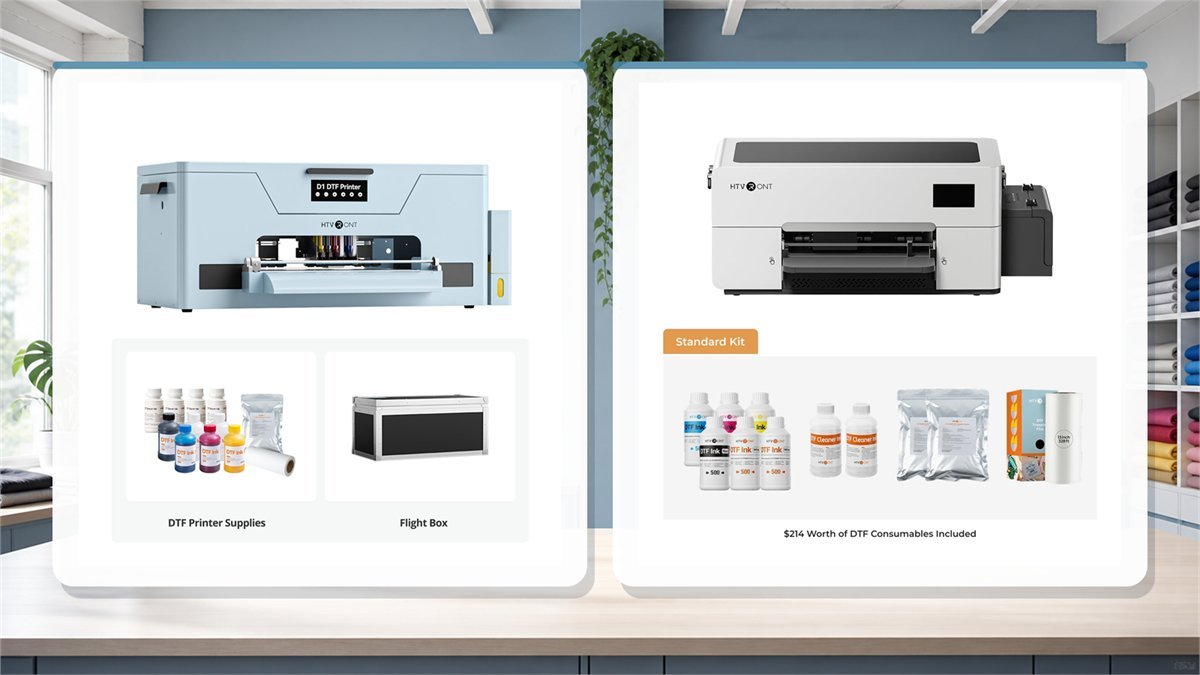
| Standard kit contents | Six 250 ml ink bottles, 13 x 328 ft film roll, 500 g powder, four 250 ml cleaner bottles, and flight box | Six 500 ml ink bottles, 330 mm x 50 m film roll, two 500 g powder packs, and two 250 ml cleaner bottles | D1 includes a flight box; D2 includes more initial ink. Neither standard kit should be assumed to include an oven or heat press. |
| Return and warranty information | 30-day return or exchange; 6 months for printhead/mainboard; 12-month comprehensive warranty | 15-day return window; 6 months for printhead/mainboard; 12 months for other machine parts | D2 has a shorter stated return window, so the delivery-day test plan matters even more. |
What comes in the box: D1 and D2 kits are not equivalent
Bundle contents can change the apparent value more than a small price difference. The current D1 standard kit lists six 250 ml ink bottles, a 13 x 328 ft film roll, 500 g of DTF powder, four 250 ml bottles of cleaner ink, and a flight box. The D2 standard kit lists six 500 ml ink bottles, a 330 mm x 50 m film roll, two 500 g powder packs, and two 250 ml cleaner bottles.
Neither list should be read as a complete apparel-production station. You may still need a curing oven or a reliable alternative, a heat press, a safe place to handle powder, blank garments, ventilation, storage, and spare consumables. If you are comparing an oven or all-in-one bundle, write down the added equipment and compare it with what you already own.
The D1 bundle makes sense when the workflow is already familiar
The D1 standard kit is easier to evaluate as a traditional printer-plus-consumables purchase. The flight box may be useful for storage or transport, while the four cleaner bottles support a more deliberate maintenance plan. The trade-off is that the official software comparison describes a USB dongle and separate RIIN/BetterPrinter workflow. A beginner should not assume that the D1 will behave like a simple design-and-print appliance.
The D2 bundle prioritizes fewer decisions at the start
The D2 standard kit starts with twice the listed ink volume per color and packages the design, nesting, and print workflow more tightly. That can reduce friction for a small shop that wants to prepare gang sheets or repeat small orders. It also means the buyer should check the D2 consumable policy carefully: the official page says that only D2 ink is supported and that D1 or third-party ink is not compatible.

What owners repeatedly discuss after setup
The HTVRONT/LOKLiK DTF community contains 814 relevant messages across 118 threads. After removing giveaway reactions, wish-list comments, and general chat, 320 messages contained an identifiable owner report or concrete troubleshooting advice. The busiest subjects were software and connection problems, ink flow, support and replacement, hardware faults, setup, maintenance, and print quality.
| Recurring subject | Evidence messages | What to test on a delivered printer |
|---|---|---|
| Software or connection | 117 | Installation, printer detection, profiles, saved presets, maximum width, restart behavior, and reconnecting after an update. |
| Ink flow or clogging | 115 | Initial ink charge, air in lines, nozzle pattern, waste flow during cleaning, and every CMYK plus white channel. |
| Support, return, or replacement | 100 | Response path, required photos or video, replacement terms, and the last day of the return window. |
| Hardware or component faults | 97 | Film feed, carriage travel, sensors, leakage, unusual impacts or noise, and error messages. |
| Setup and learning curve | 84 | Transparent artwork, mirrored output, correct film side, white fill, powder, curing, and press settings. |
| Maintenance or idle time | 56 | Circulation, sleep mode, scheduled cleaning, powered-idle behavior, and long-storage procedure. |
| Print quality or color | 54 | Banding, grain, saturation, black output, fine text, gradients, and repeatability across several prints. |
| White-layer alignment | 26 | White halo, underbase offset, choke or spread, anti-aliasing, and calibration on dark fabric. |
These are conversation counts, not failure rates: one machine can generate several replies, and a support forum naturally contains more problems than uneventful print days. The value of the pattern is practical. It shows which checks deserve attention while a return or exchange is still possible.
Positive patterns
- Some D1 owners describe setup as manageable for a first DTF printer and report bold, clean transfers after learning the artwork workflow.
- D2 users who reached a stable setup praise the integrated workflow, alerts, and the ability to keep maintenance running without leaving a computer connected.
- Several support cases ended successfully after the owner supplied a nozzle pattern, photos, video, settings, and details about the ink path.
- Both product lines are attractive to makers because DTF supports full-color designs and white ink on a broader range of fabrics than basic sublimation workflows.
Recurring cautions
- White ink alignment and visible white edges appear in public D1 and D2 discussions. This can involve artwork, white spread or choke settings, calibration, or the particular unit.
- Some D2 owners report washed or grainy color and spend time with nozzle checks, cleanings, calibration, or support before deciding whether the unit is defective.
- Software can be the limiting factor. D1 threads mention the dongle, BetterPrinter or RIIN, profiles, and computer compatibility; D2 threads add IdeaStudio presets, nesting, width limits, and update behavior.
- Idle time is not free. Threads about missing channels often begin after the printer was switched off, sat unused, or lost circulation despite being expected to care for itself.
D1 reports range from vivid first transfers and regular small-business use to repeated priming, unstable ink channels, software friction, and white-layer offset. D2 reports show the same split in a newer package: some owners like the guided setup and quieter maintenance routine, while others describe white fuzz, washed color, carriage or feed trouble, IdeaStudio limitations, or long remote-support sessions.
Independent Reddit discussions add cases involving a D2 black channel that stopped printing, another D2 returned after white offset and grainy output, and a D1 that developed inconsistent black and cyan after several hundred prints. Other D1 owners describe reliable daily work when maintenance is treated as part of production rather than an occasional cleanup.
Trustpilot’s HTVRONT profile currently carries a breach-of-guidelines warning and says fake reviews were removed, so its aggregate score is not a dependable buying signal. Individual DTF-specific reports still echo the same practical split: some customers describe patient support and a successful fix, while others report repeated diagnostic videos, slow replacement, or a refund request. The return route and quality of technical support therefore belong in the product comparison.
White-ink alignment: the test that deserves priority
White ink is the layer that makes DTF transfers work on dark garments, but it is also the layer that exposes alignment problems. If white is shifted beyond the color image, the transfer may show a pale halo or a visibly offset edge. If white coverage is too weak, dark fabric can mute the design. If white coverage is too heavy, fine details and small lettering can look blunt.
Before blaming the printer, separate the variables. Use a simple test file with a solid shape, fine black text, a color edge, and a transparent background. Check that the artwork does not contain an unintended white rectangle. Run a nozzle check, then compare the same file after one change at a time. Record the white-fill mode, spread or choke setting, calibration values, film side, and press settings.
- Print a color-and-white alignment test with no garment involved.
- Inspect the nozzle pattern before changing color profiles.
- Check that the artwork background is transparent where it should be.
- Change white spread or alignment only in small, recorded steps.
- Repeat the test on the film and powder routine you plan to sell.
- Save photos and settings if you need to contact support.
Software and artwork preparation: where beginners lose quality
The D1 and D2 are not only hardware purchases. The D1 page says its RIP software is Windows-only and requires a dongle; it also explains that design editing still happens in software such as Photoshop or Canva. The D2 page advertises an all-in-one workflow and Windows 10 or later support. Neither statement means that every design will print correctly without preparation.
Use artwork with a transparent background when the design does not need a full white rectangle. Check the actual pixel dimensions and avoid enlarging a small file until its edges become soft. Keep anti-aliasing in mind: a soft edge can produce a fuzzy white outline even when the printer is mechanically aligned. For a small business, the fastest way to improve consistency is to create a test sheet and save the settings that work for each common garment and film.
| Visible result | First checks | Why the check comes first |
|---|---|---|
| White halo around artwork | Transparency, anti-aliasing, white spread/choke, and layer alignment | A border can be created by the artwork or white settings before it is caused by a hardware fault. |
| Washed or grainy colors | Nozzle pattern, correct ink, color profile, resolution, and film side | Missing ink channels and incompatible consumables can look like a color-management problem. |
| Fine lettering looks filled in | Artwork size, white density, white spread, and film/powder consistency | Small details have less tolerance for soft edges and excess white. |
| Banding or horizontal lines | Nozzle check, head cleaning, feed settings, film loading, and dust | Banding can come from ink delivery or media handling, not only from the printhead. |
| Good print but weak shirt transfer | Powder coverage, curing, press pressure, fabric, peel timing, and wash test | Printer resolution does not determine the durability of the finished garment by itself. |
Maintenance: automated does not mean maintenance-free
HTVRONT emphasizes automatic stirring, circulation, and printhead care on both model pages. The D2 adds Sleep-care Mode, alerts for low ink or leaks, and access doors intended to make daily checks easier. These features reduce routine friction, but they do not make white ink chemically inert or remove the need to follow the model’s maintenance instructions.
The D1 comparison states that its maintenance mode requires a computer connection. The D2 comparison says maintenance can run with power only, without a constant PC connection. That is a meaningful distinction for an occasional user: the D2 is designed to keep caring for the ink system while the computer is off, but the owner still has to keep the machine powered as instructed. If the printer will be stored for a long period, the D2 FAQ specifically points to deep cleaning before storage.
Ask yourself a simple question before buying: will the printer be used often enough to justify the maintenance routine? A machine that sits idle for weeks may be a poor fit even if its daily automation is attractive. A shop that prints several days each week may benefit more from automated circulation and larger ink tanks.
Printing speed versus finished output
The listed speed is useful for a first comparison, but it should not be confused with the number of finished shirts per hour. A DTF order moves through design preparation, film loading, printing, powder application, curing, heat pressing, peeling, cooling, inspection, and sometimes rework. A 13-inch transfer can print quickly and still take much longer to become a sellable garment.
For a realistic estimate, time ten identical transfers rather than one showcase print. Record the print time, powder and cure time, press cycles, failed transfers, and cleaning interruptions. Repeat the test with a dark cotton garment and a detailed design. This will show whether the printer’s capacity matches your order pattern better than a maximum-speed headline.
Operating cost: the manufacturer estimate is only a starting point
The D1 product page gives an illustrative cost of about $3.72 for a 13-inch DTF transfer T-shirt: $0.54 for materials, $0.18 for depreciation and maintenance, and $3.00 for a plain shirt. That is a useful example of how the brand frames the economics, but it is not an independent cost study. It does not represent your labor, failed tests, electricity, oven or heat press, shipping, software, storage, ventilation, taxes, or the price of your blanks.
| Cost category | D1/D2 question | Why it changes the calculation |
|---|---|---|
| Ink and cleaner | Can you reliably source the recommended model-specific ink? | D2’s stated ink restriction makes stock and refill pricing especially important. |
| Film and powder | How many transfers can you make from the included roll and powder? | Waste from tests, dust, powder coverage, and film handling changes the usable yield. |
| Oven and press | Do you already own compatible curing and pressing equipment? | A printer-only purchase can become a much larger workstation investment. |
| Failed transfers | What percentage will you discard during calibration? | Learning cost is often highest during the first weeks, not after the workflow is stable. |
| Time and support | How much time can you spend on checks and troubleshooting? | A cheaper machine can be expensive if it interrupts paid orders or requires long support sessions. |
What to test immediately after delivery
Because the stated return windows differ, test the printer before buying more supplies or accepting customer work. Keep the original packaging and photograph the serial number, accessories, and first test results. Use the same controlled file on both models if you are comparing them.
- Confirm the exact package. Check the model, color, kit type, film, ink, cleaner, powder, and any promised accessories.
- Check software and computer compatibility. Confirm Windows support, the D1 dongle if applicable, drivers, and the current model-specific software.
- Run a nozzle check. Save a photograph of the pattern before and after cleaning.
- Print a transparency test. Include small text, a gradient, a dark block, and an edge that makes white alignment visible.
- Print an A3-style test. Use the correct film side and a design close to the size of your real work.
- Complete the powder and cure stage. A good film print is not enough; inspect the transfer after curing and pressing.
- Check a dark cotton garment. Look for white halos, pinholes, weak coverage, stretch behavior, and the finish after cooling.
- Test the maintenance mode. Verify that white ink circulation, cleaning, alerts, and offline behavior work as described for the model.
- Contact support early. If the result is poor, send the nozzle pattern, artwork, settings, film information, and photos rather than only saying that the colors are wrong.
HTVRONT D1 and D2 pros and cons
HTVRONT D1 strengths
- A3-class 13-inch film support and an official speed estimate suitable for small-batch work.
- Automatic white-ink stirring, circulation, and printhead cleaning are part of the stated design.
- Standard kit includes a flight box and a substantial set of cleaner bottles.
- Public owner reports show that a first-time user can achieve vivid transfers after learning artwork preparation.
- Longer stated return window than the D2, which gives more time for controlled delivery tests.
HTVRONT D1 limitations
- USB-dongle and separate-software workflow adds setup friction and Windows dependency.
- 250 ml tanks are smaller than the D2’s stated 300 ml tanks.
- Public discussions include white-layer alignment concerns, so a test file is essential.
- Recommended ink compatibility narrows the consumable choices.
- Maintenance mode is described as requiring a computer connection.
HTVRONT D2 strengths
- No USB dongle and a more integrated design-and-print workflow.
- 300 ml per-color tanks, ink shortage/leakage alerts, and three quick-check access doors.
- Sleep-care Mode is designed to maintain the machine without a constant PC connection.
- Standard kit lists more initial ink and two 500 g powder packs.
- Clearer path for a beginner who wants nesting, film positioning, and design resources in one environment.
HTVRONT D2 limitations
- Shorter stated return window means defects and print quality must be tested quickly.
- Official documentation says only D2 ink is supported and excludes D1 or third-party ink.
- Public D2 feedback is mixed, including fuzzy white edges, offset white, washed color, and long support troubleshooting.
- The D2 is newer, so the owner community has less long-term history than the D1.
- Standard kit still does not automatically equal a complete oven-and-press production station.
Which model is more sensible for different buyers?
Choose the D1 when you already understand DTF preparation, are comfortable with a Windows-and-dongle workflow, value the longer stated return period, or prefer the standard kit’s flight box and cleaner quantity. It is a reasonable fit for a maker who is prepared to manage the printer as a production tool rather than expecting a one-click appliance.
Choose the D2 when integrated software, larger tanks, offline maintenance, and ink alerts are worth paying for. It is the more attractive design for a small shop that wants fewer separate setup decisions. The shorter return window and model-specific ink policy make delivery testing and consumable planning especially important.
Skip both for now when you will print only a few times a month, cannot keep white ink maintained, have no room for powder and curing, or expect the printer to replace a full-service transfer supplier immediately. In that situation, ordering transfers may be cheaper and less frustrating while you learn what volume you can actually sell.
Before deciding, compare the current HTVRONT listings, exact kit contents, availability, coupon offers, and tracked prices on the HTVRONT printer deals and coupons page.
Compare HTVRONT DealsFinal verdict: convenience versus control
The D1 and D2 are not separated by a simple good-versus-bad score. The D1 gives a more traditional workflow with a longer stated return period, a flight box, and automatic white-ink features, but asks the owner to deal with a more fragmented software path. The D2 improves the ownership design with a larger tank, integrated software, alerts, and Sleep-care Mode, but the shorter return period and stricter ink compatibility increase the importance of early testing.
Either model can make sense for a small apparel or craft operation that will print regularly, document settings, and maintain the white-ink system. Neither is a good choice for someone who wants to leave a printer unused for long periods or judge performance from one colorful sample. Compare the complete kit, run the alignment and dark-garment tests immediately, and treat support quality and consumable availability as part of the product.
HTVRONT DTF printer review questions
Is the HTVRONT D2 easier to use than the D1?
On paper, yes. HTVRONT describes the D2 as a no-dongle, two-in-one design-and-print system with nesting and built-in resources, while its comparison says the D1 uses a dongle and RIIN/BetterPrinter workflow. Easier setup does not remove the need to prepare transparent artwork and test the white layer.
Can I use D1 ink in the D2?
The current D2 product page says D1 ink and third-party ink are not compatible with the D2 and that only D2 ink is supported. Treat that as an ownership-cost consideration, not a minor footnote.
Does automatic white-ink circulation mean the printer can be ignored?
No. Circulation and self-cleaning reduce risk, but the printer still needs the model’s maintenance routine. The D2 documentation also points to deep cleaning before long-term storage.
Why can a DTF transfer look good on film but fail on a shirt?
Powder coverage, curing, press pressure, fabric, peel timing, and cooling can change the final result. The printer controls the film print, not every downstream step.
What should I test before the return window ends?
Test software connection, nozzle patterns, white alignment, a detailed transparent design, a dark cotton garment, the complete powder-and-cure process, and the maintenance or alert functions. Keep photos and settings for support.