Apolosign 21.5 vs 27: Which Digital Calendar Size Is Worth Buying?
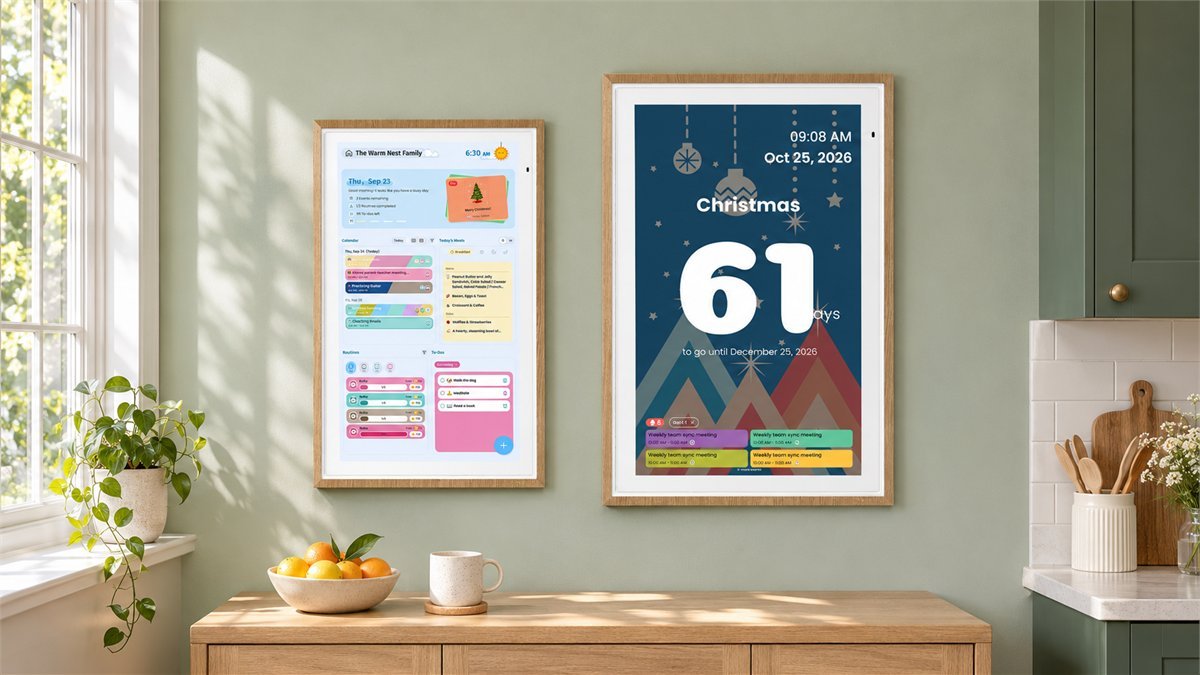
A school appointment on one phone, a work shift on another, and a grocery list that somebody forgot to bring. The attraction of an Apolosign calendar is not simply having a larger screen. It is giving those everyday plans a place where the whole household can see them. Choosing between the 21.5-inch and 27-inch versions comes down to where that place will be.
In the Apolosign 21.5 vs 27 comparison, the 21.5-inch model is the more sensible starting point for a calendar you approach and use up close. Choose the 27-inch model when a larger shared display genuinely suits your wall and viewing position. Both standard models are Full HD and offer the same core family-organizing tools. The separate 27-inch 4K model is the option to consider when sharper photos and fine detail matter as much as the calendar.
That distinction keeps the decision pleasantly simple: buy the size your room needs, rather than paying for a bigger model in the hope that it unlocks better scheduling. Current specifications, support guidance and owners’ experiences help explain what those differences mean in a real home.
The most useful feature is a plan everyone can see
The strongest positive theme in the owner accounts is shared visibility. A 21.5-inch owner on Reddit describes using Google Calendar to coordinate nursing-school commitments with a partner’s work schedule. Meal planning and a grocery list on both phones became part of the same routine. The useful detail is not the number of apps involved; it is that the plan no longer had to be copied onto a paper calendar for someone else to notice it.
A separate owner discussing the 27-inch model says it works well for chores and scheduling, then describes using its Android side for a Home Assistant dashboard. Their reason for choosing 27 over 21.5 was the scale of the wall. That is a good illustration of the buying decision, although one household’s installation cannot establish the right size for every room.
App Store and calendar-related Trustpilot accounts also describe the appeal of shared schedules, meal plans and children’s routines. A practical way to make those benefits count is to begin with one routine everyone already understands: tomorrow’s appointments, the dinner plan or a short after-school checklist. Add more once the screen has become a natural stopping point in the house.
Feedback is less uniform about layout preferences and task-management details. Some people appreciate the refreshed interface; others want stronger colors, more specific scheduling options or a browser-based workspace. Those are software-fit questions, not reasons to automatically choose the larger display. There are useful checks and settings below, especially if you expect Apolosign to replace a more elaborate planner.
Apolosign 21.5 vs 27: what actually changes?
| Buying consideration | 21.5-inch Full HD | 27-inch Full HD | 27-inch 4K |
|---|---|---|---|
| Native resolution | 1920 × 1080 | 1920 × 1080 | 3840 × 2160 |
| Calculated pixel density | About 102 ppi | About 82 ppi | About 163 ppi |
| Panel area relative to 21.5 | Reference size | About 58% larger | About 58% larger |
| Listed brightness | 300 nits | 300 nits | 300 nits |
| Processor / memory / storage | RK3576 / 4GB / 64GB | RK3576 / 4GB / 64GB | RK3576 / 4GB / 64GB |
| Main reason to choose it | A substantial family calendar in a smaller wall space | Larger physical presentation of schedules and shared information | The larger format with more detail for photos and close viewing |
| Core family tools | Calendar, chores, rewards, to-do lists, meal planning and photo display; Calendar Mode and Android Mode | ||
| Standard placement equipment | Wall mount included; do not assume a tabletop stand is included | ||
Manufacturer specifications checked November 8, 2026. Pixel density and screen-area comparisons are editorial calculations from the stated resolution, diagonal and 16:9 aspect ratio, not display measurements. The ordinary 27-inch model and the 27-inch 4K model are different products.
The standard 27-inch screen has the same number of pixels as the 21.5, spread over a larger surface. If the interface uses the same layout and scaling, the information becomes physically larger rather than automatically fitting more appointments. Software layout, text size and orientation still determine what you see.
Nor does the larger model come with more memory in the current specifications. Its extra appeal is the display size, not an established speed advantage. Both standard models also list ten-point touch, Wi-Fi 6 and Bluetooth 5.4. These are manufacturer specifications, not a promise that every third-party app or accessory will work equally well.
Why the 21.5-inch model is a good starting point
Picture a calendar beside the kitchen doorway, close enough to check while setting down your keys. You walk over to add a reminder, check the evening schedule and move on. In that situation, the 21.5-inch model offers a generous display without turning the entire wall into a screen.
It also leaves more freedom around cabinets, switches and shelves. That matters in a real kitchen, where the ideal spot on a product photograph may be occupied by a cupboard door. A smaller unit in the place everyone passes can be more useful than a larger one pushed into a less convenient corner.
With Full HD spread across the smaller panel, pixel density is higher than on the standard 27. That gives the 21.5 a useful paper-spec advantage for close viewing, although sharpness also depends on the content and software rendering. It does not make tiny month-view entries readable from any distance.
The 21.5-inch Reddit owner mentioned earlier reports occasional touch lag but says it did not substantially interrupt use. That is an individual account, not evidence of a widespread fault. If you will enter long lists directly on the screen, check that workflow early; the phone app may be the more comfortable place to do the typing while the wall display keeps the result visible.

When the 27-inch calendar earns its extra space
The 27 makes more sense when the calendar belongs to the room, not just the person standing beside it. Think of an open kitchen and dining area where someone checks the day’s plans while another person is packing a bag. A larger physical presentation can make that shared glance more useful.
The size difference is more substantial than the diagonal suggests. For two 16:9 panels, moving from 21.5 to 27 inches increases each active-screen dimension by about 26%, producing roughly 58% more display area. That is why the 27 can feel markedly larger on a wall despite the relatively small change in the model name.
Still, larger pixels are not extra detail. A crowded monthly calendar can remain crowded, especially when several people have overlapping entries. Use a day, schedule or family-focused view when the immediate goal is understanding today’s plans; use a month view for the bigger picture. Check the options in the current app version rather than judging the device from an older promotional screenshot.
Choose 27 because its size makes information easier to use in your room. Do not choose it solely because there are more people in your household. A couple reading from across a dining area may benefit more from the larger screen than a family of five who always walk up to the calendar.

Measure the frame, then stand where you will read it
Screen diagonal is not the measurement to use for marking your wall. Apolosign’s dimension drawings show the following outer sizes for the two standard models:
| Standard model | Landscape width × height | Portrait width × height | Shown body depth |
|---|---|---|---|
| 21.5-inch | 21.55 × 13.35 inches | 13.35 × 21.55 inches | 1.38 inches |
| 27-inch Full HD | 26.44 × 16.14 inches | 16.14 × 26.44 inches | 1.52 inches |
These are the manufacturer’s body dimensions, not the total installed clearance including bracket and cable. Confirm dimensions for your exact variant; this table does not establish the outer dimensions of the 4K model.
Use removable painter’s tape or paper to outline the frame. Look at it from the kitchen island, the doorway and the chair where you normally check the next day’s plans. Then walk up to the outline and imagine tapping the top and bottom of the screen. The best position needs to work for both reading and touch, particularly if children will complete chores on it.
Both standard models are listed at 300 nits. Buying the larger one is therefore not buying a higher advertised brightness. A position facing a bright window deserves a closer look for reflections; moving to a different wall may help more than another few inches of screen.
Plan for continuous power. These calendars are not battery-powered tablets that you can leave on the wall without a cable. They use a 100 × 100 mm VESA pattern, but any alternative bracket or stand still needs to suit the exact unit’s weight and installation requirements. A matching hole pattern alone is not enough.
One easily missed detail: automatic screen rotation does not mean the supplied wall bracket swivels freely. Apolosign’s guidance says to choose portrait or landscape when installing that mount. If you want to rotate the calendar regularly, check a suitable mounting solution before ordering rather than assuming the included hardware does it.
Is the 27-inch 4K version worth considering?
It is worth a look if the display will spend as much time showing family photographs as appointments. At the same 27-inch diagonal, 3840 × 2160 supplies four times the pixel count of Full HD. The calculated density rises from about 82 to 163 pixels per inch, giving detailed images and finely rendered text more room to look crisp.
That is potential detail, not a promise of four times the usable calendar space. App scaling may keep buttons and text at similar physical sizes, and a low-resolution photo will not acquire missing detail simply because the panel is 4K. For a schedule you glance at from farther away, the standard 27 may already do the job.
The sensible reason to pay for 4K is that you care about how a large screen looks up close, especially as a photo frame. The less convincing reason is hoping it will fix syncing or unlock a more capable chores system. The manufacturer’s model guide describes consistent core functionality across the sizes.

Will it work with the calendars your family already uses?
Yes for several common services, but the connection method matters more than screen size. Current Apolosign support guidance documents two-way connections for Google Calendar and iCloud. Apple’s connection uses an Apple app-specific password; subscribing through an iCal link is a different arrangement.
| Your calendar | What to choose or expect | Useful first check |
|---|---|---|
| Google Calendar | Select a two-way connection with the correct Google account. | Save a test event to that Google calendar, not local device storage. |
| Apple iCloud Calendar | Use the iCloud connection and Apple app-specific password for two-way syncing. | Check changes from both the phone and the wall display. |
| Outlook or another subscribed iCal/ICS feed | Treat URL import as one-way viewing; refresh timing depends on the source. | Edit an event at the original service and verify that the refreshed feed shows it. |
A simple acceptance test is more useful than importing every account at once. Add one appointment from your phone, check the display, then create a second event on the display using the intended cloud calendar as its source. Edit and remove only those test events to confirm the behavior you need.
If only part of the schedule appears, check the selected sub-calendars. Apolosign’s November 2026 support note explains that connecting an account does not automatically select every calendar within it. A child’s activities, birthdays or a shared household calendar may need to be enabled individually. Also check whether the missing event was saved locally rather than to the connected account.
If events travel in only one direction, verify the chosen sync mode and event source. The manufacturer’s current instructions say an existing one-way connection must be re-linked to change modes. Before doing that, confirm where your original events are stored; contact support if you are unsure which linked calendar to remove. For a URL subscription, manual refresh can help retrieve an update, but it does not turn that feed into a two-way connection.
Make the software fit your household, not the other way around
Choose one clear job for the opening screen
Calendar Mode is the straightforward place to start with family schedules, routines and meals. Android Mode adds the flexibility of compatible apps and widgets. That flexibility is part of Apolosign’s appeal, but a display with too many competing panels can become harder to scan.
Start with the information people ask for every day. Keep tomorrow’s appointments prominent if mornings are hectic, or make meals and chores easy to reach if those are your household’s recurring questions. For a Home Assistant setup, think of the calendar as a possible display for an existing system, not proof that it includes every radio or controller your smart-home devices require.
Use appointments for times and routines for completion
Several app reviews ask for more precise recurrence, timed routines or a closer connection between task lists and the calendar. Some of those comments predate the major September 2026 interface update, so they should not be read as a complete description of today’s software.
The useful buying check remains the same: try your actual routine. A swimming lesson at 4:30 p.m. belongs in a timed calendar event. Packing a swim bag is a completion task. Check that the current repeat options suit your week rather than assuming a points-based chores system has all the rules of a specialist project planner.
Core scheduling, chores, rewards, lists and photo features do not require a recurring Apolosign subscription according to its documentation. Its more detailed FAQ distinguishes optional AI features, however, so avoid treating every AI function or third-party Android service as included forever. Compare the functions you intend to use, not just a subscription-free headline.
Try the color setting before blaming the screen size
Color preferences recur in the app feedback, particularly around the version 2 redesign. The relevant setting is Follow Calendar Color. Apolosign documents that enabling it fills events with their calendar color; disabling it uses participant-based styling, with color changes affecting borders. On the device, the documented path is Settings > App > Follow Calendar Color.
Try the available styles with your busiest day visible. Choose colors that your household can distinguish comfortably, then check them from the place you actually read the screen. This addresses the way information is presented; it is not a guarantee that every person’s preferred palette is available.
Decide whether phone-based management suits you
The mobile app is central to managing the family calendar away from the wall. Apolosign’s FAQ does not offer a full browser-based version of its family planner. You can manage a linked Google calendar in Google’s web interface, but that is not the same as editing every Apolosign routine, reward and meal plan from a laptop. Buyers who prefer doing all planning on a computer should check this fit before choosing either screen.
Which Apolosign size would we choose?
Choose the 21.5-inch model for an approachable, everyday planning spot. It has the core tools that make a shared calendar useful and is easier to place on a modest wall. For a household that walks up to the display, its smaller footprint can be an advantage rather than a compromise.
Choose the 27-inch Full HD model when the room benefits from larger information. Its extra area makes the most sense where the screen is read from several positions and has enough wall space to look intentional. The reason to upgrade is visibility in that setting, not more advanced scheduling.
Consider the 27-inch 4K model when photographs and close-up presentation are a meaningful part of the purchase. It is the resolution upgrade in this comparison. If your priority is simply checking the next appointment, settle the location and layout first.
Once the size is settled, compare current prices and any eligible offers on Apolosign Coupons & Deals. Check the exact Full HD or 4K version and the included mounting equipment when comparing totals.
Still deciding between a dedicated family calendar and other household electronics? Electronics & Tech Coupons & Deals is a useful place to compare display hardware and accessories. Keep the software job in mind: a general-purpose screen does not automatically include the shared chores and planning tools that make a dedicated calendar convenient.
Questions that matter before ordering
Does the 27-inch Apolosign show more events than the 21.5-inch model?
Not automatically. The standard versions both use 1920 × 1080 panels. The 27-inch screen provides more physical area, while the chosen view, text scaling and app layout determine the number of visible entries. Do not confuse a larger screen with a higher-resolution one.
Is the regular 27-inch calendar the same as the 27-inch 4K model?
No. The regular 27-inch model is Full HD. The separate 4K model has 3840 × 2160 pixels. Check the full model description when comparing prices; both can be described casually as a 27-inch calendar.
Can either model stand on a kitchen counter straight out of the box?
The standard package for the 21.5-inch and larger calendars includes a wall mount, not the tabletop stand supplied with the smaller 15.6-inch model. For counter use, confirm a suitable stand and its support rating for the exact calendar.
Can I use an iPhone with either size?
Yes. There is an iOS app, and current support guidance describes an iCloud two-way connection using an Apple app-specific password. A calendar imported through an iCal link is a different, one-way connection. Confirm the method during setup.
Will the calendar work without being plugged in?
These models need their power adapter; they are not battery-powered wall tablets. Include an outlet and a tidy, safe cable route in your placement plan.
Sources
- Apolosign support: screen-size selection and shared functionality across models
- Apolosign first-time setup: power, account binding and operating modes
- Apolosign support: Google and iCloud two-way setup and event-source checks
- Apolosign support: selecting sub-calendars when events are missing
- Apolosign support: importing and refreshing external calendar feeds
- Apolosign version 2 FAQ: calendar-color controls and interface changes
- Apolosign iOS app reviews: family organization, layout preferences and planning workflows
- Reddit: a 21.5-inch owner’s account of shared schedules and meal planning
- Reddit: a 27-inch owner’s calendar and Home Assistant setup
- Trustpilot: calendar-related owner accounts within mixed Apolosign product feedback
DiscountedSavings may earn a commission from qualifying purchases through product links.