Blackview XPLORE 6 Teleconverter Camera: 10x Zoom Setup, Camera Limits, Rear Display, and What to Verify Before Pre-Order
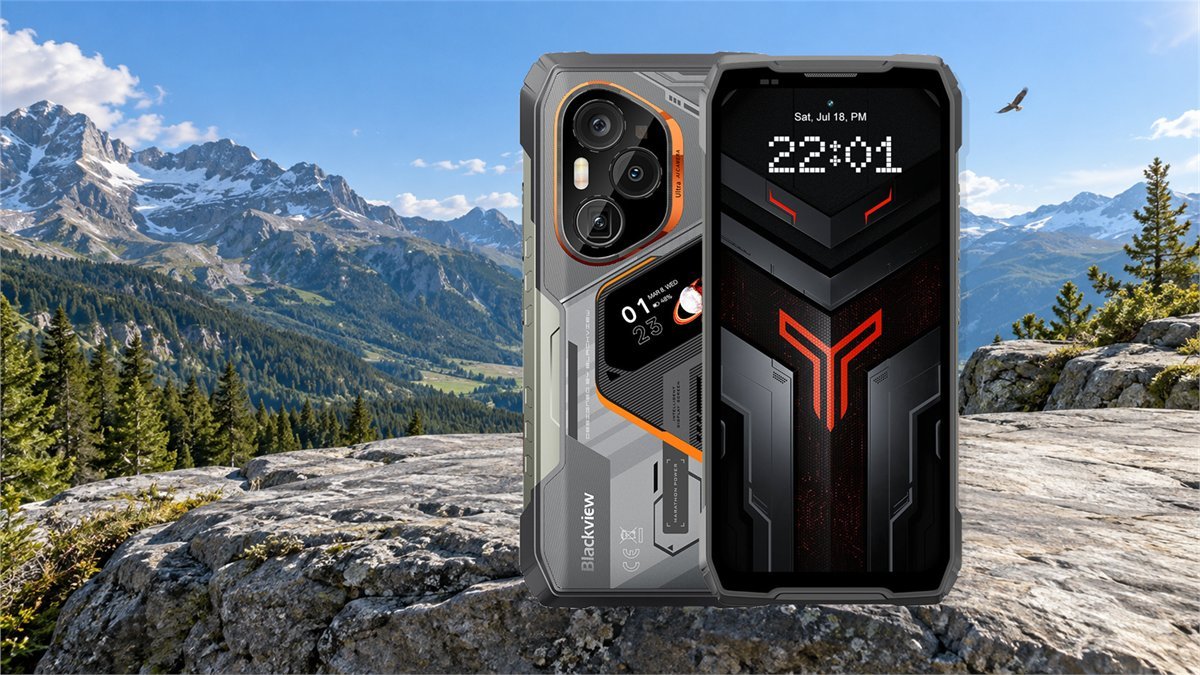
The Blackview XPLORE 6 combines a built-in 3x periscope camera with a detachable 3.33x teleconverter to create a claimed 10x optical shooting mode. That sounds simple, but the purchase decision is not. The accessory depends on a matching case, the camera software must recognize and rotate the image correctly, and the first public demonstrations did not test final image quality. The right question is not whether the phone can display “10x,” but whether the complete optical system is practical for the subjects, light, carrier, and return conditions that matter to you.
Short verdict: the XPLORE 6 is an unusually ambitious rugged camera phone, and the early hardware demonstration is credible enough to make the teleconverter more than a decorative bundle item. The 3x-to-10x optical path, accessory detection, and 230mm-equivalent view were demonstrated at IFA. Sharpness across the frame, low-light quality, focus consistency, stabilization at long range, mount wear, and retail-software reliability remain unproven. Buyers who need a rugged phone first and a daylight spotting camera second have a reason to consider the pre-order; buyers choosing primarily for camera quality should wait for full-resolution samples and retail testing.
Blackview XPLORE 6 specifications that affect the camera decision
A teleconverter is only one part of the system. The phone underneath it is exceptionally large, and its display, battery, processing platform, camera layout, and radio configuration all change how useful it will be away from a desk.
| Specification | Current published detail | Why it matters before ordering |
|---|---|---|
| Built-in telephoto | 50MP periscope camera; the IFA unit used a 3x optical base with OIS | The detachable 3.33x optic relies on this camera to reach the demonstrated 10x optical mode. |
| Other cameras | 50MP main, 50MP ultrawide, and 50MP front camera | Equal megapixel labels do not mean equal sensor size, lens quality, autofocus, or low-light output. |
| Main display | 6.73-inch AMOLED, 1440 x 3200, 120Hz | The main screen is the practical viewfinder for critical long-range composition and focus checking. |
| Rear display | 1.47-inch AMOLED secondary screen | Useful for status, media controls, and basic camera operation, but not confirmed as a complete telephoto interface. |
| Body | 179.5 x 85.4 x 18.2mm; 428g before adding the external lens | At 10x, the combination is a two-handed or supported camera, not a light one-handed phone. |
| Processor and memory | Dimensity 9400+, 18GB LPDDR5X; 512GB or 1TB UFS 4.1 depending on variant | The hardware should have ample image-processing headroom, but software tuning still determines camera consistency. |
| Battery and charging | 12,000mAh; claimed 120W wired and 80W wireless charging | Long shooting sessions are plausible, but no independent retail battery or charging test is available yet. |
| Protection claims | IP68, IP69K, MIL-STD-810H, Gorilla Glass Victus 2 | These claims apply to the phone under stated test conditions; the attached optical accessory has no published equivalent protection rating. |
| Software | DokeOS 5.3 based on Android 16 | The first demo exposed orientation and responsiveness issues, making early firmware quality important. |

What “10x optical zoom” means on the XPLORE 6
The most important distinction is between magnification selected in the app and magnification created optically. Without the accessory, the phone can still offer a 10x button by cropping and enlarging the built-in telephoto image. With the 3.33x teleconverter aligned over the 3x periscope, the optical system reaches roughly 10x before additional digital enlargement.
During the IFA demonstration, the app identified the accessory and changed its focal-length display to about 230mm equivalent. A much larger value, extending as far as a displayed 1,600mm equivalent, was also available. That upper number is not a 1,600mm all-optical lens. It combines the external optic with aggressive digital zoom, where atmospheric shimmer, motion, sharpening artifacts, and lost fine detail can become more important than the number on screen.
How the XPLORE 6 teleconverter setup works
The accessory mounts to a matching protective case rather than directly to an exposed phone lens. One hands-on report described the fitting as screw-in; another described a bayonet-style action. Both handled a pre-release demonstration unit, so the shipped case, locking direction, and final mounting instructions should take priority over either description.
What correct alignment should look like
A properly centered accessory should not create a hard black crescent on one edge, a permanently soft corner opposite a sharp corner, or a frame that changes dramatically when the lens barrel is touched. Some edge softness or light falloff may still be part of the optical design, but obvious asymmetry is a reason to reseat the case and lens before blaming the camera sensor.
How to carry and clean it
- Use caps on both ends whenever the teleconverter is detached.
- Remove the accessory before placing the phone in a tight pocket or bag compartment; leverage on the barrel can load the case mount.
- Keep the mounting surfaces dry and free of grit. The phone’s rugged rating does not establish waterproofing for the detachable lens.
- Use a blower first, then a clean lens cloth. Dry-wiping sand or trail dust across coated glass can create permanent marks.
- After rain, condensation, or a rapid temperature change, let the detached pieces acclimate before sealing them in a pouch.
What the first XPLORE 6 hands-on reports actually prove
The strongest public evidence comes from short demonstrations at IFA rather than a final retail review. Notebookcheck observed the accessory icon, approximately 230mm-equivalent framing, and the distinction between accessory-assisted 10x and bare-phone digital 10x. The lens appeared stable during the brief session, but the reviewer explicitly did not test image quality or long-term durability.
The same demonstration revealed a software concern: the preview and captured image sometimes rotated when the reviewer switched between live view and playback, and the interface felt sluggish. That is not proof that retail firmware will behave the same way, but it is a specific issue worth checking during the return period rather than assuming a powerful processor automatically guarantees a polished camera app.
A separate IFA report used the teleconverter to view distant signs and booth details across the exhibition hall and found the result recognizable instead of collapsing into an obvious digital smear. That is encouraging, but an illuminated trade-show hall is not a controlled camera test. It tells us the concept works; it does not establish edge resolution, night performance, autofocus reliability, color consistency, or superiority over a conventional flagship phone.
Evidence already available
- The external optic produces a visibly longer optical view than the bare 3x periscope.
- The demo software recognized the accessory and adjusted its focal-length display.
- The matching case held the lens steadily during a short indoor trial.
- The rear display provided basic camera controls for main-camera selfies.
Evidence still missing
- Original full-resolution 3x, digital 10x, and optical 10x comparison files.
- Night, backlit, moving-subject, and video stabilization tests.
- Minimum focusing distance and close-focus behavior with the extender.
- Mount wear, case replacement availability, and firmware behavior after launch.
Camera limits to understand before paying for the bundle
Ten-times reach magnifies movement as well as detail
Optical image stabilization helps the periscope camera, but it cannot freeze a moving animal, remove wind-induced body movement, or eliminate the effect of a 428g phone pulling against an added lens. In bright light the camera can choose a faster shutter. Near dusk it may lengthen the exposure or raise ISO, so a stable frame can still contain subject blur or noise.
Long-distance air can become the weakest lens element
At long range, heat shimmer, haze, mist, dust, and shooting through glass can erase the advantage of added optical magnification. A sharp 10x system cannot recover detail that never reaches it cleanly. Early morning, short sight lines, and avoiding hot surfaces between camera and subject often matter more than pushing from 10x toward the maximum digital setting.
The teleconverter probably has a narrower useful envelope
No independent test has established how much light transmission, contrast, edge sharpness, flare resistance, or autofocus speed changes with the accessory. Those are the measurements that separate a useful wildlife tool from a novelty. The marketing value “50MP” does not answer them, because output quality depends on the sensor area, optics, focus, stabilization, exposure, processing, and whether the app saves a heavily sharpened crop.
The case is part of the optical system
If the teleconverter depends on one proprietary case, losing or damaging that case can disable the feature even when the lens remains intact. Before ordering, check whether replacement cases and caps are listed separately, whether the lens works only with the included case, and whether the mount blocks wireless charging or another accessory. These details were not established by the short show-floor tests.
A useful first-day test for the XPLORE 6 teleconverter
A repeatable test is more revealing than photographing different subjects at random zoom levels. Choose a distant building sign, brick wall, utility structure, or detailed tree that can be photographed safely from one fixed position. Keep the phone at the same height and use a support whenever possible.
| Test frame | What to record | What to inspect at full size | Decision it informs |
|---|---|---|---|
| Built-in 3x | One photo with the bare periscope at its native optical step | Baseline focus, detail, noise, shutter speed, and stabilization | Whether the built-in telephoto is already sufficient |
| Bare-phone 10x | Select 10x without attaching the extender | Digital sharpening, lettering edges, fine branches, and compression artifacts | How much the app can recover through cropping alone |
| Accessory 10x | Attach the lens and use the recognized teleconverter mode | Center detail, corner consistency, vignetting, flare, color, and focus confidence | Whether the accessory adds useful information rather than only magnification |
| Handheld vs supported | Repeat accessory 10x both ways | Motion blur and framing consistency across several shots | Whether your normal use requires a tripod, clamp, or monopod |
| Bright vs late light | Repeat before sunset without changing the subject | ISO, shutter speed, noise reduction, autofocus hunting, and lost texture | Whether 10x remains useful during the hours you actually shoot |
| Short video clip | Pan slowly, then hold on a fixed detail | Jitter, focus pulsing, frame jumps, rolling shutter, and orientation changes | Whether the accessory is suitable for observation only or also for video |
Check these before the return window becomes difficult
- Accessory icon appears consistently
- Portrait and landscape orientation remain correct
- No hard vignetting after reseating
- All four corners show similar alignment
- Autofocus locks at realistic distances
- Playback does not rotate or freeze
- Video starts and stops reliably at long zoom
- Case mount has no movement or visible stress
- Replacement caps and case availability are clear
- Saved files retain expected resolution and metadata
How useful is the 1.47-inch rear display?
The secondary AMOLED screen can show selected information, control media, and provide basic camera controls so the main rear camera can be used for selfies. That is useful because the main camera should outperform a typical front camera in difficult light, and the small display can help place a face inside the frame without turning the phone around.
It should not be assumed to replace the 6.73-inch main display for teleconverter work. At 10x, small framing changes matter, manual controls may be needed, and judging critical focus on a 1.47-inch screen would be difficult. No public demonstration has confirmed that every shooting mode, focus control, exposure control, video option, or teleconverter indicator is available on the rear display.
Good rear-screen uses
- Main-camera selfies and group framing
- Quick status checks
- Basic shutter control when the phone is positioned securely
- Media controls without waking the main display
Use the main screen for
- 10x composition and precise subject placement
- Checking focus and edge behavior
- Reviewing files at useful magnification
- Diagnosing orientation or accessory-detection problems
US network compatibility needs its own pre-order check
The current global specification lists broad LTE and 5G support, including several bands used in the United States. It does not list every band used by every carrier, and the published 5G list does not include n71. More importantly, radio-band overlap alone does not guarantee that a carrier will activate an imported model or enable VoLTE, Wi-Fi Calling, visual voicemail, eSIM, or every roaming feature.
AT&T directs BYOD customers to its tested-and-approved device check. T-Mobile advises entering the IMEI and warns that a partially compatible device can have reduced coverage or missing features. Verizon also requires an IMEI check for BYOD eligibility. Because a pre-order unit may not expose its IMEI until shipment, ask the seller to identify the exact regional model and return path if your carrier rejects it.
| Pre-order question | Why the product page alone may not answer it | Practical verification |
|---|---|---|
| Will my US carrier activate it? | Supported bands do not establish carrier approval or IMEI acceptance. | Use the carrier’s official BYOD checker with the exact retail IMEI before porting a number. |
| Will rural coverage be complete? | The current published band list omits some low-band frequencies used for extended coverage. | Compare the exact regional variant with the bands used in your ZIP code, then confirm by IMEI. |
| Does this variant support eSIM? | The feature summary mentions eSIM, while the detailed specification block describes dual SIM without explaining implementation. | Request written confirmation for the exact capacity and regional SKU. |
| Is the teleconverter included? | The current pre-order bundle advertises it, but gifts and regional bundles can change. | Save the order summary and verify that the lens, matching case, and caps appear as included line items. |
| Can I test the camera and still return it? | Current return language combines a short request period with unused-condition requirements. | Ask how opening, activating, and mounting the lens affect return eligibility before paying the balance. |
| What happens if the mount breaks? | Phone warranty language may not explain accessory wear or replacement-case availability. | Confirm lens, case, and mount coverage separately and retain the packaging. |
Who should pre-order, and who should wait?
Pre-order makes more sense when
- You already want a heavy rugged phone with a very large battery.
- Your long-range use is mostly daylight observation, wildlife, landscapes, or documented field inspections.
- The teleconverter and matching case are explicitly included in your order.
- Your carrier confirms the exact model or IMEI, and the return terms are acceptable.
- You are comfortable treating the first firmware releases as part of early ownership.
Waiting is the better choice when
- Camera quality is the main reason for spending flagship-level money.
- You need dependable low-light, sports, or handheld long-zoom video.
- A 428g phone is already beyond your comfortable daily-carry limit.
- You cannot verify US carrier activation before the return deadline.
- You need evidence about software updates, repairs, and replacement accessories.
The strongest reason to buy the XPLORE 6 is not that it replaces a mirrorless camera or spotting scope. It is that it combines a serious processor, a huge battery, rugged construction, a real periscope, and an optional longer optical path in one field device. The same combination creates its biggest risks: exceptional weight, proprietary mounting hardware, complex camera software, and a high price before independent retail testing exists.
Bottom line: the Blackview XPLORE 6 teleconverter has demonstrated a genuine optical idea, not merely a digital 10x label. The early evidence supports cautious interest, not a final camera verdict. Confirm the exact bundle and carrier first; then judge the accessory by controlled 3x, digital 10x, and optical 10x comparisons during the return period. If the optical frame adds readable fine detail without unstable focus, severe edge problems, or recurring orientation errors, the system has a practical role. If it only makes the subject larger while processing hides detail, the built-in periscope may be the more useful everyday camera.
Before placing a pre-order, compare current Blackview coupon codes, rugged-phone deals, and tracked product prices. Then verify the regional model, included teleconverter kit, carrier eligibility, and return conditions against the exact item in your cart.
Frequently asked questions
Does the Blackview XPLORE 6 have true 10x optical zoom?
The demonstrated setup combines a built-in 3x periscope camera with a 3.33x external teleconverter, producing approximately 10x optical magnification and a displayed focal length around 230mm equivalent. Selecting 10x without the accessory uses digital enlargement and is not the same optical path.
Is the XPLORE 6 teleconverter included with the phone?
The current pre-order bundle advertises a professional teleconverter and matching protective case as included gifts. Bundle contents can change by market, variant, and date, so confirm that both appear in the final order summary rather than relying on an older promotional image.
How does the XPLORE 6 teleconverter attach?
It attaches through a matching protective case. Early hands-on reports described the action differently as screw-in and bayonet-style, so follow the markings and instructions supplied with the retail kit. Do not force the lens if it binds or sits off-center.
Can the XPLORE 6 use 10x zoom without the teleconverter?
Yes, the demonstration software offered a 10x view without the lens, but that version was digitally enlarged from the built-in camera. The accessory-assisted 10x mode uses the 3x periscope and 3.33x optic before any further digital zoom.
Is the teleconverter waterproof and drop-resistant?
No equivalent protection rating for the attached lens-and-case assembly has been published or independently verified. Treat the phone’s IP68, IP69K, and ruggedness claims separately from the detachable optical accessory.
Will the Blackview XPLORE 6 work on AT&T, T-Mobile, or Verizon?
The global specification overlaps with several US LTE and 5G bands, but that does not guarantee activation or full carrier features. Check the exact retail IMEI through the carrier’s official BYOD tool and confirm the regional model before the return period expires.
Should camera-focused buyers pre-order the XPLORE 6?
Buyers who primarily care about camera quality should wait for original full-resolution files and retail tests covering 3x, digital 10x, accessory 10x, low light, autofocus, stabilization, and video. Current hands-on evidence proves the concept works but does not establish final image quality.
Independent hands-on and compatibility references
- Notebookcheck: XPLORE 6 teleconverter IFA hands-on, mount behavior, focal length, and early software observations
- Index.hu: independent IFA handling and long-range exhibition-hall observation
- TechRadar: early MWC handling of the XPLORE 6 and periscope-camera positioning
- AT&T: official BYOD compatibility process
- T-Mobile: official IMEI, band, and partial-compatibility guidance
- Verizon: official BYOD IMEI and compatibility guidance