AOSU SolarCam T2 vs T2 Ultra: Which Solar Security Camera Is Right for Your Home?
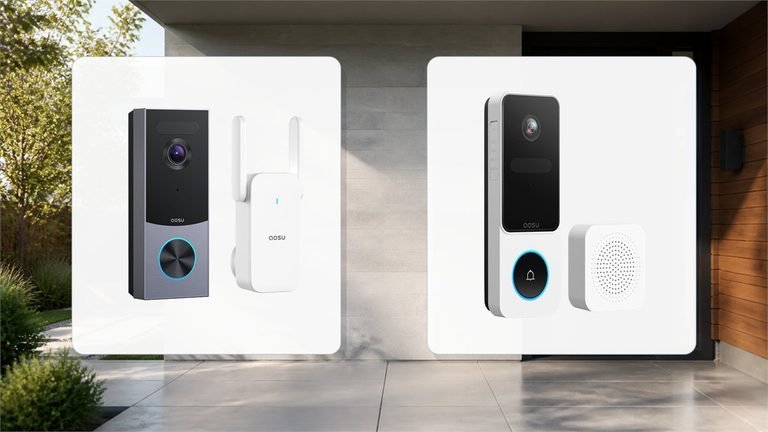
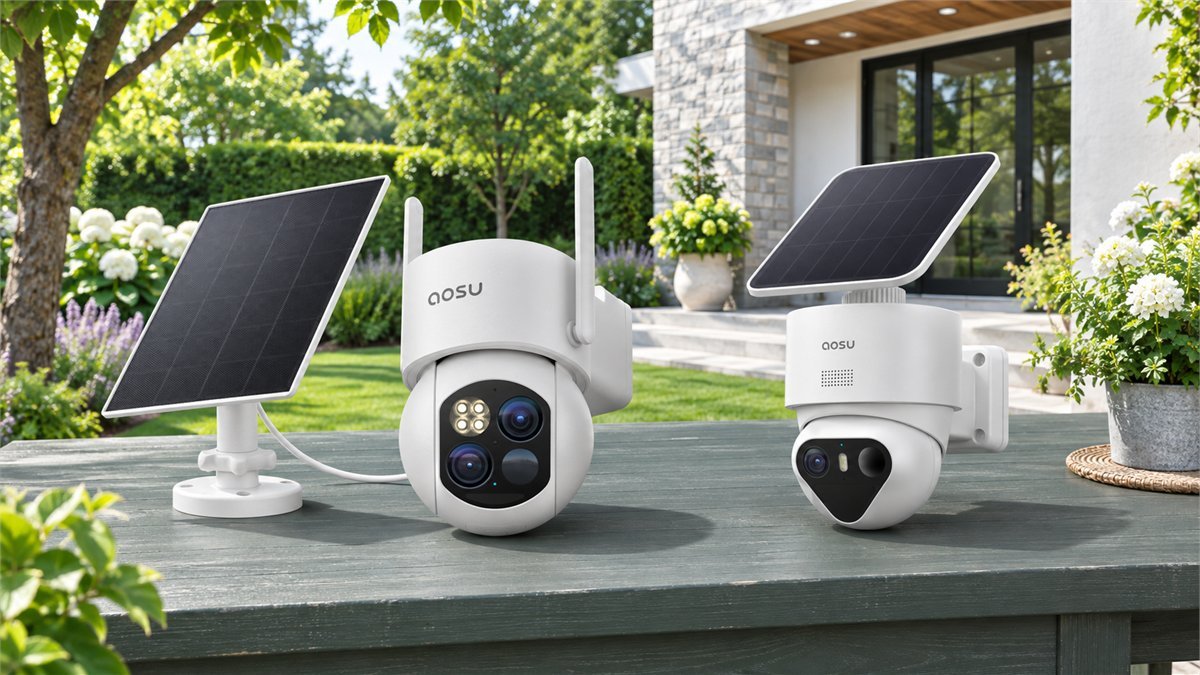
A camera watching the driveway has two jobs: show what is happening, and leave enough detail to understand it afterward. AOSU’s SolarCam T2 puts a wide view and a closer telephoto view together. The T2 Ultra takes another route, with a single 4K image and a choice of standalone or multi-camera configurations. Neither approach is automatically better for every home.
Choose the SolarCam T2 when you want an overview and a closer view of the same approach. Choose the T2 Ultra when 4K event footage, its night-vision options and a suitable multi-camera kit are the better match. Both are solar/battery cameras built around events, not replacements for a wired system that records every second. The T2 also has a system version, so the decision is about optics and the exact package, not simply “one camera versus a hub.”
AOSU announced the T2 in October 2026, making it a timely alternative to the established Ultra. We compared current specifications, published field reviews and owner discussions to look beyond the names. This is a buying comparison, not a claim that we installed both cameras side by side.
What the useful real-world accounts tell us
The most appealing thread in the Ultra coverage is practical: local recording can make a camera system feel like a purchase rather than another monthly commitment. Techaeris appreciated the local-storage approach in its two-camera kit review. The Irish Examiner reached a similar conclusion with a standalone Ultra. Those are different packages, but both illustrate why an optional cloud plan can be more attractive than a compulsory one.
One four-camera Ultra owner on Reddit describes using the system across the front door, driveway and backyard. They found grouped events helpful for following activity between areas, and said adjusting the angles and motion zones reduced unwanted alerts from nearby traffic. That is useful buying advice: several well-placed cameras can tell a more complete story than one camera turning around an entire house.
For the newer T2, the clearest hands-on material we found was Pipl Systems’ sponsored residential field demonstration. It shows the benefit of keeping a broader scene available while inspecting a closer view. It also makes an important distinction: the two lenses move together. This is not the T2 Pro arrangement, and it does not give you two independently aimed cameras.
Owner evidence for ordinary T2 remains limited. With Ultra, several accounts also raise questions about event length and settings. The useful response is to test the saved footage, not just admire the live picture. We explain those checks below, including AOSU’s guidance for clips that end sooner than expected. There is no basis here for a failure-rate estimate or a claim that every owner has the same experience.
AOSU SolarCam T2 vs T2 Ultra: the differences that matter
| Buying consideration | SolarCam T2 | SolarCam T2 Ultra |
|---|---|---|
| Main camera arrangement | Two 3K views: wide-angle and fixed 8 mm telephoto | Single 4K, 8MP view; published recording specification is 3840 × 2160 at 15 fps |
| Closer inspection | Advertised 8× hybrid zoom; separate telephoto feed plus digital enlargement | 6× digital zoom |
| Night options | Color and infrared modes, with spotlight capability | TrueColor and Covert Full-Color modes, plus infrared options |
| Timeline approach | Event clips plus All-Day Snapshots at five-minute intervals | Motion-triggered event clips; do not assume continuous recording |
| Available configurations | Standalone and a separately specified aosuBase system | Standalone, aosuBase system and aosuCortex system |
| Power and placement | Battery, separate 3 W solar panel and 3 m panel cable listed | 9,200 mAh battery and 3 W panel with attached or separate placement |
| Best starting point | A defined area where both context and a closer view matter | 4K coverage and a kit matched to several separate approaches |
Manufacturer specifications checked November 9, 2026. These are not our laboratory measurements. T2 Pro is a separate model. Storage, included accessories and camera capacity depend on the selected kit and base generation.
The resolution labels do not settle the choice. Two 3K feeds do not combine into one 6K photograph, and a 4K label does not guarantee a readable face at any distance. What matters is how much of the useful image a person occupies, how they are lit, and whether the event was recorded at the right moment.
The T2 makes sense when you want context and a closer look
Think about the space between a gate and a parked car. An overview helps explain where someone went; a tighter view may help you understand what they were carrying. T2’s attraction is having both perspectives available instead of continually enlarging one broad picture.
Its telephoto lens has a fixed focal length. The camera can turn, but the lens does not mechanically zoom through an eight-times range. The narrower feed starts with a closer composition, and digital enlargement then makes part of that captured image larger on your phone. That is a meaningful distinction from simply cropping the wide feed, but it is not an 8× optical-zoom specification.
Choose the mounting position around the area that deserves that closer view. A camera aimed generally toward the street may produce an attractive overview while leaving your actual gate near the edge of the tighter frame. A better purchasing question is: “Can one sensible mounting point show the place I care about?” If the answer is no, another camera position may contribute more than another step of zoom.
The two feeds are still views from one physical location. They cannot see behind a garage, through a fence or around a corner. For a single open approach, that may be entirely adequate. For a house with separated entrances, make a coverage plan before deciding that two lenses mean two areas are protected.
All-Day Snapshots adds another reason to consider T2. A sequence of stills can help you notice when something in a scene changed between motion events. It is useful context for everyday questions, such as when a bin was moved or a vehicle left. It is not a substitute for video of a brief action between snapshots.
Where the T2 Ultra earns its place
The Ultra is appealing when you prefer a detailed single image and want to build coverage around separate camera positions. One unit can watch the driveway while another remains responsible for the side entrance. That is a different advantage from having a second lens looking in broadly the same direction.
Techaeris found its Ultra system useful for everyday property monitoring, while noting that its better-lit camera position produced the stronger night image. Its review also described some softness or lag with fast movement. These observations support a practical distinction: a clear view of a still driveway is not the same test as a person moving across it.
For someone choosing mainly on night performance, the Ultra deserves a closer look, but not an unconditional win. AOSU distinguishes illuminated TrueColor operation from a Covert Full-Color mode that avoids switching on a spotlight. The latter can be less visually intrusive, with a possible smoothness tradeoff. There is no controlled same-location comparison here proving it beats T2 in every lighting condition.
That gives you a useful first-night task. Record a person walking the route you want covered, with the outdoor lighting you normally use. Check clothing detail, the face at the relevant point and any blur in movement. Compare available modes rather than choosing solely by how colorful an empty scene looks.
If you need to identify someone near a distant gate, a closer camera position may be more effective than relying on a large digital zoom. Likewise, neither model should be treated as a dedicated license-plate recognition system. Distance, angle, movement and headlight glare can make a readable plate in one situation unreadable in another.

The base in the box changes what you are buying
With AOSU, the name on the camera is only part of the specification. A standalone Ultra, an Ultra kit with aosuBase and an Ultra kit with aosuCortex can look similar in a shopping grid while offering different storage and system capabilities.
There is also a T2 system version. The current T2 comparison distinguishes a standalone microSD-equipped camera from a kit with aosuBase and included 32GB storage. Do not assume that an existing standalone camera will pair with any base simply because the brand name matches. Confirm the camera model and hub revision together.
| Configuration | What it contributes | What to verify |
|---|---|---|
| Standalone camera | Local microSD recording without buying a complete hub kit | Card inclusion, supported capacity and exact camera compatibility |
| Ultra with aosuBase H2L | 32GB included, SD expansion up to 1TB and support for up to six devices in the cited configuration | H2L/base generation, supplied storage and number of cameras actually included |
| Ultra with aosuCortex | 32GB built in, hard-drive expansion up to 16TB, up to eight devices and additional local recognition functions | Supported devices, drive requirements and regional availability of recognition features |
The Ultra base distinctions are supported by AOSU’s model comparison and a brand-support reply. They are not universal capacities for every product sold under the aosuBase name. The current T2 system table lists up to four cameras for its specified package.
A base kept indoors also puts the recording destination in a different location from an exposed camera. That can be useful, but local storage is not an off-site backup. If keeping a copy away from the property matters, evaluate the optional cloud service and its current terms separately.
Storage duration is another place to avoid a simple promise. The same memory capacity lasts differently with frequent traffic, long events and several cameras. Once installed, look at actual usage over an ordinary week. Export an example clip early so you know how to preserve something important before older events are overwritten.
Event recording: what to expect before relying on either camera
For checking a delivery, watching an entrance or reviewing detected activity, event-based recording can be a sensible balance of convenience, storage and battery use. It becomes the wrong choice when your essential requirement is an uninterrupted record of everything that happens.
T2 supplements events with five-minute still images. Imagine a brief action occurring halfway between two snapshots: the stills alone will not show that action. A separately triggered video may capture it, but the snapshot timeline does not turn the camera into a continuous recorder. A cloud subscription is not a shortcut to continuous recording either.
Why an Ultra clip can be shorter than 60 seconds
Two separate Ultra owner accounts on AOSU’s forum describe short clips despite selecting a longer maximum. In its response to one thread, AOSU explains that the duration setting is a ceiling, not a fixed recording length. Event detection can end even while a person remains visible. That is worth understanding before purchase, especially for a remote property where checking footage is more important than receiving a quick alert.
The official next steps are to raise detection sensitivity gradually and, where possible, position the camera so people cross the detection area rather than approach straight toward it. Repeat a walk through the important route and inspect the saved event. If recordings still cut off during clear activity, send support the firmware version, app version and an example event time. This is diagnostic guidance, not a confirmed universal fix.
A useful acceptance test is to have someone enter, pause, move again and leave. Watch the recording afterward rather than assuming that successful live tracking proves the whole sequence was saved. If your required sequence remains missing after supported adjustments, use the return/support options available to you or choose a system designed for continuous recording. More storage alone does not change how an event starts and ends.
Solar convenience starts with the right two positions
There is a camera position and there is a solar-panel position. They do not always need to be the same. The camera may need the view beneath an eave while the panel needs a more exposed patch of wall. Check cable reach, a secure mount and safe access before committing to either location.
The Irish Examiner reported that its Ultra stayed close to fully charged during several sunny weeks. That is encouraging evidence for a favorable installation, not a winter guarantee. T2’s current page uses an estimate of two hours of direct sunlight for a day’s power; Ultra marketing uses a different estimate. Neither figure is a controlled efficiency comparison between the cameras.
Instead of choosing by those headline hours, consider your own routine. A quiet side path and a busy driveway create different workloads. Frequent live viewing, repeated tracking and lighting use all compete with the energy the panel collects. A shaded winter location deserves a manual-charging plan even if the summer battery display looks reassuring.
During the first week, check whether charge is stable, rising or steadily falling under your preferred settings. If it is falling, inspect shading and panel placement first, then review unnecessary activity and viewing time. Do not disable coverage you genuinely need simply to make the battery percentage look better. A wired option can be the more comfortable choice for a demanding, persistently shaded location.
Make the alerts useful without turning the camera off
Begin by deciding what deserves your attention: the gate opening, someone approaching the garage or activity beside a parked car. Configure the relevant area rather than treating every moving object beyond your property as equally important. Then make one adjustment at a time and check both the useful events and the unwanted ones.
A quiet notification tray is not proof of a good setup if it also stopped detecting visitors. Repeat the ordinary approach after changing a zone or sensitivity setting. For a driveway, check a person on foot as well as a vehicle; they do not occupy the same part of the image or move in the same way.
One Ultra owner specifically asked how to stop the camera’s spoken warning. Community replies suggested checking warning and alarm settings, but the thread did not establish a confirmed fix. If you prefer a discreet camera, review the active mode’s deterrence options during setup and ask support for the correct controls if needed. A spoken warning, a phone notification and saving an event are different behaviors; you need not assume they should all be switched off together.
For the connection, test the complete route from camera to phone. A standalone setup uses the home’s wireless connection; a base kit adds the hub and its router connection. Check live view and saved playback at the intended mounting point before drilling, then try access using mobile data. An owner praising quick live view and another installation buffering can both be real experiences without either proving a universal speed.
What is worth paying extra for?
The useful comparison is the total cost of covering your chosen areas. Count cameras, panels, the included base or memory card, any storage expansion you actually need, and installation accessories. Only then compare packages. A four-camera price divided by four still includes shared hardware; it is not directly equivalent to the price of four standalone units.
Paying more makes sense when it solves a concrete need: another entrance covered at the same time, the night mode you prefer, easier review across cameras or the right local-storage hardware. Paying for an unspecified “more advanced” kit is less useful if you will never use the additional capability.
Once you have the right configuration in mind, compare available kits and any applicable offers on AOSU Coupons & Deals. Check the selected camera count and included base rather than relying on a family photo that may show several package options.
If the front door is still a separate gap in your plan, explore Smart Home Coupons & Deals to compare video doorbells and other connected-home products. A doorbell can address close-range visitor interaction while an outdoor camera watches the approach; the two roles are complementary, not interchangeable.
Our choice: match the camera to the scene
Start with T2 for a defined driveway or yard where seeing context and closer detail together is the main attraction. It offers a different way to inspect a scene, and the snapshot timeline adds context between events. Make sure the tighter feed covers the spot that matters to you.
Start with T2 Ultra when you prefer its 4K approach and want a well-matched kit for several camera positions. Its storage configurations and night options deserve more attention than the Ultra label itself. Choose the base you need at purchase rather than assuming an upgrade path afterward.
For either camera, the best next step is simple: mark the areas you need to see, decide whether event recording meets the job, and check the exact package against that plan. If you need uninterrupted footage, an existing NVR workflow or reliable operation where solar access is poor, make those requirements the starting point instead. AOSU explicitly lists no ONVIF, RTSP or NAS support for Ultra; local recording should not be mistaken for open NVR integration.
Questions worth settling before ordering
Is SolarCam T2 the same as T2 Pro?
No. This comparison concerns the ordinary T2 with wide and telephoto views, and the single-lens 4K T2 Ultra. T2 Pro is another model. Check the full name rather than transferring a Pro review’s specifications to T2.
Do I have to pay a monthly subscription?
Local recording is available with the appropriate card or included base storage. Optional cloud services add separate features and off-site event storage. Check the plan offered for your exact model and region; a hub is hardware, not a subscription tier.
Can T2 or T2 Ultra replace a 24/7 recorder?
Not when you need continuous full-motion footage. T2’s five-minute snapshots are still images between events. Ultra is also an event-based battery camera, and selecting a longer maximum clip does not guarantee uninterrupted recording.
Does 8× hybrid zoom make T2 better than 4K Ultra?
Not in every scene. T2 supplies a separate closer view; Ultra supplies a higher-resolution single view. Framing, distance, lighting and movement determine useful detail. Neither number alone guarantees face or license-plate identification.
Can I use any AOSU base with either camera?
Do not assume that. Compatibility and camera capacity depend on the camera and hub generation. Verify model numbers with AOSU before buying an add-on. aosuBase and aosuCortex are not interchangeable names for the same storage system.
Sources
- AOSU’s October 2026 T2 announcement: model introduction and recording features
- Pipl Systems: sponsored T2 residential field demonstration and dual-view observations
- Techaeris: T2 Ultra two-camera system review, local storage and night-use observations
- Irish Examiner: standalone T2 Ultra review and sunny-weather battery experience
- AOSU technical explanation: fixed telephoto and digital enlargement on T2
- AOSU technical reference: Ultra video, night modes and integration limits
- AOSU storage guide: local recording, optional cloud and base-generation distinctions
- AOSU community: brand-support explanation of H2L and Cortex hardware
- AOSU community: Ultra clip-duration reports and official diagnostic guidance
- AOSU community: separate Ultra owner’s short-recording account
- Reddit: four-camera Ultra owner’s early impressions of zones and grouped events
- Reddit: an Ultra and doorbell owner’s live-view experience
- Reddit: Ultra spoken-warning question and unconfirmed settings advice
DiscountedSavings may earn a commission from qualifying purchases through product links.