AOSU R1 Ultra vs SE: The Real Differences in Video, Storage, Alerts, and Installation
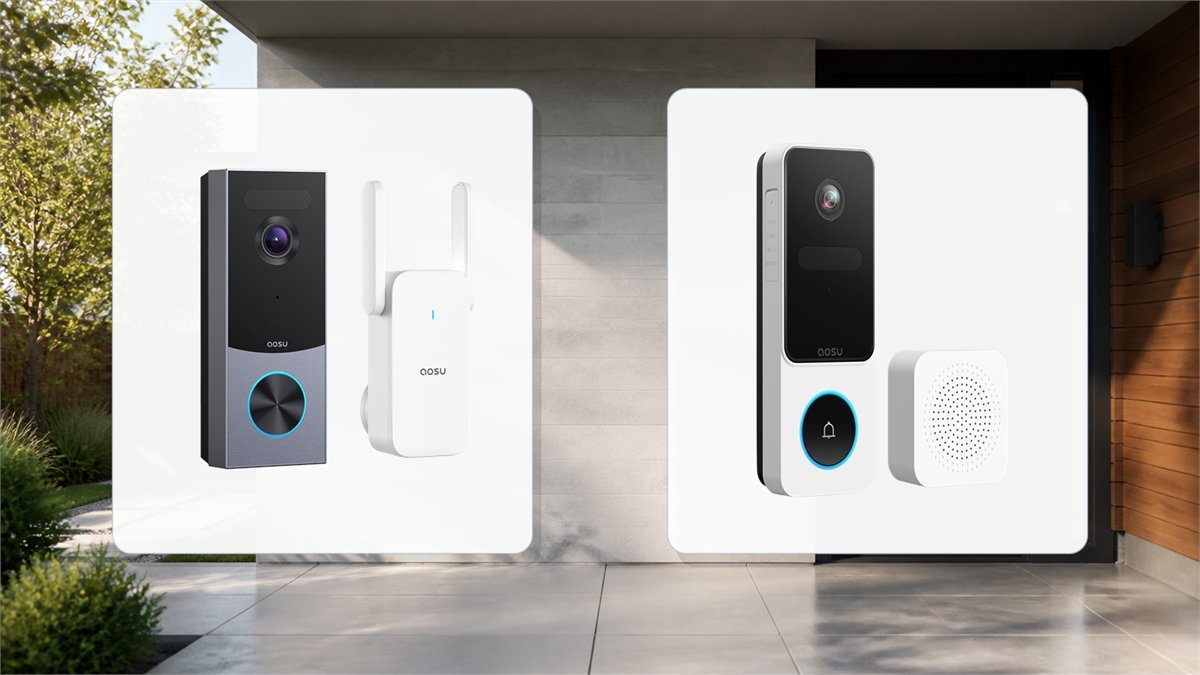
The AOSU R1 Ultra and Video Doorbell SE can both show a visitor and the package at their feet, but they reach that result in very different ways. The R1 Ultra is a newer 5MP system built around an indoor storage base, radar-assisted detection and optional hardwiring. The SE is a simpler 2K battery doorbell with a taller 9:16 view and a microSD card inside the outdoor unit.
Short answer: choose the R1 Ultra when retained local evidence, anti-tamper alerts, stronger motion filtering and a permanent powered installation matter most. Choose the SE when the priority is a lower-complexity battery installation and a very tall view of visitors and doorstep packages. The important trade-off is not 5MP versus 2K alone: R1 clips are stored inside the house on the aosuBase mini, while SE recordings remain on a card in the removable doorbell unless cloud backup is used.
Base-side local storage, radar plus PIR detection, pry alerts and battery or hardwired power.
Tall 9:16 package view, expandable microSD storage and an uncomplicated plug-in indoor chime.
AOSU R1 Ultra vs SE specifications
| Feature | AOSU R1 Ultra | AOSU Video Doorbell SE | Why it matters at a real front door |
|---|---|---|---|
| Video class | 5MP UHD; current documentation also describes 3K capture and enhanced WDR | 2K QHD; published listings do not consistently agree on the exact pixel raster | More pixels can preserve facial and label detail, but lighting, motion blur, compression and distance still decide whether that detail is usable. |
| Framing | 166-degree field of view, 4:3 aspect ratio | 170-degree vertical view, 9:16 aspect ratio | R1 gives a more balanced scene. SE devotes more of the frame to the path between a visitor’s face and the doorstep. |
| Motion system | PIR, radar and AI; approach and loitering logic are advertised | PIR-based motion with human and package recognition | Radar gives the R1 another signal for separating an approach from traffic crossing the edge of the scene. |
| Local storage | 8GB in the indoor aosuBase mini; up to 60 days of loop recording is the manufacturer’s usage-dependent estimate | 8-128GB microSD card inside the doorbell | R1 footage remains indoors if the camera is removed. SE capacity is expandable, but the card leaves with the device. |
| Cloud storage | Optional backup | Optional encrypted cloud plan, advertised with 30-day recurring event storage | Neither model requires cloud storage for its basic local recording path, but cloud can preserve a second copy after theft or damage. |
| Power | Rechargeable battery or existing doorbell wiring for continuous power | Rechargeable battery installation | Hardwiring avoids taking the R1 indoors to charge. SE is easier where no suitable doorbell circuit exists. |
| Advertised battery ceiling | Up to 180 days under test conditions | Up to 120 days in published setup material | These are not guaranteed calendar intervals. Foot traffic, weak Wi-Fi, cold weather, live view and clip length can reduce them sharply. |
| Indoor hardware | aosuBase mini: chime, local storage and Wi-Fi extension | Plug-in indoor chime | The R1 base does more and should be placed where both signal and chime volume are useful. |
| Tamper design | Pry detection and base-first clip storage | No comparable anti-pry system is currently advertised; the release clip is accessible from the rear edge | The R1 has the more complete answer to someone trying to remove the outdoor unit. |
| Network | Base-assisted Wi-Fi; the public V8S13 FCC filing lists the 2.4GHz band | 2.4GHz Wi-Fi | Use a dedicated 2.4GHz SSID during setup if band steering causes pairing trouble. Confirm any 5GHz claim for the exact regional R1 SKU. |
| Smart displays | Alexa and Google Assistant | Alexa and Google Assistant | Neither listing should be assumed to include HomeKit, Matter, RTSP or ONVIF unless AOSU documents support for the exact model. |
5MP versus 2K: where the extra detail helps
The R1 Ultra’s 5MP sensor gives it more source detail to work with than the SE’s 2K-class video. That can help when a face occupies a small part of the frame or when the camera is trying to hold detail in a backlit doorway. Enhanced WDR is particularly relevant when the porch is shaded but the street behind a visitor is bright.
Resolution is not the same as identification quality. A 5MP frame blurred by a moving subject, a dirty lens or slow shutter can reveal less than a clean 2K frame. Wi-Fi congestion and video compression also affect what reaches the phone. For both models, the useful test is to walk toward the door at normal speed in daylight, porch light and near-dark conditions, then pause each saved clip on the face rather than judging the live-view thumbnail.
4:3 on R1 Ultra or 9:16 on SE?
The R1 Ultra’s 4:3 image is wide enough to show the visitor and surrounding approach without becoming a narrow portrait strip. It is the safer general-purpose shape when people approach from an angle or when the path crosses the door rather than ending directly in front of it.
The SE’s 9:16 view spends more pixels vertically. That is useful when packages are placed close to the threshold and a conventional landscape doorbell cuts off the floor. It can also reduce wasted wall area. The trade-off is less horizontal context, so a side approach or adjacent gate may leave the useful part of the frame sooner.
Motion detection and notification quality
Both doorbells can classify people and packages, but the R1 Ultra adds radar to PIR and AI analysis. PIR reacts to changes in infrared energy, while radar can contribute movement and direction information. In practical terms, the R1 has a better hardware basis for distinguishing somebody approaching or waiting near the door from a person crossing at the edge of the property.
That does not make default settings correct for every porch. A road, moving branches, flags, reflective car panels and warm afternoon siding can still produce excess events. Detection zones should exclude the public sidewalk when possible, and sensitivity should be raised only after reviewing what the current level misses.
A detailed SE hands-on test reported quick motion notifications and very sensitive defaults. The reviewer was able to narrow detection to humans and packages, change the active zone and choose immediate or filtered notifications. Package recognition was useful but occasionally too sensitive. Those observations came from one disclosed product-supplied review, so they describe available controls and one installation rather than a measured failure rate across all homes.
| Symptom | First adjustment | Second check | Avoid |
|---|---|---|---|
| Too many sidewalk alerts | Shorten the detection zone before lowering all sensitivity | Angle the view away from cross-traffic | Disabling human detection and recording every pixel change |
| Visitor appears after reaching the door | Extend the zone along the actual approach path | Improve Wi-Fi signal and compare clip start time with notification time | Maxing every setting simultaneously, which can hide the original cause |
| Packages are missed | Put the drop zone in the lower-center portion of the image | Improve porch lighting and test different box sizes | Pointing the camera so the threshold is visible only at the extreme distorted edge |
| Battery drains quickly | Remove roads, trees and busy public areas from the active zone | Reduce unnecessary live viewing and long event clips | Using the advertised maximum battery duration as the expected recharge date |
Local storage is the biggest security difference
The R1 Ultra sends event clips to the indoor aosuBase mini first. Because the 8GB storage sits inside the home, recorded evidence should remain available if the outdoor unit is pried off or damaged after capturing the event. The base also acts as the indoor chime and a Wi-Fi extension point, so its position affects both playback speed and radio stability.
The SE stores local events on a microSD card in the doorbell. This is convenient and expandable: current instructions specify Class 10 cards from 8GB to 128GB formatted as FAT32. It also creates a physical risk. If someone removes the unit, the local card goes with it. Optional cloud storage can create an off-device copy, but then the comparison is no longer strictly between subscription-free local systems.
AOSU’s 60-day R1 loop estimate is not a fixed retention guarantee. Storage duration changes with event count, resolution, clip length and encoding. A quiet side door might keep clips much longer than a door facing a busy sidewalk. The useful question is how many days of your own event pattern remain after the first full week.
This is an editorial comparison of storage location and tamper design, not a laboratory security score. R1 ranks higher because clips are retained on an indoor base and pry detection is advertised; SE stores the card in the removable outdoor unit.

Battery life and the case for hardwiring
The R1 Ultra is advertised for up to 180 days on battery, while current SE setup material quotes up to 120 days. These numbers are best understood as low-activity laboratory ceilings. A camera wakes for motion, starts its radio, records, classifies the event and may upload or stream it. A doorway with 40 events a day has a different energy budget from one with four.
Cold weather reduces available battery capacity, while high heat can accelerate long-term battery aging. Weak Wi-Fi keeps the radio active longer. Frequent live viewing and two-way talk are especially expensive because the camera remains awake. After installation, record the battery percentage at the same time each day for two weeks. A stable daily percentage drop is more useful than a generic month count.
R1 hardwiring is the better fit when compatible existing doorbell power is available and the owner wants continuous power. Wiring should still be verified against the exact manual and transformer rather than matched by connector shape or an assumption that all doorbell circuits are interchangeable. Turn off the circuit before touching conductors and use a qualified installer when the transformer or wiring condition is uncertain.
The SE is a battery-first design in current hands-on and retailer documentation. That makes it suitable for rentals and door frames without a usable circuit, but recharging means removing the camera. Its accessible release mechanism is therefore both convenient and the main physical-security compromise.
Installation details that change the result
- Test Wi-Fi at the final outdoor position. Close the door, stand where the camera will sit and open live view repeatedly. A strong signal indoors does not prove that masonry, metal trim or a foil-backed door will not attenuate it outside.
- Start between 47 and 59 inches from the ground. This is the published SE mounting range and a sensible starting point for both models. Adjust for steps, a raised porch and the usual package location.
- Frame an actual person and box. Do not rely on an empty live view. Ask someone of average height to approach while a medium parcel sits where deliveries normally land.
- Check the release side of the mount. On the SE, make it difficult to reach the rear clip without blocking service access. On the R1, test the anti-pry alert before treating it as active protection.
- Place the indoor unit deliberately. The R1 base needs a reliable path to the doorbell and a location where the chime can be heard. The SE chime should be tested behind closed bedroom or office doors.
- Build detection zones from saved clips. Let the camera run for a day, inspect every unwanted event and remove only the area that caused it. Overly tight zones can begin recording after the visitor is already at the button.
- Export one test event. Confirm that another household member can find, play and download a clip. A recording system is not ready until somebody can retrieve evidence without guessing through menus.
Night video, porch lighting and WDR
The R1 Ultra’s enhanced WDR is the more meaningful difference in a difficult daytime doorway. A shaded face against a bright street is a high dynamic range problem, not simply a resolution problem. WDR can preserve both regions, although aggressive processing may make motion look softer.
The SE hands-on footage was described as sharp during the day and usable in infrared black-and-white mode at night. Color after dark depended on ambient porch lighting; switching infrared off in a dark scene produced grainier, less useful detail. That is normal camera behavior rather than evidence that color mode is always better.
- Use a shielded porch light that illuminates faces without shining directly into the lens.
- Clean the lens with a soft cloth after rain, pollen or construction dust.
- Test a moving face, not only a person standing still under the light.
- Check whether reflective house numbers, glass panels or white siding dominate exposure.
- Keep infrared away from a nearby wall edge that can bounce light back into the lens.
What public reviews can and cannot prove
The exact R1 Ultra is a new 2026 V8S13 model. Older reviews labeled “AOSU Ultra” often describe another generation, even when a comparison site groups them under the same name. Their battery reports, app behavior and storage hardware should not be transferred automatically to the R1 Ultra.
The R1 Ultra product page shows a review aggregate, but the accessible store metadata and review widget did not expose a consistent, independently readable set of matching review bodies. That is not a sound basis for statements such as “owners consistently report” or for a calculated failure rate. The R1 portion of this comparison therefore rests on current specifications, regulatory identification and installation consequences rather than invented long-term ownership.
The SE has more observable field evidence. One detailed product-supplied review found setup fast, alerts responsive and the tall view useful for packages, while also identifying high default sensitivity and an easier-to-reach release clip. A small number of customer comments praise setup and image quality; an isolated manual-page comment reports intermittent phone connection and missed notifications. The honest conclusion is mixed but limited: the SE controls can work quickly when signal and zones are right, yet its mount and device-side storage deserve more scrutiny than the headline resolution.
Which one fits your doorway?
| Situation | Better starting choice | Reason | Check before buying |
|---|---|---|---|
| House with compatible existing doorbell wiring | R1 Ultra | Continuous power, base-side storage and stronger tamper response | Transformer compatibility, indoor outlet for the base and final Wi-Fi route |
| Rental with no wiring changes allowed | SE | Battery installation and a simple plug-in chime | Permission to drill, a secure bracket position and how often charging will be practical |
| Packages left directly below the button | SE for framing; R1 for evidence retention | SE’s 9:16 view favors the doorstep, while R1 stores clips indoors | Test the exact package zone with a box before fixing the bracket |
| Busy sidewalk close to the front door | R1 Ultra | Radar, PIR and AI offer more inputs for approach filtering | Detection-zone control still matters; radar does not erase a badly framed street |
| High concern about device theft | R1 Ultra | Pry alert plus clips already stored on the indoor base | Test the tamper alert and confirm that the event remains playable after disconnecting the doorbell |
| Need the largest removable local capacity | SE | Supports an expandable microSD card up to the published 128GB limit | Use a compatible high-endurance card and accept that it remains inside the outdoor unit |
Availability and bundles change by model. Compare current AOSU video doorbell deals, coupons and tracked prices before deciding which configuration still matches the comparison above.
Final verdict
The AOSU R1 Ultra is the more complete door-security system. Its advantage is not the 5MP label by itself. Radar-assisted detection, an indoor storage base, pry alerts and optional hardwiring work together to reduce the two largest risks of a battery doorbell: late or noisy events and losing the recording with the camera.
The AOSU Video Doorbell SE remains a sensible design for a different job. Its tall 9:16 frame is genuinely useful at package-heavy doors, local microSD storage is expandable, and battery installation avoids doorbell-circuit questions. The lower complexity comes with two compromises: recordings live in the removable outdoor unit, and the release mechanism deserves careful placement.
For a permanent home installation, R1 Ultra is the stronger recommendation. For a rental, side entrance or simple battery setup where head-to-toe framing matters more than retained base storage, SE can be the better fit when it is available. In either case, the first-day walking test, night test, package test and clip-export test matter more than the maximum battery or resolution number on the box.
AOSU R1 Ultra vs SE questions
Does the AOSU R1 Ultra need a subscription?
No subscription is required for its basic local event recording path. The R1 Ultra stores clips on the included aosuBase mini. Optional cloud service can add off-site backup, but the local base is the central storage difference in this comparison.
Can the AOSU Video Doorbell SE record to a microSD card?
Yes. Current setup material describes support for 8GB to 128GB Class 10 microSD cards formatted as FAT32. The card sits inside the outdoor doorbell, so removing the device also removes the local recording media.
Is the R1 Ultra picture much better than the SE?
The R1 Ultra has a higher 5MP source resolution and enhanced WDR, which can preserve more detail and handle a bright background better. The SE’s 2K image can still be useful, and its 9:16 framing may show packages more effectively. Motion, lighting and camera placement can matter more than the resolution label.
Can the R1 Ultra be hardwired?
Yes. AOSU describes battery and hardwired installation for the R1 Ultra. Existing wiring and transformer compatibility should be checked against the exact regional manual before installation. The SE is presented as a rechargeable battery model in current hands-on and retailer documentation.
Which model is better if someone steals the doorbell?
The R1 Ultra has the stronger design because it advertises pry detection and stores event clips on the indoor aosuBase mini first. The SE keeps its local microSD card in the removable doorbell unless optional cloud backup is active.
Do both doorbells work with 5GHz Wi-Fi?
Do not assume that they do. The SE is documented for 2.4GHz Wi-Fi. Some R1 listings mention dual-band operation, but the public FCC filing for model V8S13 lists a 2.4GHz authorization. Confirm the exact regional R1 SKU and use 2.4GHz during setup when band steering causes trouble.
Technical references and public field evidence
- FCC equipment record for AOSU R1 Ultra model V8S13
- V8S13 R1 Ultra setup and specification reference
- Video Doorbell SE setup and storage reference
- Disclosed product-supplied AOSU Video Doorbell SE hands-on test
- Public Video Doorbell SE manual questions and user comments
- AOSU community discussion involving V8E doorbell cameras and app behavior