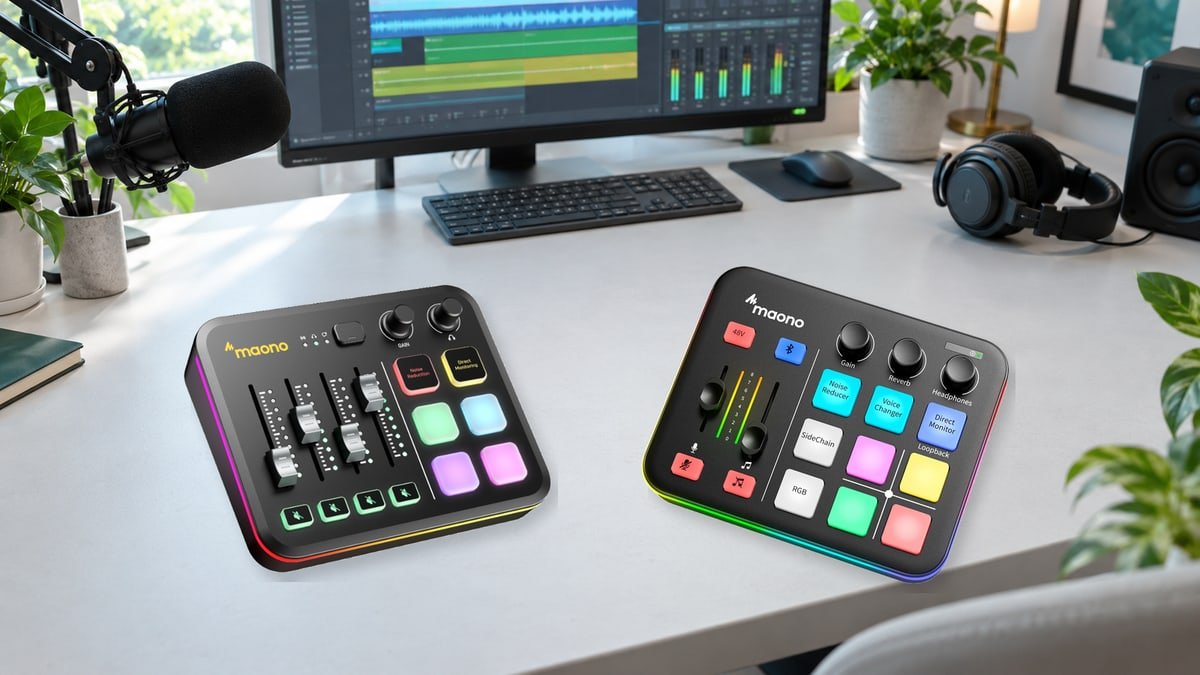
MAONO G3 vs G1 NEO: Which Mixer Makes Sense for Your Streaming Setup?
A game gets loud, someone in Discord gets louder, and the music that sounded fine a moment ago is suddenly fighting your voice. That is usually when an audio mixer starts to look more useful than another upgrade to the camera. MAONO’s newer G3 promises more control over that crowded soundscape. But the simpler G1 NEO still has a good argument for a place on the desk.
The MAONO G3 vs G1 NEO decision is not really about which one has the brighter buttons. It is about whether you want to balance a straightforward stream or build different mixes for different people. A good choice should leave you thinking about the conversation, not wondering which slider controls it.
The short answer: choose the G3 for a Windows streaming setup that needs separate app control and different sound for viewers, teammates, and headphones. Choose the G1 NEO for simpler microphone-and-background-audio control, Bluetooth input, and hands-on effects. Neither is an automatic upgrade in microphone quality, and neither provides four XLR microphone inputs.
Looking through MAONO’s documentation, published hands-on reviews, and owner discussions, one question keeps coming up: can the mixer change the sound you want to adjust without disturbing the sound you need to leave alone?
The differences that change everyday use
Both mixers offer an XLR microphone input and switchable 48V phantom power. Beyond that shared starting point, their controls serve different jobs. Think of the G1 NEO as a small live mixing desk and the G3 as a physical control surface tied to a more flexible Windows audio system.
| What matters | MAONO G3 | MAONO G1 NEO |
|---|---|---|
| Physical faders | Four, linked to the first four channels in Arena | Two: microphone and accompaniment |
| App-by-app control | MAONO Arena virtual channels | No equivalent programmable app-fader system |
| Mix destinations | Separate Stream, Chat, and Headphone mixes | A combined mix, with local monitoring controls |
| USB connections | PC-1 and PC-2 for the dual-device workflow | One computer/phone data port plus a separate DC 5V power port |
| Main computer requirement | Windows 10 or later with Arena for the full workflow | Hardware-controlled operation; Windows and macOS support |
| Bluetooth input | No | Yes, for an external audio source such as a phone |
| Advertised maximum mic gain | 57 dB | 56 dB in MAONO’s current comparison |
| Sound effects | Four custom soundpads with software file import | Four recordable pads, up to 20 seconds each; voice effects and reverb |
| Noise reduction | Two DSP levels and an AI option | Two selectable reduction levels |
Features checked October 15, 2026. The G1 NEO’s additional power socket is not a second USB audio connection. Gain figures are manufacturer claims, not measurements of clean recording headroom.
That last distinction deserves emphasis. A one-decibel difference in advertised maximum gain is not a persuasive reason to replace a working mixer. The meaningful upgrade is being able to change one audience’s mix without accidentally changing everyone else’s.
Where the G3 earns its place: one source, several audiences
Imagine a quiet evening stream rather than a complicated studio. You want viewers to hear your voice and the game. Your friends should hear you, but not a replay of their own conversation. You would also like a little music in your headphones without adding it to the broadcast. Those are three different listening requirements, even though everything is happening on one desk.
The G3’s separate mixes make that kind of arrangement possible. The following is a proposed routing plan, not a factory preset or a measured test result:
| Source | Viewers | Teammates | Your headphones |
|---|---|---|---|
| Your microphone | On | On | Optional sidetone |
| Game sound | On, balanced below speech | Off | On |
| Discord conversation | Off for a private conversation | Do not return their voices | On |
| Personal music | Off | Off | On |
There is a creative benefit here as well as a technical one. You can keep your own listening comfortable while presenting a calmer mix to the audience. A loud game does not need to drown out a quiet story; a private exchange does not need to become part of the recording.
Start by deciding those destinations on paper. Then assign the applications to separate Arena channels and use the appropriate Stream or Chat input in the receiving application. Check the channel links before relying on a private mix: linked adjustments can affect more than one destination. MAONO’s Arena user guide explains the routing and linked controls.
Four faders are useful, but they do not move themselves
The hardware follows the first four input channels in Arena, so put your most-used sources first. The faders are not motorized. After a software adjustment or a change of mix, their physical positions can differ from the active levels. You move a fader to the indicated level to reconnect control, rather than expecting an immediate jump.
That is manageable when you know about it. It is less charming if you expect a console where every slider always shows the exact current setting. Before choosing G3, picture your busiest moment on stream: will four frequently used controls solve the problem, or are you expecting instant hardware access to eight sources?

Why the G1 NEO still makes sense
Not every stream needs its own routing diagram. Sometimes you want to raise your voice a little, lower the background, and reach a real mute button without taking your eyes off the screen. The G1 NEO has that appeal: a small set of controls with jobs you can learn quickly.
Its two faders balance the microphone and accompaniment. Bluetooth lets a phone supply audio, and SideChain can lower background music while you speak. That suits a casual broadcast, a tabletop session, or a conversation with occasional sound effects. Keep the effects restrained and the result need not sound like a novelty toy.
The important limitation is what happens before the accompaniment reaches its fader. Computer playback, Bluetooth, and AUX audio share that control; it is not a separate volume strip for every app. You can balance a phone at the phone and a game in its own settings, but the mixer does not turn those sources into individually assignable hardware channels.
A useful way to judge it is to ask how often you actually change those balances. Once at the start of a session? The G1 NEO may be enough. Every few minutes as guests, games, and browser clips come and go? The G3 starts to justify the extra setup.
The two USB-C sockets are not interchangeable
Use the socket marked for a computer or phone for data. The DC 5V socket supplies power; it does not connect a second computer’s audio. For phone use, MAONO specifies external power and the appropriate data connection or adapter. The G1 NEO has no internal battery.
The G1 NEO connection and control guide also distinguishes a short press for direct monitoring from a long press for loopback. Monitoring changes whether you hear yourself. Loopback returns computer playback to the recording path. Confusing the two can make a perfectly connected setup seem broken.

Check the rest of your equipment before choosing either mixer
Mac or phone first? Be cautious with the G3
MAONO’s current G3 setup requirements specify Windows 10 or later and no macOS version of Arena. A secondary device on PC-2 does not replace the primary Windows computer. That makes the G3 a poor choice for a Mac-only desk if you are buying it specifically for its full routing system.
The G1 NEO is the more straightforward candidate here: its manual lists Windows, macOS, Android, and iOS, and MAONO lists it among hardware-controlled products that do not need a companion app. Mobile compatibility still depends on the connection and power arrangement, so check your actual phone and connector, not just the word “mobile.”
A USB microphone cannot simply plug into the mixer
Neither unit should be treated as a USB microphone hub. For a microphone connected directly to the mixer, plan around a compatible analog connection, usually XLR. A USB-to-USB-C adapter changes the plug, not the job the port performs.
There is an important G3 nuance: Arena supports selected MAONO USB microphones connected to the computer. That is different from plugging a USB mic into the G3. If you already own a USB-only microphone, confirm its exact software support before buying hardware around it; do not assume every brand will behave the same way.
With a USB/XLR microphone, choosing XLR can also change which controls are available. Settings applied inside the microphone’s USB software may not follow the analog signal. Start with the microphone’s own instructions and establish which device is doing the processing.
Bluetooth on G1 NEO is an input, not wireless headphone support
The Bluetooth feature brings audio into the G1 NEO. It does not make the mixer a transmitter for Bluetooth headphones. If your plan depends on wireless headphones, confirm the complete monitoring path before ordering. A wired headphone connection is the simpler starting point for checking timing and hearing what the mixer is doing.
Two computers still need a video plan
G3’s PC-2 connection can carry a selected mix to another device. That is useful for splitting gaming and production work, but it does not turn the mixer into a video capture card. Budget for a suitable video route separately and check synchronization in the finished recording.
Nor should “three mixes” be mistaken for a guarantee of isolated recordings of every source. A finished mix and separate editing tracks are different things. If you want to remove music or rebalance a guest later, establish the recording tracks in your software before the important session.
What the reviews and owner reports actually suggest
The G1 NEO has a longer trail of published experiences than the newly launched G3. The useful pattern is not a single star rating. It is the gap between people who want quick physical controls and people who expect those controls to behave like a fully programmable software mixer.
Podcast vs Player’s hands-on review liked the G1 NEO’s straightforward setup and spoken-word performance, while noting the limit of one XLR input. GameGrin’s review also found the basic controls useful but was less enthusiastic about the voice effects. Both disclose manufacturer- or PR-supplied review hardware; those impressions are useful, but not independent purchase verification.
There are ergonomic cautions too. MMORPG.com’s reviewer reported that the fader cut sound near the bottom of its travel and found the combined output limiting for editing. ThePhonograph’s hands-on account liked the accessible controls but criticized hard-to-see knob markers and pads that needed a firm press. Those are reasons to test the controls at your usual desk angle, not reasons to assume every unit is defective.
Owner discussions add another perspective. In a G1 NEO computer-audio thread, a participant restored playback by adjusting the accompaniment fader as well as the headphone level. Another discussion about shared PC and Bluetooth volume illustrates the routing limitation particularly clearly. Turning the headphone knob cannot separate sources that have already been combined.
There are also reports of static through analog connections. They justify a careful cable, port, and headphone test, but these self-selected support threads do not establish a failure rate or a single proven cause.
For G3, Sound & Go’s early hands-on review found the routing flexible but criticized the non-motorized faders and the learning curve. It also questioned the available gain for demanding microphones. That supports a cautious buying approach: G3 looks more compelling as a routing upgrade than as a promise of dramatically better sound. Its shorter public history leaves long-term software stability less settled.
Better routing does not automatically mean a better voice
It is easy to spend money on the box with the most controls and leave the real problem untouched. A microphone across the desk, a reflective room, or a fan pointing toward the capsule can undermine either setup. Before replacing a mixer, move the microphone into a consistent speaking position and listen to a short, unprocessed recording.
Use the microphone’s recommended distance, then test your normal voice and your loudest likely reaction. Leave room for a laugh or an excited sentence. Turning down a later fader does not repair distortion that already occurred at the input, and turning up the headphones does not make the recording louder.
Noise reduction is worth auditioning, not automatically maximizing. Record the same paragraph with it off, on its lighter setting, and on its stronger setting. Listen for softened consonants, clipped word endings, and an unnatural silence between phrases. A little remaining room noise may be less distracting than speech that sounds repeatedly cut apart.
If your microphone needs unusually high gain, do not buy on the assumption that 57 dB must be enough for every voice and distance. Check the microphone manufacturer’s requirements and leave room in the budget for a different interface or a suitable inline preamp if needed. Enable phantom power only as required by the connected equipment.
Five checks to make before your first important stream
A short private rehearsal is more informative than an evening spent admiring RGB lighting. Test the setup you intend to use, including the actual headset, game, chat app, and recording software.
| Check | What to do | What you want to learn |
|---|---|---|
| Voice headroom | Record normal speech, a laugh, and a louder phrase. | Speech stays clear without clipping during the loud part. |
| Source separation | Play a game and a chat call; change one control at a time. | The intended source changes, without surprising changes elsewhere. |
| Private audio | Record the audience mix while playing a harmless private test phrase. | A source intended only for headphones is absent from the recording. |
| Monitoring and echo | Listen through one monitoring path, then check the saved file. | No doubled voice, delayed return, or chat fed back to its sender. |
| Restart and reconnect | Restart the computer, reopen the apps, and repeat the short test. | The correct devices and routes are selected again. |
With G1 NEO, investigate the accompaniment fader, headphone level, and loopback state before assuming that missing computer audio means faulty hardware. With G3, check that the application is sending sound to the intended Arena channel and that the correct mix is reaching the receiving app.
For echo, simplify first. Disable duplicate software monitoring paths and listen again. Capturing both a complete mix and the same underlying desktop audio can produce a doubled result. Keep one deliberate route for each source before adding more.
Make firmware changes when you have time to recover, not minutes before going live. Follow instructions for the exact model; MAONO’s G3 support FAQ currently specifies connecting both USB ports to the computer during a firmware upgrade. Do not substitute firmware shared for a different model or an undocumented fix from a comment thread.
Which one would we put on the shortlist?
For a new, uncomplicated stream, the G1 NEO is the more restrained purchase. It puts useful controls within reach and lets you learn microphone technique, levels, and monitoring without first building a complex routing setup. Its Bluetooth input is genuinely relevant if a phone is part of your routine.
For a Windows creator who keeps fighting mixed-together audio, choose the G3. The extra value is control over destinations, not a bigger number on a gain specification. Even a one-PC creator can benefit when the audience, teammates, and headphones need different things.
If you already own a working G1 NEO, name the problem before upgrading. “I need to keep Discord out of the broadcast while hearing it myself” is a useful reason. “The newer one probably makes my voice better” is not. If you need two independently controlled XLR microphones for an in-person interview, widen the shortlist beyond these two models.
When comparing offers, match mixer-only versions with mixer-only versions. A bundle containing a microphone, arm, or headphones can make the price gap look much larger than it is. Once the model is settled, check MAONO coupons and deals for the relevant offer and any applicable code.
Building the rest of the desk at the same time? Browse Electronics & Tech Coupons & Deals to compare complementary equipment, keeping connection compatibility and the complete setup cost ahead of another feature you may never use.
Questions worth asking before ordering
Is the G3 worth it for a single-PC stream?
Yes, when you need separate app control and different mixes for viewers, chat, and headphones. Two computers are not required to benefit. For a single microphone and a background track that rarely changes, its routing system may be more than you need.
Can the G1 NEO control Discord and game volume separately?
Not as two independently assignable hardware faders. You can adjust the apps at their sources, but the G1 NEO’s accompaniment control is shared. Choose G3 if separate hands-on app control is the reason you are buying a mixer.
Do four G3 faders mean four microphone inputs?
No. The faders can control physical and virtual audio sources. They do not represent four XLR preamps. For multiple people using separate XLR microphones, choose equipment with the required physical inputs.
Does buying a mixer remove the need for OBS audio setup?
No. OBS still needs the correct input, monitoring choices, and recording-track configuration. Hardware makes live adjustments more convenient; it does not automatically prevent duplicate capture or create isolated editing tracks.
Useful setup references
For model-specific connection diagrams, use the G1 NEO user manual. For software requirements, consult the G3 setup guide and MAONO software compatibility list. Requirements and supported devices can change with software releases.
DiscountedSavings may earn a commission from qualifying purchases through product links.