EINSTAR vs EINSTAR 2: Is the Upgrade Worth It for Your Projects?
A cracked trim panel, a tool that needs a fitted drawer insert, a curved part that refuses to cooperate with a ruler: these are the projects that make a 3D scanner tempting. Then you reach the EINSTAR vs EINSTAR 2 decision and discover that the real question is not simply which scanner captures more detail. It is which one gets your particular object into a usable model without demanding a completely different computer, budget, or weekend.
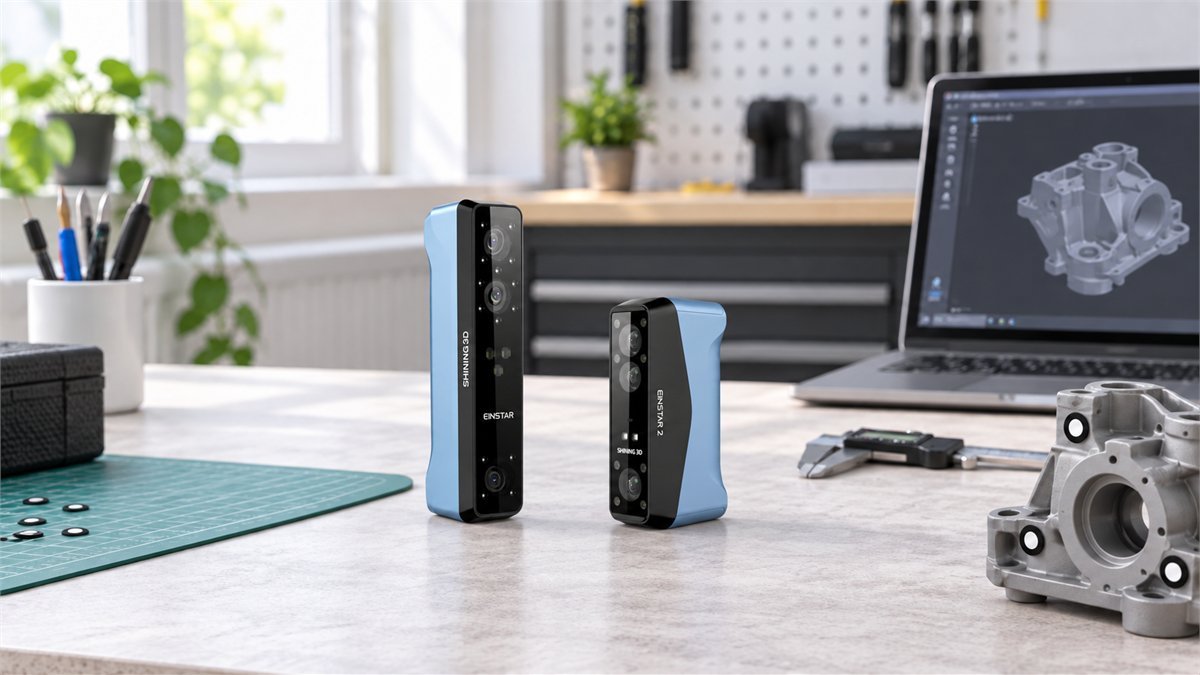
SHINING 3D gave EINSTAR 2 a smaller body, wireless operation, and a blue-laser mode alongside infrared scanning. That makes it an appealing step forward, especially for small mechanical parts. But an original EINSTAR already doing useful work does not become worthless because a newer model exists. We compared the specifications, software guidance, and owner discussions to see where the upgrade makes sense and where keeping the older scanner is the more sensible choice.
The short answer: for a first purchase at a modest price gap, EINSTAR 2 is the more versatile choice, provided your computer is suitable. For an existing EINSTAR owner, upgrade to solve a specific limitation: small-part capture, cable management, or a workflow that benefits from laser scanning. If your current scans already fit the job, there is no automatic reason to replace it.
EINSTAR vs EINSTAR 2: the differences that change the job
The original EINSTAR is an infrared structured-light scanner. EINSTAR 2 adds a separate laser workflow rather than simply turning up the detail in the same old process. The distinction matters because the laser and infrared modes have different working distances, tracking needs, and useful applications.
| What changes | Original EINSTAR | EINSTAR 2 |
|---|---|---|
| Capture system | Infrared VCSEL structured light | 17 parallel blue laser lines plus infrared VCSEL |
| Published point spacing / resolution | 0.1–3 mm | Laser: 0.05–10 mm; IR: 0.2–10 mm |
| Working distance | 160–1,400 mm | Laser: 100–600 mm; IR: 160–1,400 mm |
| Marker-free options | Feature and texture-based alignment, plus marker options | Feature/texture options in IR; published laser alignment uses markers |
| Connection | Wired computer connection | Wi-Fi or USB-C; still computer-connected |
| Body and weight | 220 × 46 × 55 mm; 500 g | 130 × 37 × 61 mm; 420 g with battery |
| Scanning software | EXStar | EXStar Hub |
| Best reason to consider it | Lower entry cost or an already proven workflow | More flexible capture methods and easier movement around a subject |
Manufacturer specifications, checked September 27, 2026. Resolution and point spacing are not guaranteed dimensional accuracy. Hardware specifications: [1]; software and connection guidance: [2], [3].
Why 0.05 mm does not mean every dimension is accurate to 0.05 mm
Imagine placing more dots along the outline of a part. You can describe the outline more finely, but adding dots does not prove that the outline is in exactly the right place. Point spacing describes sampling density; dimensional accuracy concerns how closely the result matches the real object.
That is why the original’s 0.1 mm setting and EINSTAR 2’s 0.2 mm IR setting do not, by themselves, establish which one produces a better model. Alignment, surface behavior, calibration, and the scale of the object all affect the result. The newer scanner’s finest listed setting belongs to its laser mode, not its infrared mode.
For a fitted bracket, check critical hole spacing and mating surfaces against independent measurements. For a decorative model, surface completeness and a clean mesh may matter more. Buying on the smallest number in a comparison chart is an easy way to solve the wrong problem.
Where the original EINSTAR still makes sense
Suppose your regular projects are larger, reasonably textured objects, and you already know how to get a reliable scan from them. The original scanner’s strongest argument is not nostalgia. It is that you have a working process: a known computer, familiar software, and a realistic idea of the cleanup involved.
Keeping that setup can be a better investment than paying to relearn a workflow you did not need to change. This is particularly true when the scan is only a reference surface for designing something else, rather than the finished deliverable.
Buying the original today needs a stricter calculation. The manufacturer’s FAQ suggests a smallest subject around 100 × 100 × 100 mm, which should discourage choosing it primarily for tiny clips, jewelry, or miniature mechanical features. That is guidance, not a hard boundary around every successful scan, but it gives you a more useful starting point than the resolution figure alone. [4]
A used unit deserves a live demonstration on your type of object. Check that the matching calibration board, cables, power supply, and transfer or activation arrangements are included. A bargain is less convincing if the missing accessories or a computer upgrade consume the money you saved.

What EINSTAR 2 adds beyond a shorter cable list
The more compelling upgrade is the extra way of capturing an awkward object. Infrared remains available for broader coverage; laser scanning gives you another route when a smaller part needs closer attention. That flexibility is attractive for a workshop where yesterday’s job was a textured housing and tomorrow’s is a dark interior trim piece.
Small mechanical parts: a stronger reason to upgrade
A housing with ribs, recesses, and attachment points is a better test of the upgrade than a simple rounded ornament. Laser mode gives EINSTAR 2 a different capture option, but the preparation still matters. Its published laser alignment modes are marker-based. Budget time for arranging markers, keeping them visible as you move, and recording enough overlapping geometry.
Do not assume that a demonstration of markerless laser scanning on an EINSTAR Rockit also applies here. These are different models. On EINSTAR 2, marker-free feature and texture tracking are part of the infrared workflow; that is not the same promise as marker-free laser capture.
Dark or reflective surfaces: better options, not magic
A successful scan of one black plastic component does not guarantee success with a glossy black panel or transparent cover. The official preparation guide still recommends suitable scanning spray for transparent, shiny, or reflective objects. It also cautions against subjects that move and structures with numerous small, deep holes. [5]
For a valuable or delicate part, surface preparation itself can be the deciding factor. Test any compatible coating on a safe area and follow its instructions. If you cannot apply markers or spray, ask for a demonstration using a genuinely comparable surface before buying. A sample mesh of the wrong material answers very little.
Wireless helps around a vehicle, but the computer still comes along
Moving around an engine bay or a large object is less awkward without a scanner cable following your hand. However, EINSTAR 2 is not a self-contained scanner with its own full editing workstation. EXStar Hub still runs on the connected computer.
The official setup guide requires a wired connection for activation and directs first-time users to calibrate over a cable. Wireless scanning comes afterward. Keep the supplied data cable available: it is both part of setup and a practical alternative when Wi-Fi becomes troublesome. [3]
For someone moving between larger objects and small components, that combination of infrared, laser, and two connection methods is the most persuasive reason to choose EINSTAR 2. It offers more ways to approach the work, not a guarantee that every approach will be effortless.

Check the computer before choosing the scanner
The scanner may be the exciting purchase, but the computer decides whether the experience feels usable. A laptop that handles ordinary CAD work is not automatically a good match for processing a large scan. Nor does a gaming label tell you its available RAM, dedicated GPU memory, or upgrade options.
For a new Windows purchase, EINSTAR 2’s model-specific specification is the safer starting point: Windows 11, an i7-13700H or better, an RTX 3060 Laptop GPU or better with at least 6 GB of VRAM, USB 3.0, and at least 32 GB of dual-channel DDR5 RAM. The recommendation rises to 64 GB or more. The broader EXStar Hub support matrix lists lower minimums, including an RTX 2060 and Windows 10/11, so check the exact configuration with support rather than treating the lowest figure on either page as a promise. [6]
| Your situation | What to check before paying |
|---|---|
| Existing Windows laptop | Exact CPU and NVIDIA GPU model, VRAM, installed RAM, and whether RAM can be upgraded. Test a representative project if possible. |
| Buying a Windows workstation | Use the model-specific recommended configuration, not just the software minimum. Leave room for larger projects and storage. |
| Apple Silicon Mac | The current Hub matrix lists macOS Tahoe 26.2+, supported M-series chips, and 16 GB minimum / 24 GB+ recommended memory. Confirm your exact chip; base M1 is not the same as M1 Pro. |
| MacBook Air | Do not make it the default workstation purchase for this job. The manufacturer’s configuration guidance does not recommend the Air, even where newer models can run the software. |
| Already using original EINSTAR | Check EXStar Hub compatibility separately. Successful operation in EXStar does not establish that the newer software will suit the same machine. |
Memory is also a workflow decision. A broad scan at moderate point spacing and a dense scan of the same area are very different workloads. EXStar Hub’s guide explicitly links finer spacing to larger files and longer processing. Start with the detail your project needs, not the finest setting the interface allows. [7]
One useful pre-purchase exercise is to list your three largest intended subjects and the smallest feature you actually need to preserve. Send those, alongside your full computer specification, to the supplier. That produces a more meaningful answer than asking whether a scanner is suitable for “car parts.”
What owner feedback adds to the specification sheet
The encouraging reports are not just about opening the box. In a December 2025 first-scan discussion, an EINSTAR 2 owner described straightforward wireless connection and a satisfying first mesh, while finding the software workflow harder to learn than expected. Another participant using it for car body parts reported splitting large work into smaller scans on a 32 GB laptop. These are useful experiences, not controlled benchmarks. [8]
The cautionary side concerns processing and connection reliability. In a July 2026 EINSTAR 2 calibration thread, the owner eventually reported that a different USB adapter resolved repeated disconnections. That is more actionable than treating every calibration failure as a defective scanner, but it is still one person’s fix, not a universal solution. [9]
A separate July thread reported EXStar Hub crashes during processing. Support suggested an update; a second participant said the problem persisted on that suggested version. A June report described slower processing after a firmware/software update. Neither thread establishes how common the issue is, and the available discussion does not prove those particular problems persist in every later release. [10]
Together, these reports suggest a sensible buying test: complete your actual workflow while you still have return options. Connect, calibrate, scan, generate the mesh, save, reopen, and export it. A smooth live preview is encouraging, but the useful deliverable is the file you can work with afterward.
The upgrade price is not always the price difference
On September 27, 2026, the checked US base-model listings were $759 for the original EINSTAR and $899 for EINSTAR 2, before tax. That was a $140 difference for a new buyer choosing between the two. It was not a $140 upgrade for someone who already owned the original. An owner would need to account for the new purchase, any extra equipment, and whatever the old scanner actually sells for.
That distinction can change the recommendation completely. A small gap between new scanners favors the newer model. Add a replacement laptop, however, and keeping a functioning original becomes much easier to justify. Conversely, choosing the cheaper scanner does not save money if it cannot complete the work you bought it for.
Compare the cash you would actually spend
USD estimates, before tax and shipping. Starting scanner prices are the September 27 reference prices, not guaranteed offers. For an upgrade comparison, set the original scanner cost to $0 if you already own it. Include only extra costs you expect to incur.
EINSTAR 2 requires $140.00 more cash in this example.
Enter an amount from $0 to $1,000,000 in every field.
Original total = scanner + extra computer cost + extras. EINSTAR 2 net total = scanner + extra computer cost + extras – resale proceeds.
Keep software separate from the hardware comparison. Scanning and exporting a mesh are not the same as rebuilding it into editable CAD. If you need a reverse-engineering package, check the actual license and bundle terms. A promotion mentioned in an older launch post is not evidence that the same license is included with today’s order.
A useful scan still needs a useful workflow
Before buying either model, picture the last step of your project. Are you printing a decorative copy, designing a holder around an existing tool, or reproducing a part that must fit precisely? The scanner is only one part of each of those processes.
For fitted parts, use the mesh as a reference
A scanned mesh contains surface geometry, not the original designer’s sketches, constraints, or manufacturing intent. EXStar Hub exports formats such as STL, OBJ, PLY, and 3MF; none automatically supplies a clean parametric feature history. [11]
For a replacement cover, you might use the scan to establish the outer shape, then rebuild mounting features in CAD using measured dimensions. For an insert that holds a tool, the scan can guide the recess while you deliberately add clearance. In both cases, printing a small fit-test section first can be more informative than committing to the whole part.
For big subjects, resist collecting detail you will discard
An engine-bay reference for checking clearances does not necessarily need the same detail everywhere as a small mating surface. Decide which areas are critical before scanning. Keep the original project, save intermediate exports, and check alignment across overlapping sections rather than judging only a smooth-looking final surface.
If processing becomes the bottleneck, a more expensive scanner is not automatically the answer. Reconsider the required point spacing, the scan area, and whether several controlled captures would suit the computer better. Do not smooth away or automatically fill a critical hole and then treat the result as a measured feature.
Make the first week a realistic acceptance test
- Start with a stable, matte object. Establish that connection, calibration, and export work before choosing your most difficult reflective part.
- Then scan a representative project. Use the size, material, and level of detail you actually bought the scanner for.
- Check the complete file. Reopen the project and load the export in your intended CAD or mesh application.
- Measure what matters. Compare several accessible dimensions independently, including distances across the object rather than only one small feature.
- Repeat before trusting it. A second capture helps reveal whether the result is repeatable enough for your purpose. This is a practical check, not a substitute for certified metrology.
Look after the calibration board as carefully as the scanner. The official guidance calls for recalibration after significant vibration, a long idle period, or a serious decline in scan quality, and warns against using a mismatched or damaged board. A clean reference is part of the workflow, not just an unboxing accessory. [12]
Which would we choose?
For a new buyer with a suitable computer, we would lean toward EINSTAR 2. The additional capture method gives it room to handle a more varied project list. When the purchase-price gap is small, buying the older model solely to save that difference is difficult to recommend unless its workflow already fits you particularly well.
For an original EINSTAR owner, we would be more selective. Keep it if it already produces the geometry you need and you know its limits. Upgrade when you can name the problem you expect the new scanner to solve. “I need a better approach to these small mechanical parts” is a stronger reason than “the new one has a smaller resolution number.”
For someone expecting a one-click route from object to perfect CAD, we would pause. There is learning, preparation, and verification on both paths. Ask for a representative sample project and make sure you enjoy the modeling side of the work as much as the idea of capturing it.
Once you know which setup fits, you can compare EINSTAR coupons and deals before ordering. Choose the workflow first; let the final offer settle the budget, not the other way around.
Questions worth settling before checkout
Can EINSTAR 2 replace the computer with a phone?
Do not buy it on that assumption. Its documented workflow uses EXStar Hub on a compatible computer. Wireless describes the scanner connection; it does not make EINSTAR 2 a standalone workstation.
Does EINSTAR 2 need markers?
Its published laser alignment modes use markers. Infrared mode offers feature and texture-based options as well as marker alignment. Whether marker-free IR tracking is appropriate depends on the object’s geometry and surface.
Does EINSTAR 2 work with a Mac?
Yes, a macOS EXStar Hub download is available. Check the current supported chip, memory, and macOS requirements for your exact machine. Early discussions from before Mac support arrived should not be treated as current compatibility advice.
Is original EINSTAR software still available?
Yes. The official support download page lists EXStar 1.2.2.0 for Windows and Apple Silicon Macs. That confirms availability, not a promise about future updates or the support lifespan of the hardware. [2]
Which is better for reverse engineering?
EINSTAR 2 is the more flexible candidate for varied parts because it adds laser capture. But the right choice depends on your object’s material, size, and required tolerance. Request a sample scan, validate important dimensions, and include the time and software needed to rebuild the mesh into usable CAD.
References
- SHINING 3D technical specifications: original EINSTAR and EINSTAR 2.
- Official software support: EXStar downloads and EXStar Hub downloads and supported systems.
- EXStar Hub manual: first-time setup and wired and wireless connection.
- Original EINSTAR FAQ and object-size guidance.
- EINSTAR 2 surface preparation and markers.
- EINSTAR 2 computer configuration guidance; see also specifications [1] and the Hub matrix [2].
- Resolution, alignment, and project settings.
- EINSTAR 2 first-scan owner discussion, December 2025.
- Calibration connection report and owner’s follow-up, July 2026.
- Community reports: processing crashes and performance after an update, June–July 2026.
- EXStar Hub export formats.
- Calibration timing and board care.
DiscountedSavings may earn a commission from qualifying purchases through product links.