EINSTAR Coupons & Deals
Compare listed offers with product-specific cart results where available. Prices exclude shipping and tax.
How we verify deals · Affiliate disclosure
EINSTAR Coupons & Promotions
Offer titles describe listed terms. Cart results show the savings actually observed on eligible products, which can differ. Browse matching products.
$300 OFF EinScan Rigil 3D Scanner
10% OFF EINSTAR EXModel Software
Free Shipping on EINSTAR US Orders
EINSTAR Coupons & Deal Highlights
Browse EINSTAR Products by Category
EINSTAR product catalog shows all active tracked products, not only discounted items. Compare products by deal rating, current price, newest additions, popularity, available savings, and price-history signals, or choose a category to narrow the list.
Browse all EINSTAR product categories 2 groups
Top rated EINSTAR products
Showing all products sorted by deal rating.
 -20%
-20% EXModel Software
 -20%
-20% EXModel Personal
 -28%
-28% 
 -20%
-20% 
EinScan Rigil | The Tri-Mode Laser 3D scanner
 -34%
-34%  -28%
-28%  -21%
-21%  -15%
-15%  -11%
-11% 


Showing 18 of 22 products
EINSTAR Price & Offer Comparison
Store price is the current listed product price, including any store markdown. A separate offer price shows the result of a tested coupon or automatic cart discount. Shipping and tax are not included.
EINSTAR Tracked Price Drops & Recorded Lows
Up to five products: price drops recorded in the seven days up to the price snapshot first, then products at their lowest recorded price after a tracked price change. Selection uses actual store-price history, not the discount from a crossed-out regular price.
| Product | Store price | Price history | Deal rating | Details |
|---|---|---|---|---|
|
EINSTAR 2-Still EINSTAR, Even BetterLowest recorded price | $899.00 | View | ||
|
EINSTAR Rockit-Rock-it in Your PocketLowest recorded price | $1,519.00 | View |
Related EINSTAR Guides & Articles
Read selected articles with additional product guidance, comparisons, and practical information related to EINSTAR.
EINSTAR FAQ
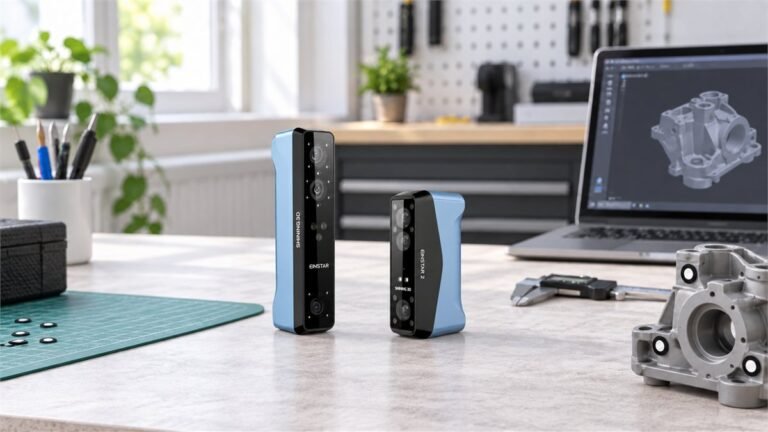
EINSTAR coupon and 3D scanner selection guide
An EINSTAR coupon can reduce the checkout total, but the largest practical
difference comes from choosing a scanner that matches the object size,
surface, capture environment and computer workflow. Compare the models
first, then test the available discount against the complete scanner,
software and accessory bundle.
Choose the workflow before comparing specifications
Scanner specifications are easier to interpret after deciding where the
data will be captured, what types of surfaces are involved and how the
final mesh will be used.
Computer-assisted scanning
A PC-connected workflow can be suitable for studio projects where a
compatible computer is already available. Check the required operating
system, graphics hardware, memory and connection before ordering.
Mobile object capture
For vehicles, sculptures or objects away from a desk, compare scanner
weight, battery arrangement, wireless operation and the working-distance
range—not only the finest listed resolution.
Standalone scanning
An all-in-one model combines scanning, display, storage and computing
in one device. This can simplify field capture, although storage,
processing workflow and export requirements still need to be checked.
Output and post-processing
Confirm that the available export formats fit the next stage of the
project. A scan intended for printing, visualization or CAD reference
may require different cleanup and conversion steps.
EINSTAR scanner comparison
This comparison focuses on stable product differences instead of temporary
prices. On smaller screens, swipe the table horizontally to see every column.
| Model | Primary workflow | Capture technology | Listed working distance | Listed output formats | Useful starting scenario |
|---|---|---|---|---|---|
| Original EINSTAR | Portable scanner used with a compatible computer | Infrared VCSEL with RGB color capture | Effective range up to approximately 1,400 mm; optimal distance around 400 mm | OBJ, STL, PLY, P3 and 3MF | General prosumer scanning, people, medium-to-large objects and 3D-printing workflows |
| EINSTAR 2 | Wireless computer-assisted handheld workflow | 17 parallel blue laser lines plus IR Rapid mode | Laser: 100–600 mm; IR: 160–1,400 mm | STL, OBJ, PLY, 3MF and ASC | Users who want both detailed laser capture and faster infrared scanning |
| EINSTAR Rockit | Portable handheld workflow with onboard battery support | Crossed and parallel blue laser patterns plus IR Rapid mode | Laser: 100–600 mm depending on pattern; IR: 160–1,400 mm | STL, OBJ, PLY, 3MF and ASC | Automotive parts, design work and projects needing multiple laser patterns |
| EINSTAR VEGA | Standalone, wireless all-in-one scanning | Infrared MEMS HD mode and infrared VCSEL Fast mode | HD: 100–350 mm; Fast: 270–1,500 mm | PLY, STL, OBJ and ASC | Field scanning when completing capture without a connected computer is important |
| EinScan Rigil Lite | Standalone, wireless-PC or wired-PC operation | Crossed and parallel blue laser lines plus IR Rapid mode | Laser: 170–550 mm; IR: 160–1,500 mm | STL, OBJ, PLY, 3MF and ASC | All-in-one laser scanning with the option to use additional computer resources |
| EinScan Rigil | Standalone, wireless-PC or wired-PC operation | 25+25 crossed blue laser lines, parallel laser lines and IR Rapid mode | Laser: 170–550 mm; IR: 160–1,500 mm | STL, OBJ, PLY, 3MF and ASC | More demanding professional projects where scanning speed and onboard resources matter |
Product specifications, compatibility and included accessories can change.
Confirm the exact model page and selected bundle before completing an order.
Match the scanner to the object
A scanner with the longest specification list is not automatically the
best fit. Begin with the physical and visual properties of the subjects
that will be captured most often.
Mechanical parts and compact objects
Prioritize laser modes, minimum scan volume, fine detail capture and
stable object positioning. Check whether markers or a turntable will
improve alignment for the intended geometry.
Vehicles, sculptures and equipment
Compare field of view, working distance, tracking options and scan
speed. A rapid infrared mode can be more useful than maximum detail
when covering a large surface.
People, displays and digital assets
Review texture-camera specifications and lighting conditions when
color matters. Geometry quality and texture quality are separate
considerations and should be evaluated independently.
Dark, glossy or translucent materials
These surfaces may require a compatible scan mode, markers, controlled
lighting or temporary matting spray. Include preparation supplies in
the project plan before applying a coupon to the scanner alone.
EINSTAR ordering checklist
Use this checklist to reduce compatibility surprises and compare the
real contents of competing bundles.
Define the typical object range
Record the smallest and largest objects, expected surface finishes,
required color detail and whether scanning will happen indoors or outdoors.
Verify the complete workflow
Decide whether the project needs standalone operation or can rely on
a computer. For PC workflows, compare the listed CPU, GPU, memory,
operating-system and interface requirements.
Inspect the selected bundle
Check the scanner, calibration equipment, cables, batteries, markers,
case and software included with the exact variant. Similar bundle
names may contain different accessories.
Plan for surface preparation
Determine whether reflective markers, matting spray, a tripod,
turntable or controlled lighting will be required for the objects
being scanned.
Confirm file compatibility
Match the scanner’s export formats to the intended CAD, mesh-editing,
rendering or slicing software. Account for any cleanup or conversion
step required after capture.
Review regional order terms
Confirm that the regional store serves the delivery address, then
review current shipping, tax, return and warranty conditions before
opening or using the equipment.
EINSTAR coupon and 3D scanner FAQ
Practical answers for comparing models, preparing a scanning workflow and
checking a discount before payment.
EINSTAR offers handheld and standalone 3D scanners intended for
applications such as 3D printing, design, digital archiving and
reverse-engineering workflows. Its store also carries accessories
such as markers, scanning spray, tripods and selected software options.
EINSTAR VEGA is designed as a wireless all-in-one scanner that can
complete scanning without a connected computer. EinScan Rigil and
Rigil Lite also support standalone operation while adding wireless
and wired PC modes. Compare their capture technology, onboard
resources, size and workflow before choosing.
Laser modes generally emphasize detailed geometry and controlled
capture of smaller features, while rapid infrared modes are useful
for covering larger objects and broader areas efficiently. The best
choice also depends on surface finish, lighting, object size and
alignment method.
Not every object or mode requires markers. Feature and texture
alignment may work when the subject has enough recognizable geometry
or visual detail. Markers can improve tracking on smooth, repetitive
or low-feature surfaces, so check the supported alignment modes for
the selected scanner.
Results depend on the model, scan mode, lighting and material.
Highly reflective, transparent or very dark surfaces can remain
challenging and may benefit from markers or a removable matting
spray. Test preparation requirements against the object’s finish
before selecting accessories.
Confirm the model, variant, bundle contents, computer compatibility,
required accessories and regional delivery terms. Then enter the
coupon and verify that the order total changes before payment.
Promotions may exclude selected models, bundles or products already
receiving another discount.
Compare the complete setup. Depending on the project, that may include
a suitable computer, markers, surface spray, batteries, calibration
tools, storage, software and post-processing time. A lower scanner
price is not necessarily the lower total workflow cost.