SwitchBot Fan 2 Pro with Apple Home: Is Native Matter Worth the Upgrade?
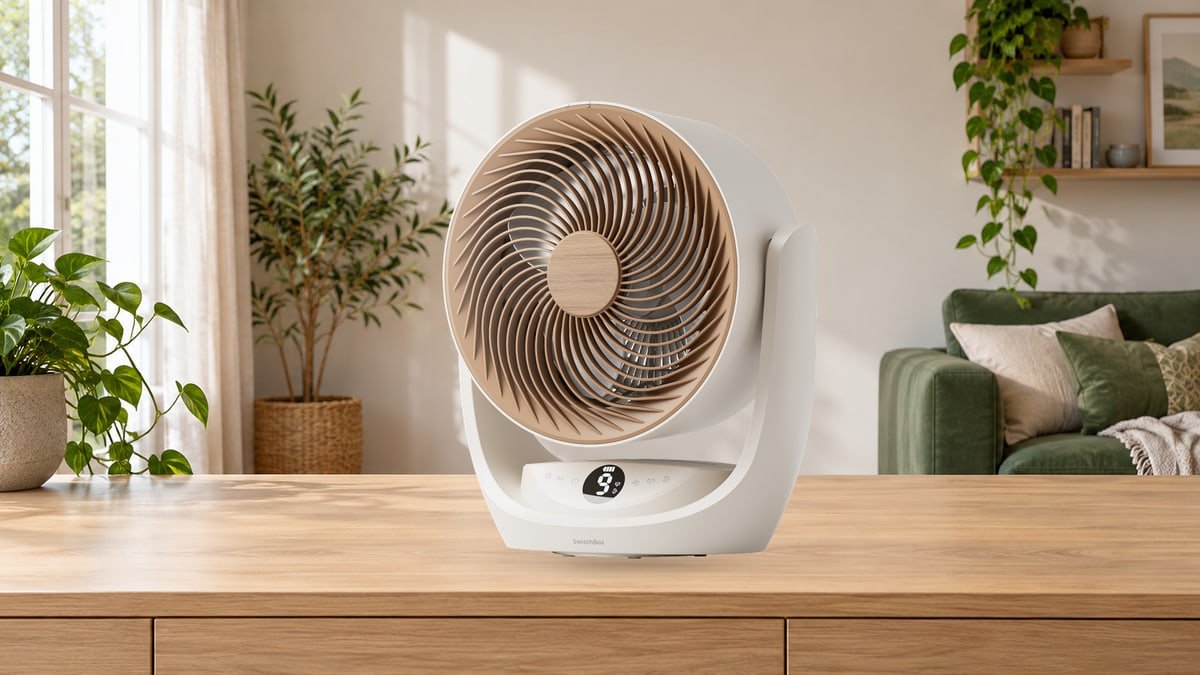
A fan is easy to overlook until the room is stuffy, the remote has disappeared, and the only comfortable speed sits somewhere between two settings. SwitchBot’s Battery Circulator Fan 2 Pro promises a more accommodating routine: carry it where you are sitting, adjust it from Apple Home, and let it join the rest of the house when bedtime arrives.
The important change is native Matter over Wi-Fi. For someone considering the SwitchBot Fan 2 Pro for Apple Home, that matters more than another impressive-looking airflow claim. But does it justify replacing a perfectly good fan? The early experiences point to a useful upgrade with some very ordinary household compromises.
Our buying verdict: shortlist the Fan 2 Pro if you want cordless placement and meaningful Apple Home control, particularly adjustable speed, without buying a SwitchBot bridge. Keep your existing fan if it already feels quiet and comfortable and all you need is scheduled on/off control. The stronger case for upgrading is convenience, not a promise of quieter sleep.
What early users appreciate, and what is worth checking first
Feedback is still developing, especially for the US version. European and Japanese owner comments are useful for spotting questions to ask, but they are not a US reliability survey. Some store reviews carry an incentive disclosure, and Mark’s Tech Blogs reviewed a supplied beta unit. That makes the practical details more valuable than an average star rating.
Moving the breeze is the feature that earns its place
Cordless movement comes up repeatedly in Japanese owner feedback: moving between rooms, borrowing the fan for a desk, or changing its position without finding another outlet. Several also appreciate easier access to the power connection than on an older model.
This is the benefit to picture before buying. If your chair, kitchen work area and bedside table are in different places, a rechargeable fan can follow your evening. If it will spend its entire life beside the same socket, the battery is less persuasive. At the US manual’s listed 2.1kg, it is portable rather than featherweight; support it securely when moving it and leave room for the rear cable.
Apple Home control is a genuine improvement, but setup is not everyone’s favorite part
HomeKits’ hands-on review reports speed control, oscillation switching and a separate light in Apple Home. Mark’s Tech Blogs also tested Apple Home and Home Assistant integration. A European owner comparing both generations praises quicker Matter response, while another owner found the Matter activation process confusing.
The useful distinction is between an awkward first pairing and a limited product. Name the fan and its light clearly, then check each control before building a complicated automation. A simple “Bedroom Fan” name is more helpful in daily use than leaving several accessories with nearly identical factory names.
Quiet operation is a reason to investigate, not a guarantee
Quietness receives repeated praise in Japanese feedback, and a European owner likes the low-noise Sleep mode. Yet another European buyer who owns both generations finds the 2 Pro noticeably louder than the original. A Japanese comment specifically objects to Turbo noise while appreciating its power. These experiences do not establish which is quieter at the same airflow.
Make the bedroom test specific: sit where you actually sleep, select the lowest useful speed, and compare stationary operation with oscillation. Then listen with the optional filter fitted and, if appropriate, without it. SwitchBot confirms that the filter can reduce airflow and increase noise. A fan that sounds unobtrusive across a showroom can feel quite different beside a pillow.
Cleaning is possible; effortless cleaning is another question
Several Japanese records criticize screws and disassembly when accessing the filter, while others welcome being able to clean the parts. There are also comments about a shallow carrying grip and limited downward aim from a high shelf. These are placement and maintenance tradeoffs, not problems a faster Wi-Fi connection will solve.
Choose a stable surface near the height where you want the breeze, check the intended cleaning procedure, and keep the correct screwdriver accessible. Do not buy it for a high bookcase assuming a wide vertical sweep means it can point far downward. The most attractive location is not always the most comfortable one.
What can the Fan 2 Pro actually do in Apple Home?
The 2 Pro communicates through Wi-Fi rather than Thread. It does not need a SwitchBot Hub 2 or Hub 3 to bridge it into Matter. That removes one purchase and one dependency, but it does not make every smart-home feature independent of your network or Apple setup.
There are two different meanings of “hub” here. A SwitchBot bridge is not required for this fan’s native Matter connection. An Apple home hub, such as a HomePod or compatible Apple TV, is what enables Apple’s away-from-home access and home automations. Apple’s Matter pairing guidance also allows local pairing and control without a home hub on an iPhone running iOS 18 or later. For an automated household, plan around the home hub rather than that minimum local-control arrangement.
| What you want to do | Apple Home | Where the SwitchBot app helps |
|---|---|---|
| Turn the fan on and off | Native Matter control | Device setup, status and additional settings |
| Adjust the breeze | Variable fan-speed control reported in hands-on testing | Fine speed adjustment and mode selection |
| Move air around the room | Oscillation switching reported; do not assume every axis and angle is exposed | Separate horizontal and vertical settings and available sweep ranges |
| Use the warm light | A separately controllable light in reported integrations | Product-specific light settings; Home controls need not mirror every option |
| Build a bedtime routine | Scenes and supported home automations, with the appropriate Apple setup | Fan-specific timer and scheduling options |
| Maintain the device | Not a replacement for the manufacturer’s maintenance tools | Firmware notifications, updates and support feedback |
Control details draw on exact-model hands-on reports, the US manual and current support guidance, checked October 20, 2026. Interface options can differ with controller software and firmware.
The practical gain is not having every setting in one place. It is being able to make the common adjustments without opening a separate app. Set the detailed sweep you like in SwitchBot, then use Home for the familiar everyday controls. If separate vertical oscillation or a precise aiming preset is essential, confirm that exact function before purchase rather than treating the Matter logo as a complete feature list.
For a night routine, think in terms of a comfortable fan speed and the light state you want, not “turn everything on.” Test the scene while awake. A light that is pleasant across the room may still be too bright beside the bed.
Fan 2 Pro versus the original: what is worth paying for?
Replacing a working fan needs a better reason than a new suffix. The meaningful questions are whether you need direct smart-home control, whether the old fan reaches your seating area comfortably, and whether moving it is inconvenient.
| Buying consideration | Battery Circulator Fan 2 Pro | Original Battery Circulator Fan |
|---|---|---|
| Matter connection | Built into the fan over Wi-Fi | Uses a compatible SwitchBot Matter bridge |
| Apple Home usefulness | Fan-speed control is a central upgrade in hands-on reports | Older bridged integrations were reported with much more limited on/off exposure |
| Manufacturer maximum air volume | 13.51m³/min | 9.15m³/min |
| Noise decision | Test the speed and filter combination you will actually use | A quiet unit you already like remains a strong reason to keep it |
| Best reason to choose it | Direct integration, stronger published maximum airflow and flexible placement | Avoid replacing satisfactory hardware just to gain functions you rarely use |
The published maximum airflow is about 48% higher for the 2 Pro, calculated from SwitchBot’s 13.51 and 9.15m³/min figures. That is not a 48% improvement in comfort, and it is not an equal-noise comparison. Maximum output matters when you want to move more air; a bedroom decision depends on what happens well below maximum.
The 2 Pro is also a tabletop-style unit, not a height-adjustable pedestal fan. Its US manual lists a body about 12.4 inches wide, 6.2 inches deep and 14 inches high. Allow extra clearance for the cord and movement. If you need airflow directly across a high bed or over a desk divider, the physical position may outweigh the integration advantage.
For the current offer and any applicable code, check SwitchBot Coupons & Deals once you have decided which features matter. A discount is useful only if the fan suits the room.

Battery life: treat “up to 70 hours” as a low-speed figure
SwitchBot’s support page specifies up to about 70 hours from a full charge at speed level 1. That is a manufacturer maximum under a particular operating condition, not a promise of several days at your preferred setting. Higher airflow and additional functions change the practical result.
Owner reports are mixed: some Japanese users describe comfortable overnight use, while others wish the battery lasted longer. Without matching settings and duration, neither observation predicts your evening. A sensible first test is one ordinary session at your preferred speed, noting the starting and ending charge. Do not substitute the headline runtime for that check when continuous airflow matters.
The US manual estimates roughly 8-10 hours for a full charge. That makes a regular charging spot useful. Think of the battery as permission to move the fan conveniently, not an invitation to forget about charging until the next heatwave.
USB-C connected does not always mean the battery will hold steady
This is the power detail most likely to surprise a new owner. SwitchBot says USB-C input may not cover the consumption at medium or high speed. The fan can gradually use its battery and eventually stop even while the cable is attached.
The official recommendation: use the AC power cable for extended medium- or high-speed operation. If USB power maintains low-speed use normally, that helps distinguish a power-budget limitation from a completely failed charging function. Buying a charger with a larger wattage printed on the box does not prove the fan can accept more input.
If the battery falls while using the AC cable, check the connection at both ends and look for the charging indication on the display or in the app. Persistent failure is a support issue, not something to solve by repeatedly draining the battery. Keep a short recording of the indicator and your operating settings.
A straightforward Apple Home setup, without unnecessary resets
Set it up near a reliable network connection before finding its permanent place. The US manual specifies 2.4GHz Wi-Fi and Bluetooth 4.2. SwitchBot’s current support guidance explicitly confirms native Matter platform support, despite a generic hub note elsewhere in the printed manual.
- Start with power. Put the bottom switch in its operating position, charge the fan if necessary and confirm it works from its own controls.
- Update the relevant software. Use current iPhone, Home hub and SwitchBot app software. Install offered fan firmware updates with reliable power and the phone nearby.
- Choose the documented pairing route. For direct Matter setup, the US manual instructs a 15-second hold of the fan’s power button, followed by scanning its Matter code in Apple Home.
- Know what that hold does. It is also a factory reset and clears device settings. Do not use it casually on a fan that is already configured; use the ecosystem’s sharing or additional-pairing instructions where appropriate.
- Check the result before automating. Test power, speed, the light and available oscillation controls. Give each accessory a useful name and room.
A pairing success is only the first check. Try the controls again after the fan has been idle and after moving it to the intended room. A setup that works beside the router may reveal a coverage problem in the bedroom. Keep that test separate from any question about airflow or battery life.
If Apple Home says the fan is unavailable
First check whether the physical controls and SwitchBot app still work. That separates a general power problem from an integration problem. SwitchBot’s official Matter guidance recommends current hub and HomeKit software, a stable network, and then removing and re-establishing the Matter binding if necessary.
Re-pairing can require repairing scenes or automations, so record the existing setup before doing it. If disconnections continue, send support their frequency and the date and time of a recent occurrence. There is no verified universal firmware fix to promise here.
Making it comfortable: placement, filter choices and unusual noise
Start with where the air needs to go. For a desk, a modest sweep can keep the breeze near one person. For general circulation, a broader sweep may make more sense. Avoid forcing the head past its designed movement limits or balancing the base on an improvised wedge to compensate for an unsuitable shelf.
The fan does not refrigerate air. Its job is to move it and make the room feel more comfortable, particularly where an existing heating or cooling system leaves uneven airflow. More speed is not always the answer: moving the fan a little closer or clearing an obstruction may let you use a gentler setting.
The filter is optional, and it changes the compromise
SwitchBot describes the filter as a way to catch hair and larger dust particles. It can be useful in a dusty room, but it is not evidence of HEPA-style air purification. The US listing also explicitly excludes the ion generator advertised for the EU version, so do not choose the US fan on the strength of overseas ionizer claims.
The manufacturer recommends cleaning the filter every two to four weeks. Follow the exact disassembly instructions, switch the fan off completely and disconnect external power before handling parts. Wash only components identified as washable, let them dry fully, and never wash the motor or main electrical unit. If you dislike regular access with a screwdriver, factor that into the purchase.
A rattle is different from the sound of moving air
For abnormal oscillation noise, SwitchBot’s model-specific procedure starts with checking that the blade assembly is secured properly. It then describes removing and reinstalling the blade washer. Only attempt that with the fan fully powered off, using the correct instructions and tools; do not open the motor housing or improvise a replacement washer.
If the washer is absent, the sound persists, or you are not comfortable doing the check, stop and contact support with a video and the speed setting. That is a documented diagnostic path, not a guaranteed cure. A newly purchased fan should not need an endless cycle of adjustments to remain tolerable.
Who should buy the SwitchBot Fan 2 Pro?
It makes most sense for an Apple Home household that wants both movement and control. You can place it where a breeze is useful, then adjust ordinary settings alongside the lights and other accessories. The battery and native integration solve different inconveniences; the purchase is strongest when you benefit from both.
It is less compelling as a replacement for an already comfortable bedside fan. If the existing model is quiet, reaches the right height and works with your routine, more maximum airflow and a new connection method are not automatically better. The conflicting noise reports are a good reason to test within the retailer’s return period, not a reason to declare either generation universally superior.
A basic fan plus a smart plug can still be enough. The launch discussion on Reddit raises this fair value question, although it also mixes older-model behavior with the new fan. A plug generally switches power rather than adjusting speed, and the fan must be suitable for that use and resume safely when power returns. Confirm those points instead of assuming any touch-controlled fan will behave like one with a mechanical switch.
For the wider setup, browse Smart Home Coupons & Deals to compare compatible controls and sensors. Start with the routine you want to improve, then decide whether the fan alone is enough; extra accessories should solve a real need rather than fill a shopping list.
The Fan 2 Pro’s best argument is a small, repeated convenience: the air is where you need it, at a setting you like, without another trip across the room. If that describes your home, native Matter is a meaningful upgrade. If it does not, keeping the fan you already enjoy is a perfectly good outcome.
Questions before you order
Does the Fan 2 Pro need a SwitchBot hub for Apple Home?
No. It supports native Matter over Wi-Fi. Apple home-hub requirements are a separate question: local iPhone control and a household with remote access and automations are not the same setup.
Is it a Matter-over-Thread fan?
No. The connection is Matter over Wi-Fi. Do not buy a Thread border router solely because this fan carries a Matter logo.
Can I control fan speed in Apple Home?
Exact-model hands-on reports show variable speed control. Keep the SwitchBot app for settings that Home does not expose, and verify the controls on your current software before building routines around them.
Is the 2 Pro definitely quieter than the original?
No. Owner impressions conflict, and there is no matched equal-airflow comparison here. Test your intended speed, placement, oscillation and filter arrangement rather than choosing on a minimum-noise figure alone.
Can it run continuously from USB-C?
Not reliably at every speed. SwitchBot warns that USB input may not cover higher-speed consumption and recommends AC power for prolonged medium- or high-speed operation.
Can I take it outside?
SwitchBot allows portable outdoor use but says to keep it away from water and wet conditions. Battery operation is not weatherproofing, and Apple Home control still depends on the relevant network and controller being reachable.
Sources
- SwitchBot Fan 2 Pro US user manual: dimensions, controls, charging and reset procedure.
- HomeKits hands-on review: Apple Home controls and comparison with older SwitchBot fans.
- Mark’s Tech Blogs: supplied-unit experience with Apple Home and Home Assistant.
- SwitchBot EU and Japan customer-review widgets for Battery Circulator Fan 2 Pro / Smart Circulator 2 Pro, inspected October 20, 2026. Regional models and review incentives were considered separately; anonymous records cannot establish a count of independent owners.
- Apple: pairing and controlling Matter accessories.
- Apple: home hubs, remote access and automations.
- SwitchBot: native Matter platform compatibility.
- SwitchBot: entering Matter pairing mode and resetting the fan.
- SwitchBot: maximum airflow figures for the two generations.
- SwitchBot: the 70-hour low-speed battery claim.
- SwitchBot: USB-C power limitations at higher speeds.
- SwitchBot: checking battery drain while connected to AC power.
- SwitchBot: diagnosing unstable Matter connections.
- SwitchBot: optional filter, airflow and noise tradeoffs.
- SwitchBot: filter-cleaning interval.
- SwitchBot: blade and washer checks for abnormal oscillation noise.
- SwitchBot: outdoor use and avoiding wet conditions.
- Reddit HomeKit launch discussion: buying objections and smart-plug alternatives, not a verified owner test.
DiscountedSavings may earn a commission from qualifying purchases through product links.