BIQU BQDry Mini vs SUNLU AMS Heater: Which Upgrade Makes Sense for Your Original AMS?
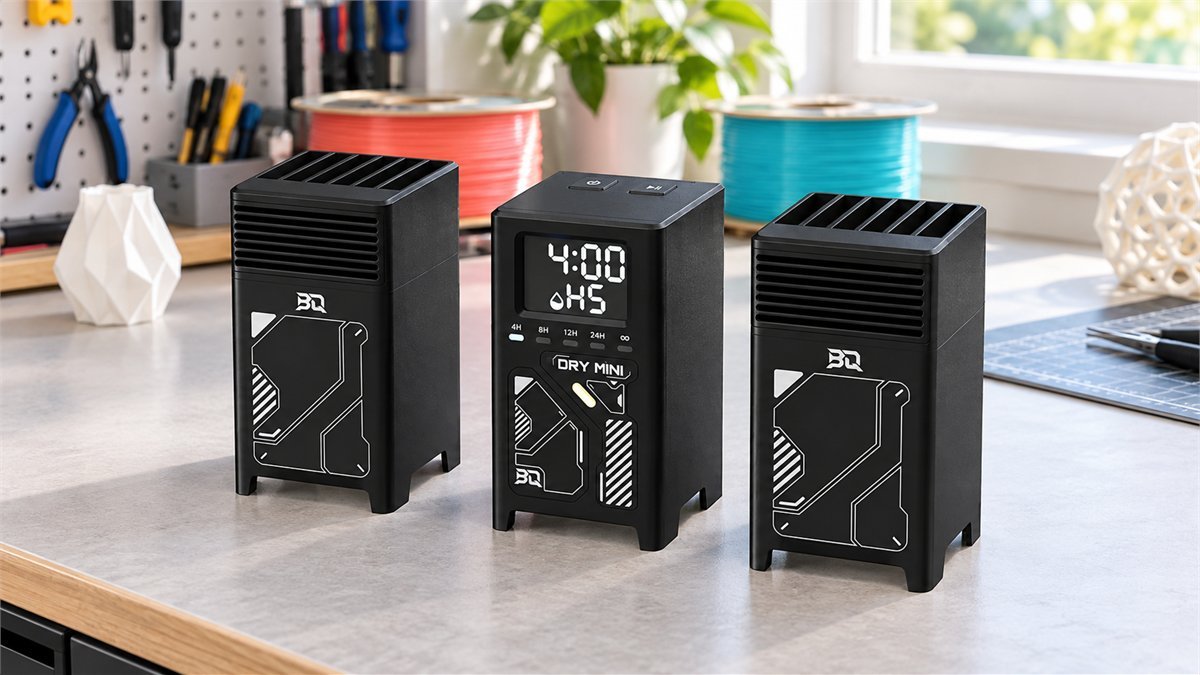
Four spools are loaded, the next print is ready, and one roll of PETG has started leaving fine strings between parts. Moving it into a separate dryer works, but it interrupts the very convenience that made the AMS appealing. BIQU’s BQDry Mini tackles that problem with a kit that sits inside the original AMS. SUNLU takes a different route: replace the lid with a heater.
The BIQU BQDry Mini vs SUNLU AMS Heater decision is less about which specification looks bigger and more about the routine you want afterward. Do you prefer browser control and the original lid, or a more straightforward lid conversion? How often do you change materials? And are the accessories already inside your AMS suitable for heat?
The short answer: BQDry Mini is the more interesting option if keeping the original AMS form factor and linking drying to a print matter enough to justify internal installation work. SUNLU is easier to shortlist if you prefer a lid replacement and want its higher temperature ceiling. Neither is an automatic upgrade for every spool: ventilation, material limits and reliable feeding matter more than running the hottest available setting.
What owners like, and what deserves your attention first
SUNLU has a longer trail of everyday reports. BQDry Mini is much newer, with too little established owner feedback to judge long-term reliability. The experiences below concern SUNLU’s heater for the original AMS, not its AMS Lite version, and they should not be read as proven faults or benefits of BIQU’s kit.
The strongest reason to want one: fewer trips to a separate dryer
Across SUNLU discussions, owners repeatedly value leaving their usual spools loaded. Some also report improved PETG printing after drying, particularly less stringing. That combination is persuasive for someone who returns to the same few materials throughout the week: drying becomes a task you can perform where the filament already lives.
There is a useful counterpoint. An owner who already dried filament and kept storage dry reported little difference in print quality, while still appreciating the convenience. A heater is not a general print-quality enhancer. If your filament already prints cleanly, the benefit may simply be less handling. If you are investigating stringing, compare the same spool and print file before changing retraction, temperature and drying all at once.
The detail that keeps coming up: moisture needs a way out
Several SUNLU owners describe humidity or condensation trouble when the manual vent is overlooked. One early owner’s later update specifically describes seeing condensation after forgetting to open it. The practical lesson is not to avoid heating altogether; it is to distinguish a closed storage box from a working dryer.
The documented response: use SUNLU’s sliding ventilation cover in its fully open drying position. BIQU instead provides a replacement handle that creates a moisture-release path. Prepare that path before a session, not after droplets appear. If condensation persists with the correct vent arrangement, stop heating, let the system cool safely and investigate with support. Do not keep raising the temperature to chase the humidity display.
PLA accessories can become the weak point
Reports of warped printed spools, adapters or desiccant holders recur across SUNLU threads. They matter even if the filament you are drying tolerates the chosen temperature. A PETG spool can share the chamber with a PLA-printed accessory that does not.
Before the first run: identify the material and heat rating of everything inside, including homemade labels and holders. Replace unsuitable parts with components rated for the intended conditions; do not assume that anything printed in PETG is automatically safe at every setting. Keep loose desiccant away from the feeder mechanism. A new heater is a good reason to audit the whole enclosure, not just the four rolls.
A heavier, less transparent lid changes small everyday habits
Owners in several discussions mention SUNLU’s limited viewing window and awkward one-handed opening. These are not dramatic faults, but they become noticeable when you swap colors frequently or check remaining filament from across the room.
Put the next spool down before opening the lid, support it carefully, and check that the shelf above allows comfortable access. Do not force it beyond its designed stop. There is no setting that makes the window larger. If visibility and familiar handling are priorities, retaining the original lid is a genuine reason to consider BIQU, although that design choice does not prove better drying.
BQDry Mini and SUNLU AMS Heater, side by side
These are accessories for an existing first-generation Bambu Lab AMS. Neither purchase includes a complete AMS. A listing or video for the separate SUNLU AMS Lite Heater describes a different product.
| What changes | BIQU BQDry Mini | SUNLU AMS Heater |
|---|---|---|
| Physical approach | Control module and two heater modules inside the AMS; original lid retained | Heated replacement lid |
| Published temperature range | 35-60°C | 35-70°C |
| Installation | Internal frame access, supplied replacement power board, cable routing and replacement handle | Remove original lid; fit replacement lid and hinges |
| Controls | Physical buttons and browser-based Web UI | On-device display and buttons |
| Automation | Documented start/stop linkage with a compatible bound printer | Humidity-triggered reheating in rH mode |
| Humidity indication | H1-H5 bands, available with compatible printer binding and connected AMS | Numerical chamber RH display |
| Moisture release | Adjustable replacement handle | Manual sliding vent |
| Published electrical figures | 116W rated; separate 24V DC, 5A supply | 220W rated; 390W maximum working power in the manual |
| Main buying tradeoff | More involved fitting for a more integrated appearance | Simpler physical conversion, but heavier lid and reduced visibility |
Manufacturer specifications and instructions checked October 18, 2026. These figures are not a head-to-head performance test. A set temperature is not proof that every point inside a spool reaches it.
Installation: keeping the lid does not mean skipping the tools
BQDry Mini’s attraction is easy to understand when desk space is limited. It adds heat without putting another full-size box beside the printer or changing the appearance of the lid. But the installation guide matters more than the phrase “drop-in upgrade.”
BIQU’s illustrated procedure includes opening the AMS, lifting its internal frame, replacing the power board supplied with the kit and securing wiring clear of the moving mechanism. No cutting of the shell is required, but this is still hands-on work around connectors and electronics. Keep the removed parts, photograph the original arrangement and follow the guide for the exact kit revision. Do not improvise a wiring route because it looks tidier.
That distinction makes the buying choice more honest. If you already enjoy careful printer maintenance, the internal approach may be reasonable. If unplugging small connectors makes you uncomfortable, the compact appearance is not a good reason to rush the job. Ask for installation help or choose an approach you can fit confidently.
SUNLU concentrates the work at the lid and hinges. It avoids BIQU’s internal power-board replacement, although the new assembly still needs proper alignment, clearance and a correctly rated regional power connection. Keep the original lid so the change is reversible. A tool that does not fit a screw is a reason to stop and get the right tool, not to force it.
Before applying heat with either setup, check normal loading and unloading. You want to know that the mechanical conversion works before adding temperature as another variable.

Is 70°C better than 60°C? Only when the material calls for it
SUNLU’s extra temperature headroom is a real specification advantage, but it is not a command to use it. Start with the filament manufacturer’s drying instructions and the spool’s temperature rating. Then check the accessories and the feeder environment around them. The lowest relevant limit governs the session.
A mixed AMS is particularly easy to misjudge. You might choose a profile for the PETG you want to print next while a more heat-sensitive roll or printed spool remains in another bay. Both products heat a shared enclosure; they are not four independently temperature-controlled dryers. If the contents need incompatible conditions, separate them into different sessions.
For a material requiring a drying temperature above a device’s range, a longer timer is not a verified substitute. A suitable standalone dryer may be the better purchase. Likewise, adding heat does not make an otherwise unsupported flexible filament suitable for the AMS feed path. Drying compatibility and feeding compatibility are separate questions.
Be especially careful with filament that stays under load
A SUNLU owner reports softened or flattened PLA catching later in the filament path after heating while other slots were used. A separate Bambu forum owner describes a kink near the feeder entry. These are specific accounts, not a failure rate, but they explain why a successful first print does not settle the question for every loaded roll.
If feed resistance appears after a heating session, stop rather than repeatedly forcing retries. Let the system cool and inspect for distorted filament, warped spool parts or an obstruction, following the AMS maintenance instructions. Return to a known-good, unheated feeding test once it is safe to do so. Persistent trouble deserves support attention; reducing temperature may change drying effectiveness and is not a proven repair for damage.
There is also an isolated report of hub and motor damage attributed by the owner to SUNLU heating. Other owners report trouble-free operation, including at higher settings. That disagreement does not establish a universal safe cutoff or prove that the heater caused every fault. It does justify taking new feeding errors seriously and keeping a record of settings and symptoms while return options remain available.
Humidity numbers: useful feedback, not a verdict on the spool
A display can make drying feel more exact than it really is. Relative humidity describes the surrounding air at its current temperature; it does not directly measure water inside the polymer. A low reading is encouraging, but it is not a certificate that the center of every spool is ready.
BIQU’s H1-H5 indication is a broad environmental scale, not a percentage. Do not read H1 as 1% RH or compare it numerically with SUNLU’s display. A missing BIQU humidity indication is also not automatically a failed heater: the documented feature depends on a compatible printer being bound and the AMS being connected.
For a practical check, use the filament’s recommended process, then repeat a familiar print with the same settings. If the result improves consistently, the drying routine is useful for that material. If it does not, examine the nozzle, material profile and feeding path instead of extending every cycle indefinitely.
Automation is helpful, but neither product opens every door for you
BQDry Mini’s print-linked control and SUNLU’s rH mode solve different problems. BIQU can tie heating to the beginning and end of a compatible printer’s job. SUNLU can restart heating when chamber humidity reaches its configured trigger. That is convenient for different routines, not evidence that one is inherently smarter.
Neither workflow removes the need to prepare the vent and select suitable contents. Starting a print is also not the same as finishing a drying cycle: a wet roll may need conditioning before the first layer, not just warming afterward. If you close a vent for passive storage, do not leave an automatic heating mode armed that expects that vent to be open.
A first-week check that tells you more than a temperature screenshot
Use the return window to test the behavior you actually bought the upgrade for. A neat installation photograph is less useful than knowing that the same spool feeds reliably after several normal sessions.
- Establish the baseline. Before conversion, run a familiar small print and confirm ordinary loading and unloading. Note any pre-existing feed errors so they are not automatically blamed on the new accessory.
- Fit the hardware with power disconnected. Follow the relevant illustrated manual, retain original components and check moving-part clearance. If a connector or hinge does not align naturally, stop.
- Check the entire chamber. Remove unsuitable printed accessories, confirm spool ratings and select contents that share an appropriate drying range. Prepare the designated moisture-release path.
- Run a supervised session. Use conditions supported by the material and device instructions. Watch for condensation, unusual smells, errors or abnormal fan behavior. Do not begin with an overnight unattended experiment.
- Repeat the same print. Keep the file, material and slicer settings unchanged. Look for consistent extrusion, stringing and dependable feed changes, not just a lower humidity reading.
- Test the routine you plan to keep. Check spool changes, lid access, the next day’s feeding and any automation. Document repeatable problems promptly rather than spending the whole return period inventing workarounds.
For normal shutdown, use the manufacturer’s procedure and allow its cooling behavior to finish. For a malfunction, burning smell, damaged wiring or liquid near electrical parts, stop using the equipment, disconnect power safely and contact support. Do not bypass thermal protection or modify mains-powered heater internals.
If BQDry Mini will not find the printer
Start with the documented network requirements: a 2.4GHz Wi-Fi connection, the correct printer access code and both devices on the appropriate local network. BIQU also identifies a possible conflict when its default hotspot subnet overlaps the home network. Use the manufacturer’s documented hotspot-address change only if that conflict actually applies; do not casually reconfigure the entire household network.
After binding, verify both the start and the stop behavior on a short, supervised job. A successful connection screen alone does not show that your intended automation works. If the exact printer or firmware combination is not supported, physical timed operation is a different workflow, not proof that the promised integration is working.
Which upgrade would make sense on your bench?
| Your situation | Stronger starting point | The condition that matters |
|---|---|---|
| You want to retain the original lid and use browser control | BQDry Mini | You are comfortable with the documented internal installation and your printer supports the desired integration. |
| You prefer changing a lid to working inside the AMS | SUNLU AMS Heater | The added lid weight, viewing window and available opening space suit your setup. |
| Your material needs a supported temperature above 60°C | Consider SUNLU or a suitable separate dryer | Every spool, accessory and intended use must tolerate the conditions; the temperature ceiling alone is not approval. |
| You frequently mix materials with different drying needs | Separate drying sessions or a different dryer arrangement | One shared enclosure cannot provide four independent temperatures. |
| You already get clean prints from dry filament | Keep the current setup unless handling is the problem | Convenience may justify an upgrade; an automatic quality improvement should not. |
There is another sensible answer: wait. BQDry Mini’s integrated design is appealing, but buyers who want a long reliability record will not get one merely because the specifications look well matched. SUNLU offers more ownership history, including both enthusiastic accounts and recurring handling or heat-related cautions. More reports make its tradeoffs easier to identify; they do not make it flawless.
For BIQU, the compelling case is preserving the familiar AMS while adding control options you will genuinely use. For SUNLU, it is a relatively direct physical conversion that keeps your regular spools in one place. Choose the routine you can operate consistently, including the boring parts: ventilation, spool checks and careful loading. Those habits are more valuable than an extra ten degrees on a comparison chart.
Once the hardware choice is clear, check BIQU Coupons & Deals for current offers and any eligible code before ordering. Confirm the kit version, power adapter and delivery terms for your location.
If this upgrade is part of a wider workshop refresh, compare the other equipment you need through Tools & Industrial Coupons & Deals. Keeping the whole project budget in view can help you avoid spending on a dryer when a different maintenance item is the real priority.
Questions worth settling before checkout
Does BQDry Mini replace the original AMS lid?
No. Its modules fit inside the first-generation AMS. Installation does include a replacement handle and internal work, so keeping the lid should not be confused with a tool-free installation.
Is this SUNLU heater the same as the AMS Lite Heater?
No. This comparison concerns the replacement-lid heater for the original enclosed AMS. Do not transfer fit, installation steps or owner reports from the separate AMS Lite product.
Can I dry and print at the same time?
Both manufacturers advertise that capability for these original-AMS upgrades. It does not make every material, spool or printed accessory suitable for every temperature. Watch feeding behavior, follow material limits and use the required ventilation arrangement.
Will either upgrade fix PETG stringing?
Drying can help when moisture is the cause, and some SUNLU owners report that benefit. Stringing also has other causes. Compare the same spool and print settings before treating a heater as the solution.
Does a low humidity reading mean the filament is fully dry?
No. It describes the chamber environment, not moisture measured inside the filament. Follow the material’s drying guidance and judge the result with a repeatable print, not the display alone.
Is BQDry Mini a proven reliability upgrade over SUNLU?
Not yet. Its different installation and control approach may suit you better, but the available owner history does not establish superior long-term reliability. Buy for the features you need, and check them carefully during the return period.
Sources
- BIGTREETECH BQDry Mini documentation: installation, controls, networking and humidity indication
- SUNLU AMS Heater user manual: electrical specifications, lid installation, ventilation and safety
- SUNLU early-owner discussion and later updates: PETG results, printed spools and condensation
- SUNLU owner feedback: four-spool convenience, manual vent and lid handling
- SUNLU buyer discussion: positive PETG experiences, warped accessories and filament feeding
- SUNLU installation experiences: convenience, viewing-window limitations and accessory heat resistance
- Bambu community follow-up: SUNLU venting, spool adapters and filament kinking
- SUNLU damage allegation and contrasting owner reports: why new feed errors deserve attention
DiscountedSavings may earn a commission from qualifying purchases through product links.