OneXPlayer Super X vs Super X Pro: Which One Makes Sense for Gaming and Local AI?
OneXPlayer’s Super X Pro arrives with a striking headline: up to 192GB of memory in a tablet-laptop hybrid. Yet original Super X owners keep returning to smaller, more personal details. They praise the screen and the freedom to work and game on one device. Some also describe an awkward carry, a divisive keyboard and wireless frustrations. Those experiences are a useful place to start before paying for more power.
The short answer: in the OneXPlayer Super X vs Super X Pro comparison, the regular model is the more sensible starting point for gaming. The Pro becomes interesting when a defined local-AI or professional workload needs its extra memory. Neither decision should overlook keyboard comfort, connectivity and the space this screen-first design needs.
What owners keep coming back to, and why it matters
The ownership accounts below concern the original Super X, not the new Pro. They reveal useful strengths and things to check, but they do not establish that the Pro shares the same faults or that OneXPlayer has fixed them. The strongest positive theme is enthusiasm for the display; keyboard impressions are much more divided.
The screen makes the whole idea more appealing
Display praise turns up in the early-owner accounts and a later buyer’s experience, even alongside reservations about other parts of the machine. The later buyer describes enjoying videos as well as using the device like a Windows laptop that can also play games.
Why that is useful: a generous built-in display can make a hotel-room gaming session, a film or a full desktop application more comfortable than squeezing the same task onto a handheld screen. That is a reason to choose this format even when you do not need the highest processor tier. Put it on a stable surface, move the screen to a comfortable viewing distance and choose readable Windows scaling for work. For demanding games, keep the desktop sharp but adjust the game’s rendering settings separately; enjoying the screen does not require running every title at maximum native-resolution settings.
One screen for work and games, without a permanent keyboard in front
Owners in the daily-driver discussion describe using the Super X for ordinary productivity, with gaming as another role rather than its only purpose. One particularly positive account values removing the keyboard and positioning the screen independently. Other owners are less enthusiastic about the input devices, so the appeal is the flexibility, not a guarantee of laptop-like typing comfort.
Where this helps: on a desk, you can type with the keyboard attached, then move it aside and use a controller without a laptop base between you and the screen. For long writing sessions, a separate keyboard and mouse let you arrange the controls around your hands instead of around the tablet. The tradeoff is more accessories and desk space. If everything must balance on your knees, that flexibility may be less useful than a conventional laptop hinge.
The complaints worth checking, and what you can do about them
Weight and keyboard comfort: work around the layout, not the laws of physics
Weight and handling concerns appear in both the daily-driver discussion and the longer purchase-experience thread. Keyboard opinions range from enthusiastic to distinctly disappointed. One owner also reports the magnetic connection detaching when the device is lifted. These accounts make a strong case for checking your preferred working position, not for declaring every keyboard defective.
The practical response: use a firm surface with room behind the screen for the kickstand. Support the tablet body when moving it; do not carry the whole assembly by the detachable keyboard. At a regular desk, an external mouse or keyboard can address input preferences, but neither makes the tablet lighter. Try a full page of typing and your usual lap position during the seller’s return window. If a comfortable setup requires accessories you do not want to carry, a different form factor is the better solution.
Wi-Fi problems: separate weak reception from an adapter that turns off
Some original Super X owners describe weak reception or dropouts; others report trouble-free Wi-Fi and Bluetooth. The symptoms should not be treated as one established hardware defect. Start by trying the same location with another device and testing the Super X closer to the router. That helps distinguish a general network problem from behavior specific to the tablet.
For a connection that disappears after idle time or sleep, there is a more specific lead. In a discussion titled Super V, one commenter explicitly reports fixing their Super X’s Wi-Fi shutoffs by disabling power saving for the wireless adapter. This is one owner’s result, not a guaranteed repair for poor signal strength. Microsoft includes the same setting in its Windows Wi-Fi troubleshooting guidance.
- Run Windows’ Network and Internet troubleshooter in Get Help, and check the correct network driver and Windows updates.
- If the adapter keeps turning off, open Device Manager, then Network adapters and your Wi-Fi adapter’s Properties. If a Power Management tab is available, note the original setting and clear Allow the computer to turn off this device to save power.
- Repeat the same idle or sleep-and-wake situation. If it makes no difference, restore the setting; keeping the adapter awake can increase power use. A missing tab is not a reason to force registry changes.
This test addresses power-saving behavior, not damaged hardware or every reception problem. Persistent drops with the correct driver, across more than one network, deserve a support case while return options remain open. A compatible Ethernet adapter can be a temporary desk workaround, but it is not a repair for the built-in radio.
USB-C disconnects: a reported workaround, not a universal fix
In the USB-C support thread, one owner reports an Ethernet adapter stopping shortly after connection; other replies describe different USB-C failures. Similar symptoms do not establish a shared cause. The original poster says a USB-A connection avoided their particular issue.
What to try: test the peripheral directly, without a hub, then use a known-good compatible cable and another port. For a suitable data peripheral, a compatible USB-A path is a diagnostic option or temporary workaround. It does not replace USB-C display output or charging, and it may change available speed. Repeated failures with multiple known-good devices should go to support, not become an endless sequence of adapter purchases.
Do not assume the thread’s “autosuspend” diagnosis is proven, or disable USB power management globally as a first move. Microsoft advises keeping USB selective suspend enabled. There is no verified universal Super X firmware fix established by these reports.
What this means before buying: the original Super X’s appeal is its enjoyable screen and adaptable desktop-style use. Its compromises deserve a real typing session, a realistic carry plan and tests with your own network and peripherals. Extra Pro memory is valuable only after those basics suit the way you want to use the machine.
Start with the configuration, not the name
There are two separate choices hidden inside this range. First comes the processor and memory combination. Then comes Standard versus Liquid Cooling. Buying the Pro does not, by itself, mean you have ordered the liquid-cooled version or an external cooler.
| Specification | Super X 388 | Super X 395 | Super X Pro |
|---|---|---|---|
| Processor | Ryzen AI Max+ 388 | Ryzen AI Max+ 395 | Ryzen AI Max+ PRO 495 |
| CPU cores / threads | 8 / 16 | 16 / 32 | 16 / 32 |
| Maximum CPU boost | Up to 5.0GHz | Up to 5.1GHz | Up to 5.2GHz |
| Integrated graphics | Radeon 8060S | Radeon 8060S | Radeon 8065S |
| Graphics compute units | 40 | 40 | 40 |
| Published GPU clock | 2,900MHz | 2,900MHz | 3,000MHz |
| Current memory / SSD choices | 48GB / 1TB | 64GB / 1TB | 128GB / 4TB or 192GB / 4TB |
| NPU capability | Up to 50 TOPS | Up to 50 TOPS | Up to 55 TOPS |
| Most persuasive use case | Gaming-first hybrid | Gaming plus heavily threaded work | Memory-intensive local AI and specialist work |
Configuration choices checked October 17, 2026. CPU, graphics and NPU figures are AMD specifications, not measured Super X performance. Earlier Super X batches had other memory options; an older 128GB review does not describe the current 64GB selection.
The interesting entry is the 388. Its eight CPU cores do not mean it has half the graphics hardware of the 395: both use the 40-compute-unit Radeon 8060S. The 395’s extra cores are more compelling for jobs that keep many CPU threads busy, such as a large compile or CPU rendering, than as a universal promise of faster gaming.
The Pro changes the graphics model to the 8065S, but it still has 40 compute units. Its published clock increase from 2,900 to 3,000MHz is about 3.4%. That calculation describes a specification difference, not a prediction of 3.4% more frames per second. Sustained power, memory behavior, drivers and the game itself can move the result in either direction.
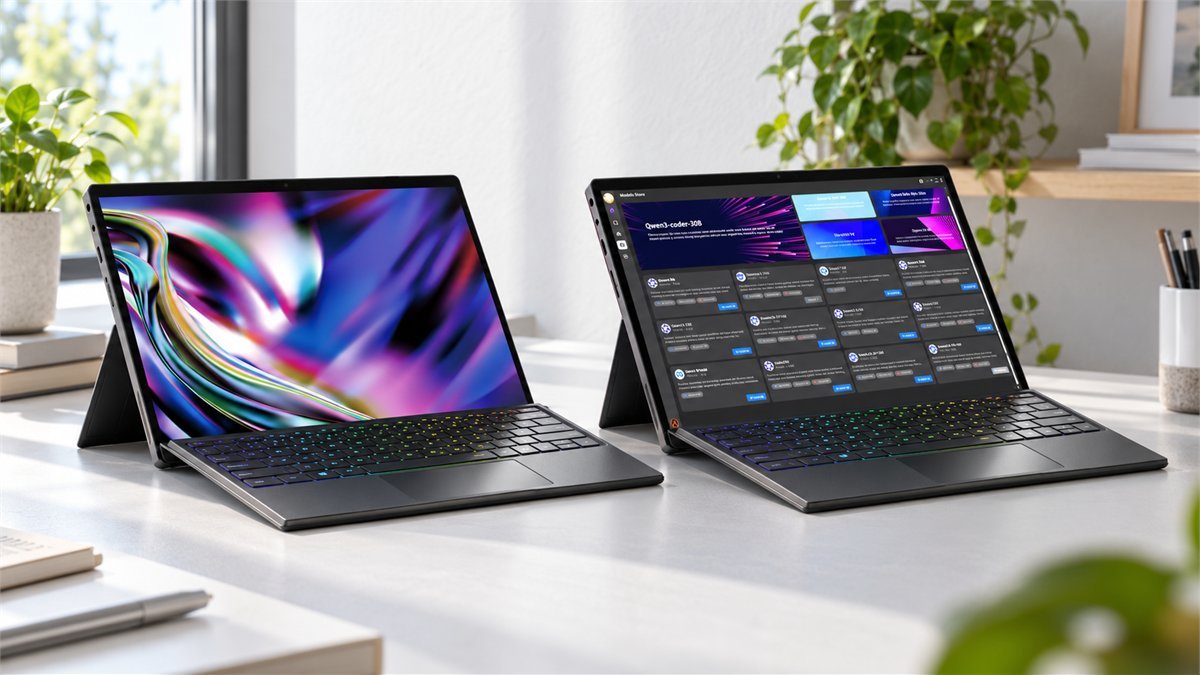
When choosing a configuration, check the full processor, memory and cooling description together. A family-level starting price is not the price of the 192GB Pro, and a photograph of the Pro does not identify the configuration selected in the options menu.

For gaming, the Pro needs to earn its premium
Imagine the actual evening: you put the tablet on a table, connect a controller, and open the game you have been waiting to play. What matters now is frame pacing, image quality and fan noise. An enormous amount of unused system memory does not improve any of those things on its own.
That is why the regular Super X belongs on a gaming shortlist before the Pro. The 388 retains the same graphics-unit count as the 395, while the 395 offers more CPU resources for mixed workloads. Neither should be bought on the assumption that a processor name guarantees a particular frame rate.
The screen is a reason to want the machine, not a reason to max every setting
The series pairs a 14-inch 2.8K AMOLED panel with a 120Hz refresh rate. That combination is appealing for detailed desktop work and games with strong art direction. But panel resolution and sensible rendering resolution are different decisions. Running every demanding game at native resolution, maximum effects and high refresh is a much harder target than enjoying a well-tuned image at a stable frame rate.
For a new game, start with its normal preset and a frame-rate target you value, then adjust rendering resolution or supported upscaling before pushing every effect upward. Change one demanding setting at a time. The best result is the one that stays comfortable through a long session, not the highest number displayed in a quiet menu.
What a convincing Super X Pro gaming test should show
Before paying extra specifically for games, look for both machines running the same title, patch, resolution and graphics preset at comparable power. Check whether frame generation is enabled. A counter that includes generated frames should not be compared directly with an unassisted result.
Average FPS is only the beginning. A useful comparison also includes frame-time consistency, sustained performance after the machine warms up and the sound of its cooling. For competitive games, responsiveness may matter more than a beautiful screenshot. For a slow-paced single-player game, quieter operation may be worth more than a small extra burst of speed.
There is not enough verified head-to-head evidence here to call the Pro a major gaming upgrade over a well-configured 395. If gaming is the whole reason for replacing an existing Super X, waiting for that evidence is the stronger buying decision.
Local AI is where the Pro becomes more interesting
A game usually asks whether the graphics hardware can render a scene quickly enough. A large local AI model asks another question first: can the model and its working data fit? When the answer is no, extra capacity can change what is practical, rather than merely making the same task a little quicker.
This is the clearest argument for the Pro’s 128GB and 192GB options. They offer more room for memory-heavy workloads in a self-contained machine with a screen and battery. They are not, however, a guarantee that every model will run quickly or that every software package will recognize all that memory as available GPU memory.
Why 192GB of unified memory is not 192GB of unrestricted VRAM
The CPU, integrated graphics, operating system and applications draw on the same physical memory pool. Firmware allocation, drivers and the chosen runtime affect how that pool is exposed and used. Leave room for Windows, the application and working buffers instead of budgeting the entire advertised capacity for model weights.
Context length matters too. A short question and a long document conversation can place very different demands on the same model. Loading successfully is one milestone; maintaining a useful response speed with your normal context is another.
| Hypothetical parameter count | Weights at exactly 4 bits each | What the calculation leaves out |
|---|---|---|
| 32 billion | 16GB | Quantization metadata, working buffers, context cache and other applications |
| 70 billion | 35GB | The same overhead, which can make a tight fit impractical |
| 120 billion | 60GB | Additional memory and runtime requirements; this is not a compatibility claim |
Illustrative decimal arithmetic: parameters × 4 bits ÷ 8. Real model files do not necessarily use exactly four bits per parameter, and these figures are neither measured memory use nor recommended minimum system RAM.
The point is not to pick a tablet from that table alone. It is to see why the model’s format and working requirements matter more than a vague ambition to “try AI.” A smaller, responsive model may suit your daily work better than a much larger one that takes too long to answer.
Before buying more RAM, name the workload
Write down the model, quantization, context length, operating system and runtime you intend to use. Then check whether the relevant AMD GPU backend is supported. AMD’s LM Studio technical guide describes Vulkan and ROCm runtime options, but its Halo-system examples are not a certification of every Super X Pro configuration.
LM Studio also provides a useful memory-estimation command: lms load --estimate-only <model_key>. Its model-loading documentation explains how context and GPU-offload choices affect that estimate. Use it as a planning aid, then leave headroom; an estimate is not a guarantee of speed or stability.
NPU TOPS should not substitute for this check. A workflow using a GPU backend is not judged simply by the NPU’s separate headline rating. For a serious purchase, ask for a demonstration using your actual model and context, including time to the first response and sustained generation speed.
Our buying view: choose the least expensive configuration that comfortably accommodates a defined workload. If you cannot yet name a task that needs more than the regular machine offers, the 192GB Pro is an expensive way to discover your requirements. If you already have that task, its memory capacity is a much more credible reason to consider it than the word “Pro.”
Standard or Liquid Cooling: choose the desk you will actually use
Liquid cooling sounds like the natural partner for a powerful processor. In practice it is a choice about your working space. An external unit, hoses and power connections turn a moveable computer into a more involved desk setup. That can be worthwhile for sustained workloads, but it is not a free improvement in portability.
For the original Super X, OneXPlayer’s campaign FAQ documents up to 55W on battery or USB power, a stable 75W through the specified DC power arrangement, and 120W with the Liquid-Cooled Edition plus Frost Bay. It also says the Standard Edition lacks Frost Bay support. Those are manufacturer operating claims for that generation, not measured results or automatically confirmed limits for the new Pro.
This distinction prevents an expensive misunderstanding: buying Frost Bay later does not add the missing internal liquid-cooling hardware to a Standard machine. Choose the compatible tablet version first. For the Pro, confirm the exact cooling connection, supported sustained power and included accessories for the configuration you are ordering.
The cooler is most interesting if the tablet will spend long periods in one place rendering, computing or running a demanding workload. For short gaming sessions between trips, its setup and packing requirements may outweigh an unmeasured performance benefit. Do not assume that moving from 75W to 120W delivers a proportional increase in useful speed.
Frost Bay is the accessory to consider for a compatible liquid-ready model, not a requirement for every Super X owner.

The charger rating is not the processor’s power draw
A 240W adapter label describes the adapter’s capacity, not a promise that the processor consumes 240W. The computer also needs power for its display, memory, storage and battery charging. A USB-C supply may power the device while still imposing a different performance ceiling from its intended DC setup.
When evaluating a lighter travel charger, compatibility matters more than the largest printed wattage. Verify the supported charging method, cable and connector requirements, then check whether the battery holds its charge during your workload. Do not treat an improvised adapter cable as equivalent to a manufacturer-approved combination.
The series’ 85.58Wh battery is substantial, but battery capacity alone cannot establish runtime. Brightness, refresh rate, wireless use and sustained system load all matter. The relevant question is whether it lasts through your journey at acceptable settings, not whether a low-load demonstration can produce an attractive headline.
Six checks before this becomes your main computer
A new machine is easiest to judge while your old one is still available. Keep the first few sessions simple enough to tell a hardware problem from a software change. There is no need to replace the operating system, change firmware and tune power settings on the same afternoon.
- Verify the delivered configuration. Check the processor, installed memory, SSD capacity and cooling version against the order. Save the configuration details and delivery information. A series name on a box is not enough when several processors share the same product family.
- Try the unglamorous essentials. Make a video call, type a full page, use the touchpad and test wireless audio where you normally work. Walk the machine to the room with the weakest Wi-Fi signal. These are more useful acceptance checks than opening a settings page that says Wi-Fi 7.
- Recreate the desk connection. Attach your normal monitor, hub, storage and network adapter. Transfer files, let the system sit, wake it from sleep and repeat the connection. Record a reproducible problem before making several changes at once.
- Test one demanding task twice. Use the same game scene or work file on external power and on battery. Note settings, responsiveness, fan behavior and battery drain. A repeatable everyday task tells you more about suitability than an isolated peak score.
- Check the storage plan. OneXPlayer describes an internal M.2 2280 SSD and an external Mini SSD expansion option. Do not assume an internal replacement is a convenient user upgrade: the original campaign guidance warns about opening the device and warranty consequences. Confirm the current service policy and accessory availability before relying on either route.
- Get the support details before you need them. Confirm the return window, who handles a repair and where the machine would need to be shipped. Keep a copy of the terms for your seller and region. A technically impressive computer is harder to recommend if the repair process does not fit your tolerance for downtime.
For software, use the support package intended for the exact model. An AMD processor driver, a OneXConsole release and a tablet firmware update solve different problems. Avoid installing an original Super X BIOS on a Pro just because the names look similar.
Which one would we put on the shortlist?
| Your situation | Start here | What would change the decision? |
|---|---|---|
| Mostly games, browsing and everyday work | Super X 388 | A specific CPU-heavy workload or verified game comparison that justifies the 395 |
| Games plus demanding CPU work | Super X 395 | A memory requirement that exceeds the selected configuration |
| Local AI with a defined large-memory workload | Super X Pro, capacity chosen around that workload | Unsupported software, insufficient usable memory or unacceptable response speed |
| Already own a 395 Super X | Keep it unless there is a specific limitation | Measured improvement in your workload, not the newer badge |
| Need light, effortless lap use above everything | Compare other form factors first | A genuine need for this screen-first, high-performance design |
The most appealing thing about the Super X family is not that it replaces every other computer. It is that it offers a particular combination: a generous screen, detachable keyboard and unusually ambitious integrated hardware. The ordinary Super X already delivers the shape of that experience. The Pro adds a stronger case for people whose work can use substantially more memory.
For a gaming-first buyer, we would put the regular model’s configuration, comfort and support arrangements ahead of the Pro badge. For someone carrying a serious local-AI workload between workspaces, the Pro is worth investigating closely. It should earn its place by solving a problem you already have.
Once you have chosen the configuration, compare the available offers on OneXPlayer Coupons & Deals. Check the complete bundle, cooling version and delivery terms before judging two prices as equivalent.
If you are still deciding between a single all-in-one device and a computer with separate desk accessories, browse Electronics & Tech Coupons & Deals to compare relevant hardware and the cost of completing your setup.
Questions that come up before buying
Is the Super X Pro definitely faster in games?
Its specifications suggest some performance potential, but they do not establish a large real-world lead. Both the 395’s 8060S and the Pro’s 8065S have 40 compute units. A useful answer needs matched game settings, power conditions and sustained testing.
Do I need 128GB or 192GB for PC gaming?
Not simply because the machine offers it. Choose memory for your actual games, mods and other applications. The Pro’s largest configurations are easier to justify for memory-intensive professional work or local AI than for gaming alone.
Can a Standard Super X use Frost Bay later?
The original Standard Edition lacks the required internal liquid-cooling hardware. Buying the external unit alone does not change that. For a new Pro purchase, verify that the ordered version is liquid-ready and that the accessory is compatible with that exact version.
Is the Super X Pro the same as Super V?
No. Do not use a Super V review, driver package or configuration description as evidence for a Super X Pro purchase. Check the full model and processor name rather than relying on the similar chassis.
Should an existing Super X owner upgrade?
Only for a clear benefit: a workload that exceeds available memory, a required platform feature or a demonstrated performance improvement that matters in daily use. A new specification sheet alone does not make a capable existing machine inadequate.
Sources
The Super X technical FAQ describes the original generation; its historical shipping, configuration and warranty answers should not be assumed to describe a current Pro order. The owner discussions below describe individual experiences, not a representative reliability survey.
- Reddit: early Super X owner impressions: display praise and initial ownership experiences.
- Reddit: a new Super X owner’s experience: videos, everyday Windows use and gaming.
- Reddit: Super X as a daily driver: productivity, keyboard comfort and handling.
- Reddit: mixed Super X purchase experiences: weight, magnetic attachment and differing wireless reports.
- Reddit: a Super X Wi-Fi workaround in a Super V discussion: the commenter explicitly identifies their own device as a Super X.
- Microsoft: fixing Wi-Fi connection issues in Windows: troubleshooting and wireless-adapter power management.
- Reddit: Super X USB-C disconnection reports: individual symptoms and a reported USB-A workaround.
- Microsoft: USB selective suspend: guidance on keeping selective suspend enabled.
- AMD: running local language models with LM Studio: supported runtime approaches and platform considerations.
- LM Studio: model loading and memory estimation: context length, GPU offload and the estimate-only command.
- OneXPlayer Super X campaign technical FAQ: original-generation power modes and cooling compatibility.
DiscountedSavings may earn a commission from qualifying purchases through product links.