Potensic ATOM 3 Remote ID in the USA: FAA Registration, FCC Availability, New-Owner Issues, and What Buyers Need to Check
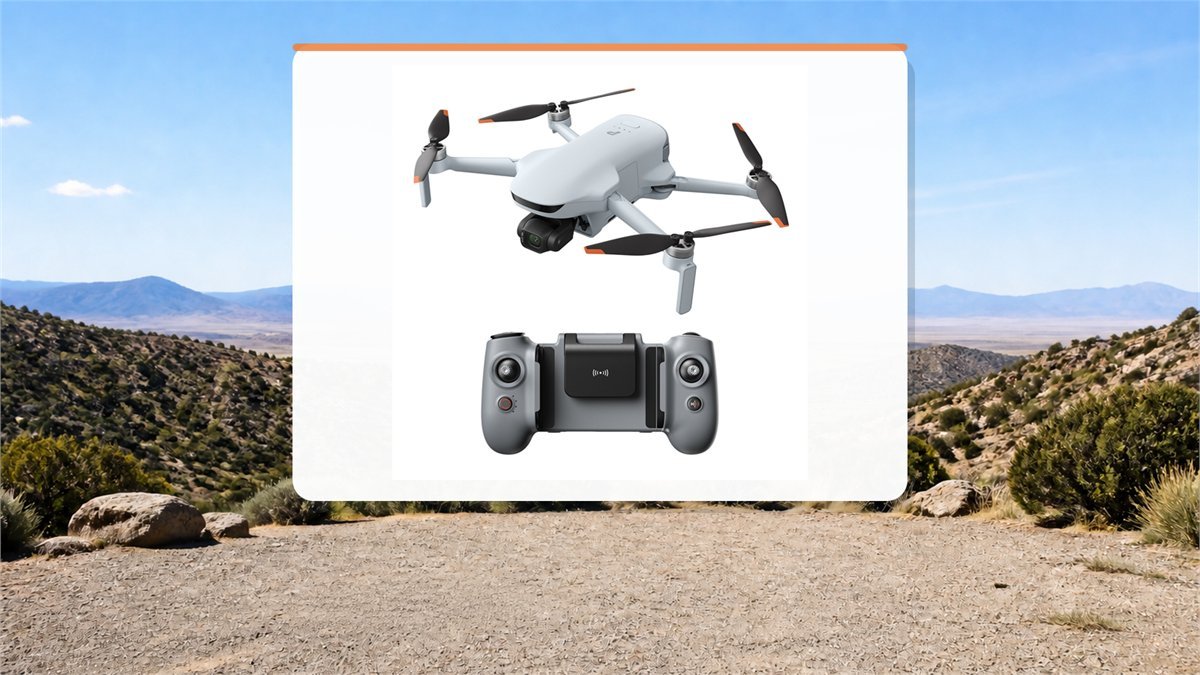
The Potensic ATOM 3 creates an unusually confusing decision for a US buyer. The aircraft is advertised at under 249 grams and Potensic says Remote ID is built in, yet those two facts do not settle whether a particular unit can be registered, whether its radio equipment was authorized for the US market, or whether adding the longer-flight battery changes the rules that apply.
Regulatory status checked August 31, 2026. FAA and FCC rules, accepted declarations, and product authorizations can change. Treat the checks below as a preflight process rather than a permanent approval for every ATOM 3 unit.
The Three Questions That Must Be Kept Separate
Most confusion around the ATOM 3 comes from treating FAA registration, FAA Remote ID, and FCC equipment authorization as one rule. They are related, but they answer different questions.
| Question | Agency or system | What it decides | Why it matters for ATOM 3 |
|---|---|---|---|
| Must the aircraft be registered? | FAA DroneZone | Whether the aircraft or recreational inventory needs an FAA registration record | Weight and purpose matter. The under-250 g exception is limited to qualifying recreational operation. |
| Must it broadcast Remote ID? | FAA Part 89 and the accepted Declaration of Compliance list | Whether a registered aircraft must broadcast approved identity and location data | A built-in feature claim is not enough by itself. The exact aircraft or an add-on module must use an FAA-accepted compliance path. |
| Was the radio equipment authorized for the US market? | FCC equipment authorization and Covered List rules | Whether radio-frequency equipment can receive a new authorization and be lawfully marketed or imported under applicable FCC rules | ATOM 3 arrived after the December 2025 Covered List expansion and independent reviews reported no confirmed official US launch or FCC clearance. |
The key practical lesson is simple: an Amazon or marketplace listing does not prove FAA Remote ID compliance, and an FAA registration screen does not prove FCC authorization. Ask for evidence for the exact model and unit instead of accepting a general statement that the drone is “under 249 g” or “has Remote ID.”

Does a Recreational ATOM 3 Need FAA Registration?
The FAA says drones weighing 250 grams or less do not have to be registered when they are flown exclusively under the Exception for Limited Recreational Operations. That exception is narrower than “I am not being paid.” The purpose of the flight must be recreational, and the pilot still has to pass the free TRUST test, carry proof, follow an FAA-recognized community-based organization’s safety guidelines, keep the drone within visual line of sight, use authorized airspace, and remain at or below the applicable altitude.
Every drone flown under Part 107 must be registered regardless of weight. Part 107 may apply to real-estate imagery, inspection work, monetized assignments, business promotion, or another non-recreational purpose even when no one hands the pilot cash at the launch site.
| ATOM 3 configuration or use | FAA registration | Remote ID consequence |
|---|---|---|
| Standard battery, actual takeoff weight 250 g or less, purely recreational | Generally not required under the recreational exception | Not required solely by weight if the aircraft is not registered, but all other recreational rules still apply |
| Any ATOM 3 used under Part 107 | Required regardless of weight | Required unless the operation fits an allowed alternative such as a qualifying FRIA flight |
| Standard-battery aircraft voluntarily registered | Already registered | The FAA states that drones which are registered must comply with Remote ID |
| Smart Battery Plus or accessories raise actual takeoff weight above 250 g | Required for recreational and Part 107 operation | Remote ID is required when the aircraft is registered, subject to the rule’s operating alternatives |
| Flight inside a FRIA with an aircraft that does not broadcast | Registration rules still depend on weight and purpose | Permitted only within the FRIA boundaries and visual line of sight under the applicable FAA conditions |
The Smart Battery Plus changes more than flight time
Potensic lists the original Smart Battery at 80 grams and the Smart Battery Plus at 123 grams. That is a 43-gram increase. Because the advertised sub-249 g takeoff weight is based on the original battery, the extended battery logically pushes the aircraft well past 250 grams. The exact figure should still be confirmed on a scale with the microSD card and every attached accessory installed.
Propeller guards, lights, mounts, trackers, skins, or other accessories also count toward takeoff weight. A drone that was exempt on the kitchen scale in its standard configuration can become registrable after one seemingly minor addition.
How to Check ATOM 3 Remote ID Before You Rely on It
Potensic advertises built-in Remote ID, but the FAA describes a Standard Remote ID drone more precisely: its producer must submit a Declaration of Compliance and the FAA must accept it. The operator then needs the Remote ID serial number when adding the device to DroneZone.
- Identify the exact aircraft model. Current technical material lists the ATOM 3 aircraft as model DSDR24A. Do not substitute an ATOM 2 listing, an older ATOM declaration, or a Potensic broadcast-module listing.
- Search the FAA Declaration of Compliance system. Filter for Remote ID and look for the exact make and model. Open the record and confirm that its status is accepted.
- Match the serial-number format. A normal product serial and a Remote ID serial are not necessarily the same. Confirm where the Remote ID number appears in the Eve app, controller menu, aircraft label, or supplied documentation.
- Test the broadcast before a required flight. Power up outdoors in a permitted location and confirm that the Remote ID state shows normal rather than disabled, unavailable, or mismatched after a firmware update.
- Register the correct device type. In DroneZone, choose Standard Remote ID only when the exact aircraft has an accepted declaration and a valid serial. If using an approved broadcast module instead, register the module as instructed by the FAA.
- Keep proof with the aircraft. Save the accepted declaration record, registration details, serial number, purchase documentation, and current firmware information before depending on the drone for Part 107 work.
If the exact aircraft is not present in the accepted list, the owner cannot submit a manufacturer Declaration of Compliance. The FAA explicitly reserves those submissions for producers. The practical choices are to wait for the manufacturer to resolve the listing, use an FAA-accepted broadcast module where appropriate, fly only under an allowed no-broadcast option such as inside a FRIA, or choose another aircraft with a verifiable compliance path.
FCC Availability: Why a Third-Party Listing Is Not Enough
On December 22, 2025, the FCC added foreign-produced uncrewed aircraft systems and critical components to its Covered List. For a new model, the immediate issue is equipment authorization: a foreign-produced radio device introduced after the change may not be able to receive the authorization normally needed for US marketing and import.
The ATOM 3 was announced in June 2026. Independent reviewers found European and UK availability, while reporting that Potensic was not officially offering or supporting the model in the United States and that FCC clearance had not been confirmed at publication. Some third-party marketplace listings nevertheless appeared for US addresses.
Questions to send the seller before ordering
- What exact model number is printed on the aircraft and controller?
- What FCC ID is printed on each radio device, and can the seller provide the matching FCC grant rather than a generic compliance logo?
- What exact FAA Remote ID Declaration of Compliance record covers this model?
- Where is the Remote ID serial displayed, and can it be entered successfully in FAA DroneZone?
- Is Potensic warranty service, accident care, repair, battery replacement, and return shipping available for a US buyer?
- Can the product be returned for a full refund if it cannot be registered for the buyer’s intended operation?
A vague answer such as “Remote ID ready” is not enough. The useful answer contains an exact model, accepted FAA record, Remote ID serial format, FCC identifier, and a written US return or support policy.
What the Specifications Mean in Real Use
| Published feature | Practical interpretation | What to check |
|---|---|---|
| Under 249 g with original battery | Useful for qualifying recreational operation, but very little weight margin remains | Weigh the exact unit with card and accessories |
| 40-minute Smart Battery claim | A controlled-condition maximum; one independent test reached about 35 minutes in windy mixed use | Plan landing reserve, wind, cold, climbs, and return distance |
| 50-minute Smart Battery Plus claim | Longer endurance, but the heavier battery removes the sub-250 g advantage | Registration, Remote ID, and actual takeoff weight |
| 16 km maximum transmission | A technical best-case figure, not permission to fly 16 km away | FAA visual-line-of-sight and airspace restrictions remain controlling |
| 4K/60 video and 50 MP photos | Strong daylight capture for this weight class; RAW adds editing flexibility | Use a suitable V30 microSD card because there is no internal storage |
| AI Tracking 2.0 | Convenient framing assistance, not collision protection | Test each tracking direction in a wide clear area before using it near obstacles |
| Level 5 wind resistance | The aircraft can remain stable in moderate wind, but a 249 g drone still has limited energy for returning into a headwind | Check wind aloft and begin the return leg early |
| No obstacle avoidance | The drone will not reliably stop itself before trees, wires, walls, or branches | Maintain direct sight and create conservative tracking paths |
New-Owner Setup: The First 30 Minutes Matter
The most avoidable ATOM 3 problems happen before the first takeoff. Potensic’s current support instructions are unusually specific about firmware conditions, which suggests that rushing the update can create a poor first impression even when the aircraft itself is healthy.
- Photograph every label before activation. Capture the aircraft model, serials, controller label, battery labels, and any FCC identifier. These are much easier to document before the first outdoor trip.
- Charge everything first. For firmware work, Potensic specifies at least 30% aircraft battery and at least two controller battery bars. A full charge gives more margin.
- Remove the gimbal protector and all shipping foam. The gimbal must move freely during its startup check and firmware procedure.
- Install Potensic Eve on a supported phone. Current requirements list iOS 13 or later and Android 7 or later. If using the phone controller, use the supplied data cable in the correct port and select data transfer when Android asks.
- Update with the drone and controller close together. Keep them within one meter, stationary, and away from a Wi-Fi router or computer. Keep the phone unlocked and leave the Eve app in the foreground.
- Restart every component after the update. Confirm matching firmware for the aircraft, controller, battery, camera, and gimbal before troubleshooting symptoms separately.
- Insert and format a V30 or faster microSD card. ATOM 3 has no internal storage, so forgetting the card can leave the pilot with previews but no full-resolution recording.
- Wait for a confident outdoor GPS lock. Set a sensible Return-to-Home altitude above nearby obstacles and confirm the home point before moving away.
- Use an open-area acceptance test. Hover low, test yaw and gimbal movement, record a short 4K clip, check each AI tracking direction, trigger a controlled short-distance RTH test, and review the file before the return window closes.
Signs the setup is probably healthy
- Firmware components show matching current versions.
- The gimbal completes its startup movement without obstruction.
- GPS and home-point status become stable outdoors.
- Live video remains clean at short range.
- All requested AI tracking directions behave consistently in open space.
- Recorded files open correctly from the microSD card.
Reasons to pause before flying farther
- A forced update repeatedly stops despite correct charge and setup.
- The model, FCC ID, or Remote ID serial cannot be documented.
- The gimbal reports calibration errors or remains physically restricted.
- Video transmission breaks up at very short unobstructed range.
- Tracking works in one direction but repeatedly fails in others.
- Return-to-Home status or home-point confirmation is uncertain.
A recent ATOM 3 owner described inconsistent behavior between AI tracking directions and considered a replacement. That report is useful as a reminder to test every advertised mode during the return period, but one thread cannot establish a defect rate. Older Atom-family discussions about gimbal covers, failed updates, pairing, or video feed problems are also useful troubleshooting context, not proof that the new ATOM 3 shares every older problem.
Camera and Flight Limitations Worth Knowing Before Purchase
The strongest part of the ATOM 3 is daylight imaging. The 1/1.3-inch sensor records 4K video at up to 60 fps, the three-axis gimbal stabilizes movement, and still images can be captured in RAW. Independent testing found good daylight color and stable footage, while AI tracking performed well in open conditions.
The compromises matter more for a first-time pilot than the specification sheet suggests. There is no obstacle avoidance, so tracking a person beside trees or wires requires a manually planned path. Vertical video is created from a crop rather than a camera that rotates 90 degrees. Digital zoom loses detail. The f/2.8 lens and processed Night Mode were less convincing in independent testing, with visible noise, motion blur, and an unnatural look in difficult light.
The long transmission figure should not guide route planning. A pilot in the United States normally has to keep the aircraft within unaided visual line of sight. Battery reserve, wind direction, terrain, controlled airspace, temporary flight restrictions, and the ability to identify the drone’s orientation become limiting factors long before a laboratory transmission maximum.
Who the ATOM 3 Makes Sense For
The ATOM 3 is most convincing for a recreational pilot outside the US authorization uncertainty, or for a US buyer who can document the exact FAA and FCC status before ordering. It offers a useful daylight camera, a proper three-axis gimbal, RAW photos, good endurance with the standard battery, and a relatively approachable controller and app.
It is a weaker fit for someone who needs a guaranteed US-supported Part 107 platform immediately, depends on obstacle avoidance, regularly shoots at night, or expects the Smart Battery Plus to retain the standard configuration’s weight advantage. A professional buyer should value verifiable registration, repair, battery supply, and firmware support above a small improvement in camera specifications.
Current models, tracked prices, and any active promotions can be compared on the Potensic coupon codes, drone deals, and tracked prices page.
US Buyer Checklist
- Decide whether the intended flight is recreational or Part 107 before choosing a battery or accessory.
- Weigh the exact ready-to-fly configuration.
- Complete TRUST for recreational flying and carry the certificate.
- Register when required and mark the aircraft correctly.
- Verify the exact model in the FAA Remote ID Declaration of Compliance database.
- Confirm the Remote ID serial and broadcast state before relying on built-in Remote ID.
- Ask for the exact FCC IDs and current grants for the aircraft and controller.
- Get the US warranty, repair, battery, and return policy in writing.
- Check airspace in an FAA-approved source before every flight.
- Keep visual line of sight and ignore the temptation to treat 16 km as an operating target.
Frequently Asked Questions
Does the Potensic ATOM 3 need FAA registration?
Not necessarily when it weighs 250 grams or less and is flown exclusively under the recreational exception. It must be registered for every Part 107 operation, when the ready-to-fly weight exceeds 250 grams, or when another applicable FAA rule requires registration.
Does built-in Remote ID automatically make ATOM 3 FAA compliant?
No. Built-in hardware is only part of the answer. Check that the exact make and model appears on an FAA-accepted Remote ID Declaration of Compliance and that the unit provides a valid Remote ID serial number that can be entered in DroneZone.
Does the Smart Battery Plus keep ATOM 3 below 250 grams?
No. Potensic lists the Plus battery as 43 grams heavier than the original battery used for the sub-249 g configuration. That implies a takeoff weight above 250 grams. Confirm the exact ready-to-fly weight on a suitable scale.
Is the FCC Covered List the same as an FAA flight ban?
No. FCC rules govern radio equipment authorization, marketing, and related import questions, while the FAA governs aircraft registration, Remote ID, airspace, and flight operations. A unit can raise issues under both systems, but one agency’s status does not replace the other agency’s checks.
Can an external Remote ID module be used with ATOM 3?
An FAA-accepted broadcast module can be a compliance path for some registered drones when installed and registered correctly. Module operation normally requires visual line of sight. Confirm the module’s accepted declaration, serial, attachment, weight, and the rules for the intended flight.
Is it safe to buy an ATOM 3 from a third-party US seller?
A listing alone does not answer authorization, registration, warranty, or support questions. Ask for exact FCC IDs, the FAA Remote ID declaration, the Remote ID serial process, and a written return policy before the return window begins.
Sources and Further Reading
- FAA: Recreational Flyers and Community-Based Organizations
- FAA: How to Register Your Drone
- FAA: Remote Identification of Drones
- FAA: Find an Accepted Remote ID Declaration of Compliance
- FCC Public Notice DA 25-1086: Foreign-Produced UAS and Critical Components
- Tom’s Guide: Potensic ATOM 3 independent review
- T3: Potensic ATOM 3 flight and camera review
- Reddit: recent ATOM 3 new-owner issue discussion
- Reddit: ATOM 3 US availability and Remote ID discussion