SwitchBot AI Art Frame 2 Buying Guide: Which Size Is Right for Your Home?
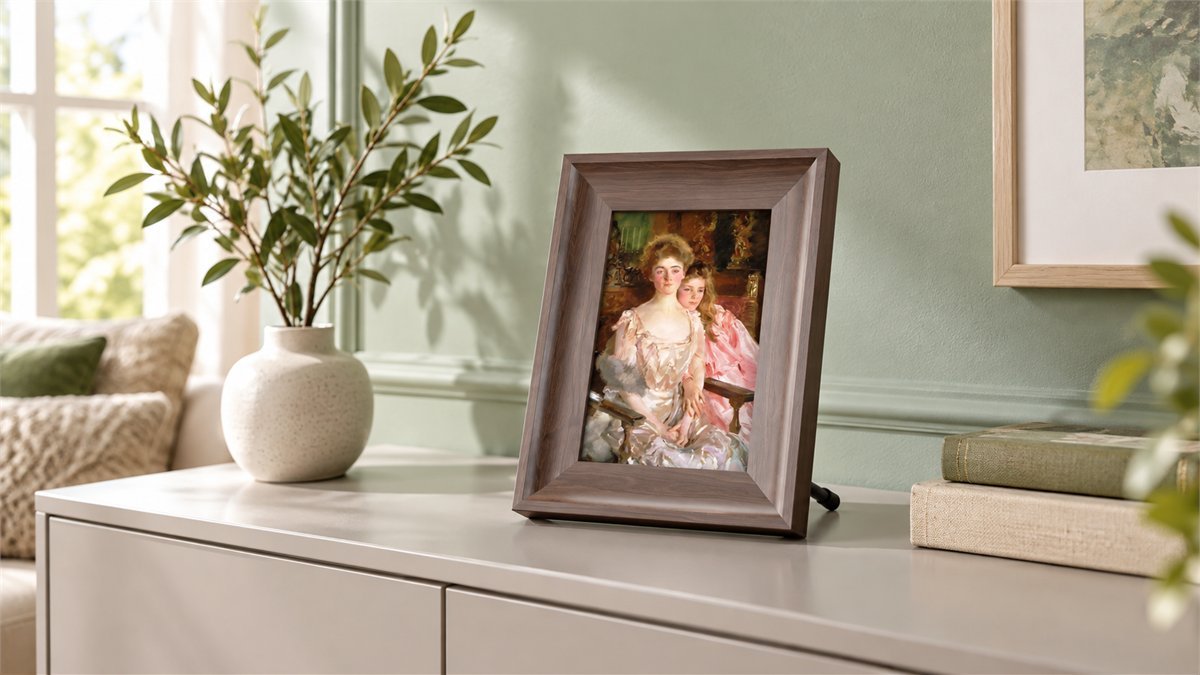
There is a pleasant difference between adding another screen to a room and adding a picture you enjoy looking at. SwitchBot’s new AI Art Frame 2 is built around the second idea: a color E Ink picture that borrows the room’s light, sits inside a walnut-look frame, and can change without anyone taking it off the wall.
Launched on October 27, 2026, it comes in three sizes that suit surprisingly different jobs. The smallest makes sense beside a favorite book or on a desk. The largest is a piece of wall decor. Between them sits a 13.3-inch model that looks like the most versatile choice for someone who has not yet settled on one permanent spot.
Our buying recommendation: choose the 7.1-inch for close-up viewing and the lowest entry price, the 13.3-inch for a sideboard or small wall arrangement, and the 31.5-inch only when you want a substantial wall picture. All three use the same display technology, but their pixel density and picture proportions differ. You do not need to make AI-generated art to enjoy the frame.
This is a buying guide based on SwitchBot’s specifications and launch documentation, not a hands-on test. At our October 30 check, we had not found an accessible body of owner reviews for Frame 2. Its appeal is clear enough to assess; long-term reliability and real-world battery life still need time.
What Makes This Frame Interesting Before You Even Open AI Studio
The most useful feature is also the least flashy: there is no backlight. A picture can stay on the shelf without casting a rectangular glow across the room. That is an appealing fit for a bedroom, a reading corner, or a living room where the television is already quite enough screen.
SwitchBot uses E Ink Spectra 6 and extends the image to the frame’s inner edge, without the previous design’s white mat. The walnut-colored, stepped surround gives the picture a more traditional presentation. One material distinction matters when comparing it with conventional framing: the official specification lists PS plastic with a walnut finish, not solid walnut wood.
Then there is the freedom to change your mind. SwitchBot supplies a 16GB microSD card, lists capacity for approximately 5,000 images depending on their size and format, and supports batch uploads from the app. Its launch guide also lists 500 curated artworks. You can build a small collection around family photographs, illustrations, or seasonal paintings instead of choosing one print forever.
That makes the frame most compelling for someone who likes the stillness of a printed picture but enjoys refreshing a room. It is not trying to replace a tablet, a television, or a fast-moving video display.
7.1 vs 13.3 vs 31.5 Inches: The Differences That Matter
Start with the place the picture will live, not the largest diagonal you can afford. A small frame seen from a desk chair and a large frame seen from a sofa have different jobs. The specifications reflect that.
| Specification | 7.1-inch | 13.3-inch | 31.5-inch |
|---|---|---|---|
| Our suggested placement | Desk, bedside table, close-view shelf | Sideboard, entryway, smaller wall | Living-room or statement wall |
| Official mounting options | Tabletop or wall | Tabletop or wall | Wall-mounted |
| Resolution | 1200 × 1600 | 1200 × 1600 | 1440 × 2560 |
| Pixel density | 282 PPI | 150 PPI | 93 PPI |
| Active image area | 106 × 142 mm About 4.2 × 5.6 in |
201 × 269 mm About 7.9 × 10.6 in |
390 × 695 mm About 15.4 × 27.4 in |
| Image shape, portrait | 3:4 | 3:4 | 9:16 |
| Battery capacity | 5,000 mAh | 20,000 mAh | 20,000 mAh |
| US launch MSRP | $169.99 | $399.99 | $1,399.99 |
Specifications are manufacturer figures. Inch measurements are rounded conversions of the active display area, not the frame’s outside dimensions. Picture ratios are calculated from resolution. Launch MSRPs are comparison benchmarks, not a promise of today’s checkout price.
The 7.1-inch: a Personal Picture, Not a Small Television
The small model has the highest pixel density of the three. Its 1200 × 1600 pixels occupy a much smaller surface than on the 13.3-inch, which makes it the sensible candidate for artwork you will see from nearby. Think of a small portrait next to your keyboard, not an image expected to fill an empty wall.
It is also the least expensive way to find out whether you enjoy the E Ink aesthetic in your own home. That matters because photographs on a reflective display will not look identical to the same files on a bright phone. Start with a favorite picture that already works as a small print, rather than a busy collage with tiny faces.
The 7.1-inch SwitchBot AI Art Frame 2 is the option below. It is particularly easy to justify when you already have a desk or bedside spot in mind.

The 13.3-inch: More Presence Without Committing a Whole Wall
For an entryway or sideboard, this is the size I would shortlist first. It has roughly 3.6 times the active picture area of the 7.1-inch, calculated from SwitchBot’s dimensions, while keeping the same 3:4 image proportions. A picture has more room to breathe, and the tabletop-or-wall choice leaves you some flexibility when rearranging furniture.
The tradeoff is straightforward: you are buying a larger picture, not more pixels. Resolution remains 1200 × 1600, so pixel density drops to 150 PPI. That does not make the small model universally better. It means the middle size is a different presentation, best judged from the place you will normally stand or sit.
The 31.5-inch: Buy It for the Wall and the Artwork Together
The large model’s active area is about five times that of the 13.3-inch. It can give one image a much stronger role in a room, but its 9:16 portrait format is noticeably taller and narrower. Rotate that shape to landscape and it becomes 16:9, an inviting fit for a wide scene.
Before spending this much, choose the actual artwork and mock up its dimensions on the wall with removable paper. Stand where you will usually view it. A beautiful portrait cropped awkwardly is a worse result than a smaller picture that fits naturally. Leave additional space for the physical surround: the active-area measurements above do not include it.
The 93 PPI specification is another reason to judge this version as wall art from your intended viewing position. Paying more buys a much bigger image and a different shape; it does not buy the sharpest close-up display in the range.
Choose Your Pictures Before You Choose Your Frame
One useful shopping exercise costs nothing: pick five images you genuinely want to live with. Include a family photograph, a landscape, an illustration, something with dark tones, and a picture with small details. Look at how each survives a 3:4 or 9:16 crop. This reveals more about the right size than browsing an endless gallery of perfect promotional images.
For example, take a 4:3 landscape photograph. It fits the smaller frames’ landscape proportions naturally. To fill the large frame’s 16:9 display without stretching, a centered crop would remove 25% of the original image height. That is a geometric calculation, not a claim about the app’s default crop behavior. It explains why a face near the top or a caption near the bottom deserves attention.
A practical approach is to prepare a copy of the photograph in the target ratio while keeping the original untouched. Reposition the crop around the subject rather than accepting the center automatically. If the composition cannot tolerate cropping, consider an image prepared with borders instead of distorting it to fill the screen.
Let the Room Light Do Its Job
Because the display reflects ambient light, placement is part of picture quality. A naturally lit shelf is a different proposition from a dark hallway. At night, the frame depends on room lighting rather than glowing on its own. That is an advantage if you dislike luminous screens, but it also means there is no brightness setting that can turn an unlit corner into a gallery.
For your first comparison, use the same image in the same location during daylight and with your normal evening lights. If it is hard to see, try a better-lit position before heavily editing the photograph. If you want vivid pictures visible in a dark room without another light source, a backlit photo frame is the more appropriate category.
SwitchBot specifies a 65,000-color output with dithering algorithms. That describes how the display builds its image; it does not establish measured color accuracy or prove that every skin tone will match your phone. For an expensive enlargement, an in-person demonstration or a return policy that allows a careful home evaluation is valuable.
Do You Need the AI Studio Subscription?
No, not simply to display your own pictures. Personal uploads, stored artwork, and scheduled changes form the ordinary frame experience. AI Studio is the creative layer: making new artwork or transforming an image rather than merely showing it.
That distinction makes the purchase easier to evaluate. If you want family photographs on a shelf, judge the frame on its display, size, and everyday controls. If you enjoy turning a child’s drawing into a different artistic style or experimenting with a room’s color palette, the AI tools become more relevant.
- AI Art Remix: restyles an existing photograph or drawing, useful when you want a personal image to feel more like an illustration or painting.
- AI Art Prompt: uses an instruction to change an image’s setting or atmosphere. Keep an original version if preserving the real moment matters.
- Voice-generated art: starts from a spoken description after activating the microphone with the function button. This is an alternative to typing an idea into the app.
- Weather Muse: uses local weather as inspiration for generated artwork. Its value is changing the mood of a picture, not replacing a weather instrument.
The US listing showed AI Studio at $3.99 per month when checked on October 30, 2026. Twelve paid months at that rate would total $47.88; this is our calculation, not an advertised annual plan. SwitchBot advertises a 30-day trial for first-time subscribers, with regional availability, language support, and generation limits subject to the service’s terms.
My suggestion is to start with ordinary photographs and a few artworks you already like. Use the trial to answer a specific question: does generating or remixing pictures actually make you use the frame more? If not, there is little reason to treat a creative subscription as an essential part of owning it. Check the enrollment and renewal terms before activating a trial.
What Everyday Use Should Feel Like
The nicest part of this concept is leaving the phone alone once the pictures are chosen. The rear button changes the image, and SwitchBot also describes a three-tap gesture, ideally near the frame’s bottom-right corner. Slideshow and scheduling options handle automatic changes.
A daily change is a sensible starting rhythm for a piece of decor. You get a different picture without making the frame compete for attention. Frequent cycling may suit a short family gathering, but it is a different workload from leaving one painting in place for a day.
Read the Three-Year Battery Claim With Its Condition
SwitchBot quotes up to three years per charge at one image refresh per day. That is a manufacturer estimate, not a result we have measured. The small model has a 5,000mAh battery; the other two have 20,000mAh. Network conditions, environment, model, and usage can change the outcome.
The practical benefit is easier placement without a permanently visible power cable. It is not a promise that every slideshow schedule will last three years. Start with a modest update schedule, watch the battery indication during the first weeks, and keep the frame accessible for charging instead of building it into an awkward recess.
A More Personal Gift Than an Empty Frame
Gift Mode is a thoughtful addition. SwitchBot’s guide describes scanning a QR code on the box, choosing pictures, and adding a personal message before handing over the unopened frame. You can also send new pictures remotely afterward.
For a family gift, a small, well-chosen album will usually mean more than filling the storage. Use photographs where the recipient can easily recognize the people at the intended display size. Plan a little setup time with them, and agree on who should be able to send images. Remote sharing is most welcome when everyone understands how it will be used.
Home Assistant Buyers Should Check the Exact Integration
SwitchBot advertises Alexa commands, its API, and Home Assistant support for Frame 2. However, the Home Assistant documentation we checked still labels the supported image device simply “AI Art Frame,” with a link to the earlier product. That is not enough to promise every Frame 2 automation works in a particular installation.
If your main reason for buying is an automated dashboard or image-upload workflow, confirm Frame 2 recognition and the required action before ordering. The documented SwitchBot Cloud image-upload action retrieves images through SwitchBot’s servers, so it is not the same as a fully local photo transfer. For ordinary app-controlled artwork, this distinction is less central.
A Simple First-Week Check That Makes the Purchase More Useful
Rather than testing every feature at once, answer the questions that will decide whether the frame earns its place in your home.
- Place it before filling it. Try the intended spot in daytime and evening light. Check that the active picture is large enough from your normal seat.
- Upload a small, varied set. Inspect faces, dark scenes, and fine detail. If an important part is cropped, prepare a better-fitting copy before assuming the display is the problem.
- Try the physical controls. Check a single rear-button press and the three-tap gesture. If the gesture is inconsistent in your setup, use the button or app and consult the model’s instructions rather than repeatedly striking the frame.
- Choose one realistic schedule. Start with a daily change and observe the battery trend. An exact multi-year runtime cannot be confirmed in a week.
- Test the feature you paid extra for. For a gift, verify sharing. For automation, verify the exact integration. For the large model, prioritize composition and viewing distance.
Handle the display as a picture surface, not a touchscreen to press or scrub. The specification lists no front protective panel. Follow SwitchBot’s cleaning guidance, avoid direct pressure on the display, and contact support if you see a persistent panel defect rather than improvising a repair.
Which SwitchBot AI Art Frame 2 Would I Choose?
For a first E Ink picture frame, the 7.1-inch is the most approachable choice if you have somewhere to view it close up. It offers the highest pixel density and the smallest initial commitment. Buy it as a personal picture for a desk or shelf, and its dimensions make sense.
The 13.3-inch is my most versatile pick on paper. Its larger image and two mounting options suit more rooms, without the cost and shape commitment of the 31.5-inch. The case for it is flexibility and presence, not a resolution upgrade.
The 31.5-inch is for someone choosing a wall picture first and a gadget second. Select your artwork, check its crop, and measure the space before buying. When those pieces fit, the large display has a clear purpose. When they do not, spending more will not fix the composition.
Once you have chosen a size, compare the available SwitchBot coupons and deals and check whether an offer applies to that exact model and bundle. A promotion is useful only after the frame itself is the right fit.
If you are planning the rest of the room too, Smart Home Coupons & Deals is a useful place to compare connected-home products alongside the frame. Choose additions around a job you actually need done, rather than assuming every device shares the same app or automation support.
Questions Before Ordering
Is the 13.3-inch frame sharper than the 7.1-inch?
No. Both have 1200 × 1600 pixels. The 7.1-inch has higher pixel density, 282 PPI versus 150 PPI. The 13.3-inch gives you more picture area, which can be more useful at a greater viewing distance.
Can it display personal photos without AI Studio?
Yes. SwitchBot separates personal uploads and ordinary frame functions from its paid AI creation service. AI Studio is relevant when you want generated or restyled artwork, not simply a photograph on the display.
Will it be visible in a dark bedroom?
It has no backlight and relies on ambient light. With the room lights off, do not expect a luminous picture. That can be exactly what you want beside a bed; choose a backlit frame if visibility in darkness is the priority.
Is the walnut frame made from real wood?
The official specification lists PS plastic and a walnut color. Treat it as a walnut-look finish rather than solid-wood furniture.
Can I use the same image across all three sizes?
You can prepare the same source photograph for them, but the framing differs. The two smaller displays are 3:4 in portrait orientation; the largest is 9:16. Check faces and important details when cropping instead of stretching the image.
Is Frame 2 a proven upgrade for existing Frame owners?
Its full-frame presentation, local image capacity, and gift-oriented features may be attractive, but that does not make replacement automatic. Compare the exact size and feature you want. Reviews and battery results for the original model do not establish Frame 2’s performance.
Sources
- SwitchBot AI Art Frame 2 official specification sheet: resolution, display area, materials, battery capacities, and controls
- SwitchBot AI Art Frame 2 reviewer guide: mounting options, photo storage, Gift Mode, and creative features
- SwitchBot’s October 27, 2026 launch announcement: US pricing and battery and AI-service qualifications
- Home Assistant SwitchBot Cloud documentation: supported image device and cloud upload behavior
DiscountedSavings may earn a commission from qualifying purchases through product links.