GOOLOO DS600 Review: What This OBD2 Scanner Can Actually Diagnose and Reset
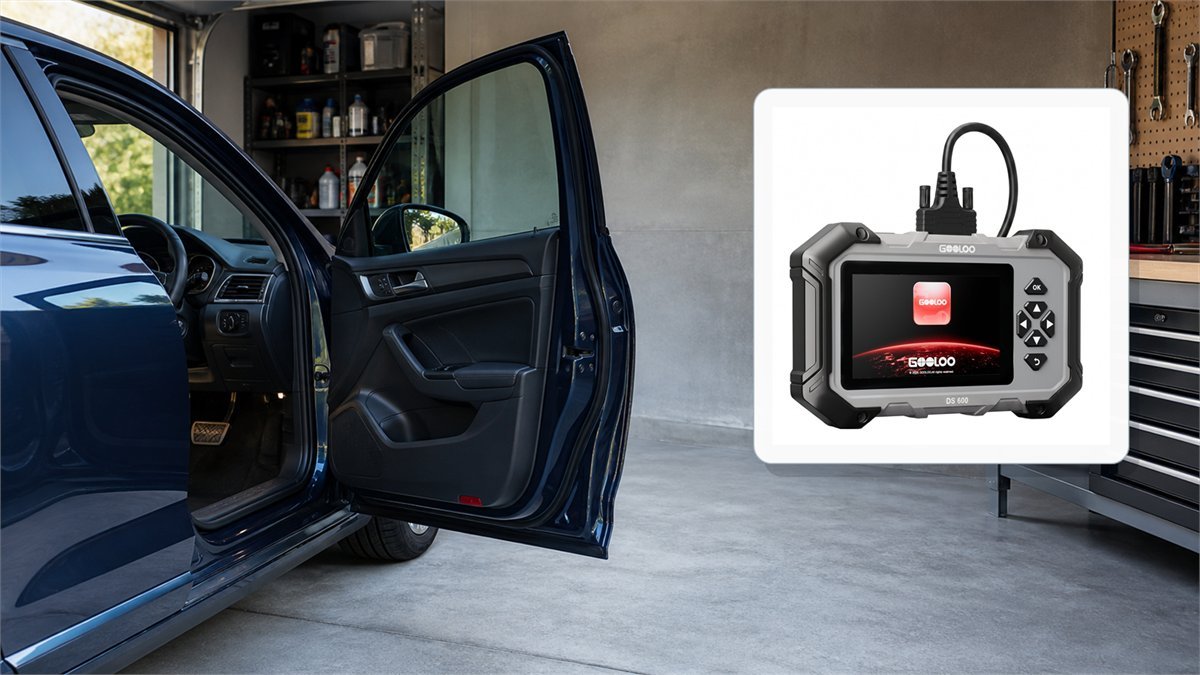
The GOOLOO DS600 sits between a basic check-engine-code reader and a professional bidirectional scan platform. It adds a dedicated Android tablet, four prominently supported vehicle systems, nine maintenance procedures, CAN FD and FCA secure-gateway access. The important question is not how many icons appear on its screen, but which modules and procedures it can actually reach on a specific VIN.
Short verdict: the DS600 is most convincing for an advanced DIY owner or small independent workshop that needs more than generic OBD2 data but does not need ECU programming, topology mapping or unrestricted bidirectional control. Its wired vehicle connection, report storage and core service functions are practical strengths. Its weak point is expectation management: “all-system” language should never be read as a guarantee that every control module, active test or reset works on every car.
Good match for
- Multiple 12V gasoline or diesel vehicles in one household
- ABS, SRS, transmission and engine fault investigation
- Routine service resets after correctly completed mechanical work
- Saving pre-repair and post-repair reports without using a phone
- Newer CAN FD vehicles when the exact VIN is listed as supported
Probably the wrong tool for
- A single car that only needs occasional check-engine-code reading
- Full battery-electric-vehicle diagnosis
- ECU flashing, immobilizer work or advanced module coding
- Guaranteed active tests across every installed module
- A professional shop that needs oscilloscope, J2534 or topology functions
GOOLOO DS600 specifications that matter
| Specification | GOOLOO DS600 | Practical meaning |
|---|---|---|
| Display | 5-inch touchscreen, 1280 x 720 | Large enough for several live-data lines and simple graphs, but still compact enough to hold near the dashboard. |
| Operating system | Android 11 | The scanner is self-contained and does not require a phone app for normal diagnosis. |
| Processor | RK3566 quad-core, up to 1.8GHz | Adequate for a dedicated diagnostic interface; not evidence that large update batches or full-vehicle scans will feel instantaneous. |
| Memory and storage | 2GB RAM, 64GB storage | Storage is generous for reports, screenshots and recordings. The 2GB RAM is functional rather than premium. |
| Vehicle connection | Wired VCI/OBD cable | A physical link avoids Bluetooth pairing loss during a reset or data capture. The tablet still uses wireless connectivity for updates and services. |
| Supported voltage | 9-18V input | Designed around 12V passenger vehicles and light trucks, not 24V heavy-duty systems. |
| Internal battery | 3350mAh, 3.7V | Allows report review away from the car. Vehicle communication still uses the cable. |
| Physical size | 225.15 x 135.15 x 39.7mm; 578g | More substantial than a pocket code reader but much smaller than a full 10-inch shop tablet. |
| Temperature range | -10 to 50C operating; -20 to 70C storage | Do not leave it baking on a dashboard or charging in a freezing vehicle outside its published limits. |
| Vehicle protocols | OBDII/EOBD plus advertised CAN FD and FCA AutoAuth | Newer-network hardware expands potential coverage; it does not make every recent model or protected function automatically compatible. |

What “all-system” diagnosis means on the DS600
The DS600 sales language creates an easy misunderstanding. One part describes an all-system diagnostic scanner, while the most prominent feature list names four systems: engine, transmission, anti-lock braking and airbag/SRS. Those are much more useful than generic emissions codes, but they are not the same promise as confirmed access to every body, chassis, comfort, infotainment and driver-assistance module installed in a modern vehicle.
AutoScan can query modules that the DS600 software recognizes on a supported vehicle. The result may include more than the four headline systems, but the list depends on make, model, year, market, powertrain and even installed options. A scanner can communicate with the engine ECU on one trim and still lack a service routine inside the electronic parking brake module on another trim from the same year.
This is why a model-family claim such as “supports Ford” is not enough. Before relying on the DS600 for a particular job, check the exact year, model, engine and procedure in the compatibility database. For a critical repair, ask support to confirm the VIN and the named function in writing. The right question is not “does it support my brand?” but “can it perform ABS automated bleed on this VIN?”
The nine service functions, translated into real jobs
| Function | What it can do | What it does not replace | Important check |
|---|---|---|---|
| Oil reset | Resets the service interval after an oil change | Correct oil, filter, level verification and leak inspection | Confirm that both time and mileage counters changed as intended. |
| Throttle adaptation | Relearns throttle position after cleaning, replacement or power interruption where supported | Repairing a vacuum leak, damaged throttle body or wiring fault | Follow prerequisites for coolant temperature, ignition state and accelerator position. |
| EPB reset | Places a supported electronic parking brake into service mode and exits it after brake work | Correct caliper retraction, pad installation and mechanical inspection | Never operate the parking brake motor with tools or fingers in the mechanism. |
| SAS reset | Calibrates steering-angle zero after alignment, steering or suspension work | A proper wheel alignment or repair of damaged steering components | Vehicle position, steering centering and level ground requirements are model-specific. |
| DPF regeneration | Requests a stationary regeneration when the vehicle permits it | Diagnosis of a failed pressure sensor, injector, turbo, thermostat or overloaded filter | Exhaust temperatures can become extreme; use the OEM procedure outdoors and away from flammables. |
| ABS bleeding | Cycles pump and valves to move trapped air on supported brake systems | Physical bleeding, correct fluid, leak repair and pedal verification | Sequence, reservoir level and pressure or pedal method must match service information. |
| BMS reset | Registers or relearns a replacement 12V battery where required | A battery conductance/load test or charging-system diagnosis | Enter the correct chemistry and capacity when the vehicle asks for them. |
| Injector coding | Stores injector calibration codes after replacement on supported engines | Leak-back testing, compression testing or correcting fuel contamination | A single wrong character can create poor running; photograph each code before installation. |
| TPMS reset | Performs supported relearn or reset procedures | Universal RF sensor activation, cloning or programming | Confirm whether the exact vehicle needs a trigger tool, driving cycle or sensor ID entry. |
The function count is useful only when connected to a real repair. For example, an EPB icon has value if it opens and closes the rear calipers on the owner’s exact vehicle. It has no value if the procedure is unsupported or if the mechanical work is unsafe. The same applies to DPF regeneration: forcing a regeneration without understanding why soot load became excessive can mask the cause and expose the vehicle to very high exhaust temperature.
OBD2 data: save evidence before clearing codes
The DS600 supports the familiar OBDII/EOBD modes: diagnostic trouble codes, freeze-frame data, I/M readiness, oxygen-sensor and onboard-monitor results, live data, component tests and vehicle information. These basic modes are often more important than the reset menu because they preserve the conditions under which a fault occurred.
Freeze frame can show engine load, coolant temperature, RPM, speed and fuel-trim values at the moment a code matured. A lean code recorded at idle with warm coolant points the investigation in a different direction from the same code captured under high load. Before clearing anything, save the report, record the complete code including status, and screenshot the relevant freeze-frame page.
Clearing a DTC removes evidence and can reset emissions readiness monitors to “not ready.” It does not repair the failed component. A car may then lose the warning light temporarily while still failing an inspection because its catalyst, evaporative-emissions or oxygen-sensor monitor has not completed. Diagnose first, repair second, clear only when appropriate, and verify with a drive cycle and a new scan.
How to use live data without drowning in numbers
The DS600 can display data as text, graphs, waveforms or combined views. More parameters are not automatically better. Select a small group that tests one hypothesis: short- and long-term fuel trim with upstream oxygen response for a mixture problem, wheel speeds for an intermittent ABS complaint, or commanded versus actual throttle position for a throttle fault.
Compare related sensors under the same conditions and label the test: cold idle, hot idle, 2,500 RPM no load, or a controlled road load. A graph with no operating context is easy to misread. If the vehicle must move, a second person should operate the scanner. Watching a diagnostic screen while driving is unsafe.
CAN FD and FCA AutoAuth: useful, but not magic keys
CAN FD supports larger data payloads and higher data rates than classic CAN and appears in many newer vehicle architectures. Having CAN FD hardware means the DS600 can physically communicate on that network when its software supports the vehicle. It does not guarantee that every manufacturer-specific ECU definition, routine or security method is implemented.
FCA vehicles may place write operations and active tests behind a secure gateway. AutoAuth is an authorized path through that gateway, not a way to bypass vehicle security. It can require an AutoAuth account, internet access, an eligible vehicle and any applicable account conditions. A scanner that can read generic codes offline may still need authorization before clearing protected codes or running a service procedure.
These two features make the DS600 more future-facing than older entry-level readers, but compatibility should still be verified job by job. “CAN FD supported” describes a communication capability. “Can perform 2024 Chevrolet ABS automated bleed” describes an outcome. Only the second answers a repair question.
First setup: a safer one-hour workflow
- Charge the tablet and inspect the cable. A loose connector or damaged pin can create communication faults that look like vehicle problems.
- Connect to reliable Wi-Fi and install updates. Update vehicle packages before the first important diagnosis, then restart the tablet so the new files load cleanly.
- Connect with the ignition off. Plug the cable into the vehicle DLC, then switch the ignition on without starting unless the procedure specifically asks for a running engine.
- Check battery voltage. Low vehicle voltage can interrupt module communication. Use an appropriate maintainer for long scans or service procedures when the manufacturer permits it.
- Try AutoVIN, then verify it manually. Confirm that the decoded year, model and engine match the vehicle. Enter the VIN or choose the vehicle manually if automatic identification is wrong or incomplete.
- Run and save a complete pre-scan. Record every module and code before opening a service menu. Old history codes can still reveal low-voltage or communication events.
- Open one system at a time. Read ECU information, codes and relevant live data before clearing anything. This establishes whether the scanner is talking to the expected module.
- Test one supported procedure cautiously. Start with a low-risk job such as a correctly timed oil-service reset, not DPF regeneration or brake actuation.
- Export or reopen the report. Confirm that saved reports, screenshots and replay data can be found under History before depending on them for a customer or future repair.
When the DS600 will not communicate
| Symptom | Likely area | Useful checks | Avoid |
|---|---|---|---|
| Tablet does not power from the car | DLC power, fuse, connector or cable | Inspect pins; check the vehicle’s DLC/cigarette-lighter fuse according to service information; verify voltage safely | Bridging pins or forcing the connector |
| Generic OBD2 works, manufacturer module does not | Vehicle selection, software coverage or gateway | Verify VIN, region and engine; update the brand package; check secure-gateway requirements | Assuming the module is failed because one scanner cannot open it |
| AutoVIN identifies the wrong vehicle | VIN data, swapped module or decoding database | Compare the physical VIN and manual selection; review ECU identification | Running a reset under the wrong model profile |
| Communication drops during scanning | Low voltage, loose cable or network fault | Stabilize vehicle voltage; reseat the cable with ignition off; inspect aftermarket devices on the DLC | Starting a write/reset operation before the connection is stable |
| Service icon is present but procedure fails | Unsupported variant or unmet prerequisites | Read the on-screen conditions; check gear position, temperature, doors, brake pedal and fault status | Repeating the command without understanding the refusal condition |
A second scan tool or the vehicle manufacturer’s service information can help separate a DS600 coverage limitation from a real network fault. Generic communication proves that the DLC and at least one ECU are reachable; it does not prove that a manufacturer-specific path to every module is available.
DS200 vs DS600 vs DS900
| Model | Diagnostic position | CAN FD | Service/advanced functions | Best reason to choose it |
|---|---|---|---|---|
| GOOLOO DS200 | Full-system step above a basic code reader | Not advertised | Maintenance features, but no comparable optional-function platform in the current comparison | Older vehicles and broad code/live-data work at lower complexity |
| GOOLOO DS600 | Advanced DIY and light workshop tablet | Yes | Nine core service functions; optional paid advanced functions | Newer-protocol support, compact dedicated hardware and useful service coverage without moving to the top model |
| GOOLOO DS900 | Higher-tier diagnostic platform | Yes | Broader advanced maintenance and optional special functions | A workshop that can justify more capability and a larger software commitment |
The DS600 is not automatically the value winner just because it sits in the middle. For a pre-CAN-FD car that only needs code reading and common live data, the less expensive scanner may do the same useful work. The DS600 earns its place when at least one of its distinguishing functions is confirmed for the vehicles being serviced.
Likewise, a shop should not choose the DS600 solely to avoid the price of a more capable platform. If the daily workload includes ECU coding, broad active tests, network topology or immobilizer procedures, missing one billable operation can cost more than the initial hardware difference.
Optional functions and the meaning of lifetime updates
GOOLOO advertises lifetime updates for the DS600’s core functions, while also presenting a separate set of optional paid advanced functions. Those statements can both be true. The included diagnostic and service package may continue receiving updates, while specialized capabilities purchased from the device’s function marketplace remain separate.
Before buying around one advanced task, identify whether it is core, optional, region-limited or time-limited. Save a screenshot of the function description and compatibility result. Do not treat “lifetime updates” as a promise that every new software module or advanced procedure will become free.
What early GOOLOO DS600 reviews can prove
The DS600 is a very new model: its FCC authorization was granted in late June 2026. At the time of this review, there was no large, independently readable body of long-term owner reports tied specifically to this scanner. Search results also mix it with unrelated GOOLOO jump starters and other manufacturers’ products that happen to use “DS600” in the name.
One early hands-on video can show menu layout, scan speed on the reviewer’s vehicle and whether a demonstrated reset completes. It cannot establish a failure rate or broad vehicle coverage. One visible complaint about obtaining instructions is worth noting as a setup check, but it is not enough to call documentation problems a common defect.
The responsible way to evaluate this model is therefore practical and specific. Confirm the VIN, perform a full scan, compare live data with known operating conditions, save a report, and test the exact service function that motivated the purchase while the return window is still open. Long-term conclusions about update stability, battery aging and connector durability need more owner history than currently exists.
Final assessment
The GOOLOO DS600 offers a sensible combination of compact dedicated hardware, stable wired communication, manufacturer-level system access, nine service procedures and support for newer CAN FD networks. Its 64GB storage and report history are practical advantages for diagnosing a problem over several sessions rather than merely clearing a warning light.
The purchase decision should still be built around confirmed vehicle coverage. The DS600 is not an ECU programmer, a universal active-test tool, a 24V truck scanner or a full-EV platform. ABS bleeding, DPF regeneration, injector coding and battery registration are valuable only when the procedure is supported and the operator follows the mechanical and safety requirements.
For an advanced DIY owner maintaining several compatible 12V vehicles, that balance can be strong. A casual owner may be better served by a simpler reader; a professional shop may outgrow the DS600. The best evidence is a VIN-specific function list and a complete acceptance test, not the number of icons on the home screen.
Before deciding, compare current availability, tracked prices and any verified GOOLOO diagnostic tool coupons and deals for the scanner that actually supports your vehicles.
GOOLOO DS600 FAQ
Can the GOOLOO DS600 diagnose every system in a car?
No universal coverage should be assumed. The DS600 prominently supports engine, transmission, ABS and SRS diagnosis and may discover additional modules through AutoScan, but available modules and procedures depend on the exact vehicle, software package and secure-gateway conditions.
Does the DS600 have bidirectional control?
The documentation describes active tests within supported single-system diagnosis, but this should not be interpreted as complete bidirectional coverage for every module or vehicle. Confirm the exact actuator test for the VIN before buying.
Can the DS600 program TPMS sensors?
The advertised TPMS reset can cover supported relearn or reset procedures. It should not be assumed to activate, clone or program every replacement sensor; some vehicles require a separate RF trigger or TPMS programming tool.
Can the DS600 perform ABS bleeding?
It can command the automated bleed routine on supported vehicles. The job still requires the correct physical bleeding sequence, suitable brake fluid, reservoir monitoring and a final pedal and leak check.
Does CAN FD support mean it works on every new vehicle?
No. CAN FD is a network capability. Vehicle software coverage, module definitions, security access and the requested diagnostic function must also support the exact model and year.
Is the GOOLOO DS600 suitable for electric vehicles?
The current model comparison describes it for OBD2-compliant 12V gasoline and diesel cars, SUVs and light trucks and says it is not compatible with fully electric vehicles. Do not assume high-voltage battery or inverter diagnosis.
Are all future DS600 functions free?
Core functions are advertised with lifetime updates, while a separate group of advanced functions is optional and paid. Check whether the specific procedure you need belongs to the included package.
Sources and evidence
- FCC filing for GOOLOO DS600 (2BTT3-DS600) – model identity, radio authorization and filing date.
- DS600 user-manual exhibit – controls, operating workflow and safety guidance.
- GOOLOO DS600 manual mirror – hardware specifications, diagnostic menus and service functions.
- New Atlas DS600 launch overview – independent publication context; treated as launch reporting rather than long-term owner testing.