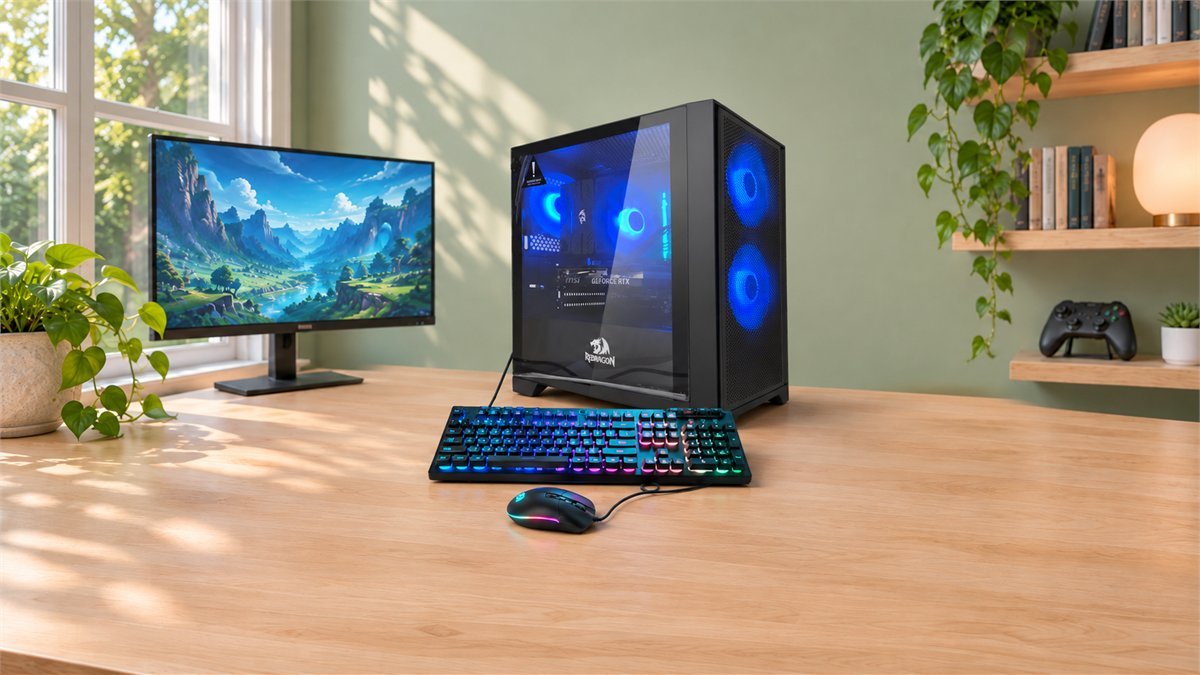
Redragon Fire Series Open-Box Review: A Budget RTX 4060 PC
An affordable gaming PC should leave you enough money to enjoy it. That means room in the budget for a decent monitor, a few games, and perhaps a headset, rather than spending everything on the tower. Redragon’s open-box Fire Series makes an interesting case for that approach: a Core i5-14600K, RTX 4060 graphics, Windows 11, and a keyboard and mouse in one ready-built package.
The appeal is not that this is the newest hardware. It is that the useful parts are already here. You get dedicated gaming graphics, a capable desktop processor, and a 1TB SSD without having to assemble a computer or source every accessory separately. For someone moving from an older laptop or buying a first gaming desktop, that is a much more meaningful starting point than colored lighting alone.
The short answer: the Redragon Fire Series is worth considering as a budget 1080p gaming PC, particularly if you already have a monitor. This specific offer is an event-display, open-box unit with a six-month warranty, US-only shipping, and final-sale terms. Its value comes from getting a useful complete configuration for less, provided the actual checkout price leaves a worthwhile saving over a comparable new PC with more flexible returns.
There were no buyer reviews on this exact open-box listing when we checked. This is a buying assessment of the published configuration and sale conditions, not a claim that we have tested the computer or measured its frame rates.
Why the inexpensive Fire Series is worth a closer look
Some low-cost desktops make you choose between a usable processor and a proper graphics card. This configuration has both. The RTX 4060 handles the graphics work, while the i5-14600K gives the machine scope for everyday jobs beyond gaming: schoolwork, a browser full of tabs, voice chat, and creative applications that can make use of its cores.
That combination makes the Fire Series especially appealing as a single household computer. It can be a work desk during the day and a gaming setup in the evening. The included keyboard and mouse also let a first-time buyer postpone peripheral upgrades until they know what they actually prefer.
We would spend the first part of any remaining budget on a suitable display, not on replacing the processor. The point of a cheap gaming PC is to arrive at a satisfying complete setup. Buying a capable tower and then using a poorly matched screen can hide much of what you paid for.

Compare the final checkout total and the product’s open-box terms before ordering. A previously recorded price is not a promise of today’s selling price.
What you get: the configuration, translated into everyday use
The exact processor matters here. Redragon specifies the Core i5-14600K, not just an unspecified older Core i5. Intel lists 14 cores, consisting of six performance cores and eight efficient cores, with 20 threads. It is paired with the regular RTX 4060, not a 4060 Ti.
| Part | Listed configuration | Why it matters |
|---|---|---|
| Processor | Intel Core i5-14600K | A capable all-purpose desktop CPU rather than an entry-level processor chosen only to keep the price down. |
| Graphics | NVIDIA GeForce RTX 4060 | Dedicated graphics aimed primarily at 1080p gaming, with 8GB of graphics memory. |
| System memory | 16GB DDR4, listed at 3200MHz | A practical starting capacity; ask whether it is one 16GB module or two 8GB modules before planning an upgrade. |
| Storage | 1TB NVMe SSD | Space for Windows, applications, and a game library. The usable free space will be lower after formatting and installation. |
| Power supply | 650W, 80 Plus Gold | A listed wattage and efficiency rating, not confirmation of the PSU’s exact model or connectors for a future graphics upgrade. |
| Operating system | Windows 11 Home, 64-bit | No separate operating-system purchase is listed as necessary for the supplied configuration. |
| Connectivity and cooling | Wi-Fi 802.11ac; air cooling | Wireless connectivity is included. Exact cooler, motherboard, and rear-port specifications should be confirmed if they affect your setup. |
| Accessories | Gaming keyboard and mouse | Useful for a first desktop. A monitor, headset, and speakers are not listed as included. |
| Condition and cover | Previously displayed at an event; six-month warranty | This is the open-box offer, not a sealed new Fire Series PC with standard new-product terms. |
The listing does not identify every internal component. That need not stop someone buying an affordable prebuilt, but it changes how far you can plan upgrades in advance. A motherboard model, memory-slot layout, SSD model, and exact PSU part number tell you more about future expansion than the case lighting does.
What kind of gaming makes sense on an RTX 4060?
Think 1080p first. NVIDIA positions the desktop RTX 4060 around that resolution. It has 8GB of GDDR6 memory and supports DLSS features in compatible games, including super resolution and frame generation. Those tools can extend your settings options, but support varies by title.
For a budget buyer, this is a useful middle ground: dedicated graphics without paying for a high-end GPU that may be wasted on a modest display. It is not a promise that every new game runs at maximum settings. A demanding single-player release, a competitive shooter, and an older strategy game can place very different loads on the same computer.
The sensible approach is to choose a comfortable picture and consistent response before chasing an impressive frame-rate counter. Start at your monitor’s native resolution, use a reasonable preset, and adjust one setting at a time. You will learn more from a repeatable section of the game than from switching several options at once.
| Your priority | A sensible starting point | What to adjust |
|---|---|---|
| Competitive play | 1080p; prioritize responsiveness and visibility. | Reduce expensive visual effects before lowering everything. Assess actual control response rather than relying only on a displayed frame count. |
| Detailed single-player games | 1080p with a moderate-to-high preset and ray tracing off initially. | Try supported upscaling if performance needs help, then compare image quality in motion as well as in a screenshot. |
| An existing 1440p monitor | Try native resolution, but allow for lower settings or upscaling in demanding titles. | Do not assume the settings that work at 1080p will deliver the same result at 1440p. |
| Texture-heavy games or mods | Watch the game’s memory guidance, where available. | If a higher texture setting introduces stutter, reduce it and retest the same scene rather than immediately buying more system RAM. |
These are editorial starting points, not benchmark results from this Redragon system. Performance depends on the game, settings, driver, memory configuration, and cooling.
There is also an important distinction between the computer’s 16GB of system RAM and the graphics card’s 8GB of video memory. Upgrading the former does not turn the GPU into a 16GB graphics card. If your main goal is demanding 4K gaming or very large graphics workloads, a different GPU class is the more relevant comparison.
Where the i5-14600K earns its place
The CPU is one of the more interesting parts of this budget configuration. Its six performance cores and eight efficient cores give it flexibility beyond simply launching a game. A buyer who also uses the PC for everyday productivity or supported multithreaded software gets more scope than the word “budget” might suggest.
That does not mean it can make up for every graphics limitation. If increasing a game’s resolution makes the GPU the bottleneck, replacing this processor is unlikely to be the first sensible use of your money. Start by understanding which component limits the task you actually care about.
The “K” suffix is not an instruction to overclock a discounted prebuilt. Motherboard support, cooling, and firmware settings determine what is appropriate for the complete system. For this purchase, stable operation at the system maker’s supported settings is more valuable than trying to extract a small extra clock-speed increase.
Open-box is the reason to compare the price carefully
Redragon says this machine was previously displayed at an event and may have minor handling marks. That is a more specific description than simply “used,” but it is not the same as a factory-sealed unit. Ask for the condition details that matter to you, especially if the PC is a gift or will sit prominently on a desk.
Cosmetic wear can be an acceptable trade for a lower purchase price. A scuff on a case does not by itself tell you anything about frame rates. At the same time, a seller’s percentage description of “like-new” condition is not a measurement of remaining component life. Judge the actual condition, included parts, and written support terms.
The important purchase condition: this listing is final sale, without ordinary returns or exchanges, and carries a six-month warranty. Redragon’s return policy distinguishes final-sale purchases from warranty claims. Keep those separate: you should not assume you can return it simply because you change your mind, but the advertised warranty still matters for a covered defect.
That makes the size of the saving important. If a comparable new computer with a longer warranty and easier returns costs only a little more, the new machine may be the better value. If this open-box price leaves a meaningful amount for your display and games, accepting cosmetic wear and shorter cover becomes easier to justify.
Compare like with like. Include the graphics card, processor, RAM, SSD, Windows license, delivery charges, applicable tax, and accessories you would otherwise need. A barebones desktop, a used office PC without a gaming GPU, and a complete RTX 4060 system are not equivalent bargains just because their listings all say “gaming computer.”
One worthwhile question about the Intel processor
Before buying, ask Redragon to confirm the motherboard model and that its supported BIOS includes Intel’s current mitigation for the documented 13th- and 14th-generation desktop instability issue. Intel recommends appropriate default settings and the latest BIOS with microcode 0x12F or later. This is relevant to checking a 14600K system, not evidence that this particular PC has a fault.
Use only the firmware and instructions approved for the exact motherboard or complete system. If the machine later shows repeated crashes at supported defaults, document them and contact Redragon rather than treating repeated voltage adjustments as a repair. Do not assume Intel’s extended coverage for eligible processors automatically extends this entire open-box PC’s warranty.
A useful first evening with the Fire Series
The advantage of a prebuilt is that the first evening can be about using it, not assembling it. A few straightforward checks help you get the benefit of the hardware and spot an issue while the delivery and packaging are still fresh in your mind.
- Inspect before powering on. Photograph the package and any damage, follow the supplied unpacking instructions, and make sure all shipping materials that the manufacturer tells you to remove are removed. Keep the invoice and packaging while checking the system.
- Connect the display to the graphics card. Use a suitable output on the RTX 4060 rather than assuming every video connector on the back of the tower serves the same purpose. The case’s motherboard and graphics-card ports are separate.
- Confirm what arrived. Check the processor, installed memory, and storage in Windows, and confirm that Windows is activated. Match the configuration to the order, not to a similar Fire Series listing elsewhere.
- Update through supported channels. Install Windows updates and the appropriate NVIDIA graphics driver. For a BIOS update, get Redragon’s instructions for this exact system before proceeding, and do not interrupt an update once started.
- Set the display’s refresh rate. In Windows, go to Settings, System, Display, then Advanced display. Select the supported refresh rate you intend to use; the available choices depend on the monitor and connection.
- Try your actual workload. Play a familiar game and use the applications you bought the PC for. If repeatable crashes or unusual behavior occur, note the software, settings, and error messages for support rather than changing several things at once.
Give the tower room to breathe. A clear surface with unobstructed vents is preferable to pushing it tightly into a closed cabinet. The listing’s air-cooling description does not tell us measured fan noise or temperatures, so neither silence nor overheating should be assumed.
Upgrades that preserve the bargain
A discounted PC stops being inexpensive if you replace half of it immediately. Start with the supplied configuration and let an actual limitation decide the next purchase.
Keep the included peripherals until you know what you want
The keyboard and mouse are useful because they get you started. Redragon does not identify their exact models in the main specification list, so do not build the value calculation around a premium keyboard you merely recognize from a photograph. Use the included pair first; an upgrade should solve a specific preference such as mouse shape, key feel, or a need for wireless operation.
Consider more RAM for heavier multitasking
If your games, background applications, or creative projects regularly run short of memory, moving beyond 16GB may be useful. First confirm the motherboard, supported memory, number of slots, and installed module arrangement. This is a DDR4 configuration: DDR5 is not a drop-in replacement, even though the processor family can be used on different motherboard types.
Add storage when the library actually outgrows the SSD
A 1TB SSD gives you a useful starting point, but large games can consume it quickly. Before buying an additional drive, check for a free compatible slot or connection and the required mounting hardware. The listing does not confirm how many spare M.2 slots are available. More capacity is convenient; it is not automatically a frame-rate upgrade.
Treat a future GPU upgrade as a complete compatibility check
The advertised 650W power supply is not enough information to approve an arbitrary replacement GPU. Check the PSU model, required connectors, manufacturer recommendations, case clearance, and cooling. A modestly priced machine is often best enjoyed for the configuration it already has, rather than bought on the assumption that every future high-end card will fit.
Who should buy this affordable Redragon gaming PC?
The strongest fit is a price-conscious buyer who wants a complete 1080p desktop, already has or can budget for a monitor, and is comfortable with open-box terms. The combination of an i5-14600K, RTX 4060, 1TB SSD, Windows, and starter peripherals gives the Fire Series a clear purpose. It is an accessible way to put a proper gaming setup on the desk without turning the purchase into a parts-building project.
A new prebuilt is worth the extra money when easy returns or longer whole-system cover are priorities. A more powerful graphics configuration is the better place to look for demanding 4K gaming. Those are different needs, rather than reasons to dismiss this machine’s budget appeal.
Our buying recommendation is conditional in a useful way: confirm the exact condition and BIOS support, compare the complete checkout cost with a similarly equipped new system, and keep the saving if it is substantial enough to justify the shorter cover. There is no need to buy a more expensive processor or premium peripherals on day one to make this configuration worthwhile.
Before placing an order, check Redragon Coupons & Deals for current brand offers and their exclusions. Open-box eligibility should be verified separately; a code advertised for keyboards or another accessory is not automatically valid on this PC.
If you are budgeting for the rest of the desk, Computers & Gaming Coupons & Deals is a useful place to compare relevant equipment and keep the complete setup cost in view, rather than judging the tower price alone.
Questions buyers ask about the Fire Series
Is this Redragon Fire Series PC new or refurbished?
This specific offer is described as open-box and previously displayed at an event, with possible handling marks. That does not establish a refurbishment process, and it should not be treated as a sealed new unit.
Does it include a monitor and Windows?
Windows 11 Home, a gaming keyboard, and a mouse are listed. A monitor is not. Include a display and any audio equipment you need in the total budget.
Is the graphics card an RTX 4060 Ti?
No. Redragon lists the regular desktop GeForce RTX 4060. Do not use benchmarks for the 4060 Ti or a laptop 4060 as if they were measurements of this computer.
Can I install DDR5 RAM in this PC?
Not as a direct upgrade to the listed DDR4 configuration. DDR4 and DDR5 use incompatible memory slots. Confirm the motherboard and its supported DDR4 modules before ordering replacement memory.
Can I return it if I decide I do not like it?
The listing says final sale, without ordinary returns or exchanges. It separately includes a six-month warranty, and Redragon’s return policy allows for warranty claims on final-sale products. Obtain clarification from support before buying if that distinction is important to your decision.
Sources
- NVIDIA’s GeForce RTX 4060 guide: graphics memory, 1080p positioning, and supported rendering features
- Intel desktop processor instability guidance: recommended BIOS mitigation and default settings
- Intel warranty guidance for processors supplied in OEM and complete systems
- Redragon return policy: open-box final-sale terms and warranty-claim distinction
- Redragon warranty policy: coverage and the six-month open-box period
- Microsoft’s Windows display guide: choosing a supported monitor refresh rate
- Corsair memory FAQ: why DDR5 is not compatible with DDR4 motherboard slots
DiscountedSavings may earn a commission from qualifying purchases through product links.