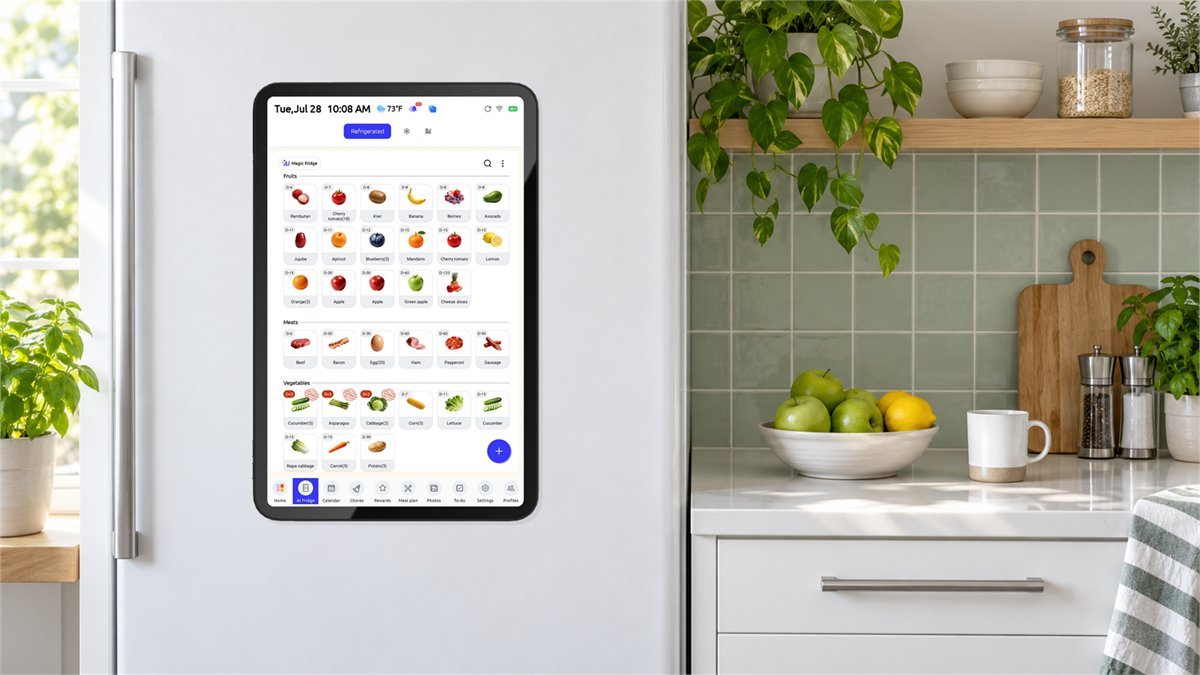
Everblog Fridge Calendar Review: Is FridgeCal Right for Your Family?
The school reminder is in an email. Saturday’s game is in somebody else’s calendar. The shopping list is on a phone that has just left the house. Everblog’s fridge calendar is built around a rather sensible idea: put the information where everyone already goes, instead of asking everyone to remember which app to open.
The original FridgeCal is a rechargeable, magnetic 13.4-inch touchscreen for the refrigerator door. It brings schedules, chores, meals, and food inventory together, but the attractive part is not simply having more features. It is giving the household a shared place to look. Whether that earns it a permanent spot in your kitchen depends on the way your family actually plans its days.
Is the Everblog fridge calendar worth it? It is a promising fit for a family that already uses digital calendars but needs a visible, shared routine. It is less convincing if you want a permanently lit, maintenance-free display or an automatic inventory system that knows what everyone has eaten. Buy it for the calendar first; treat the extra tools as useful possibilities, not a guarantee of an organized home.
What you are actually buying
There are two different problems a family planner can solve. One is storing information. Your phone probably does that already. The other is making the information visible to the person who needs it at the right moment. FridgeCal’s best argument is the second one: a child can check tomorrow’s activity, a partner can see an appointment, and nobody has to borrow the phone that holds the schedule.
| Specification | Original 13.4-inch FridgeCal | Why it matters |
|---|---|---|
| Display | 13.4-inch touchscreen; 1920 × 1200; 16:10 | Check event readability at your normal standing distance. |
| Body | Listed dimensions: 12.2 × 8.66 × 0.35 inches; 1.68 lb | Measure the usable flat door surface, not just the screen diagonal. |
| Battery | 8,400 mAh; USB-C charging | A clean, cable-free door still comes with a charging routine. |
| Wireless network | 2.4 GHz and 5 GHz Wi-Fi | Reliable coverage at the refrigerator is important for syncing. |
| Memory and storage | 6 GB RAM; 64 GB storage | These figures do not guarantee compatibility with every tablet app. |
| Included essentials | Magnetic stylus, mounting plate, USB-C cable, and charger | The separate charging dock is optional. |
Manufacturer-listed hardware specifications, checked October 2, 2026. This is the original 13.4-inch FridgeCal, not the separately announced 15.6-inch FridgeCal 2.
Everblog currently includes its core calendar functions without a recurring subscription. That is a meaningful ownership advantage if another monthly bill would make the purchase irritating. It is not the same as an offline product, however: calendar connections and remote updates still depend on working software and connectivity. [1]

Will it fit your fridge, and stay comfortably out of the way?
Start with the refrigerator, not the feature list. A display can look beautifully proportioned in a photograph and still be awkward beside your door handle or ice dispenser. Hold a paper rectangle matching the listed body dimensions against the proposed position. Then open the door normally, walk past it, and check whether the shortest regular user can reach the screen.
Everblog’s fit guidance calls for a flat mounting area. Magnetic doors can accept the device directly; non-magnetic finishes need the supplied mounting plate. Some stainless-steel doors are non-magnetic, so the material’s name alone does not settle the question. A small fridge magnet is a useful preliminary check, not proof that the surface will safely support the whole device.
- Avoid curves and seams. Keep the full attachment area on one flat door, away from a raised trim strip or the gap between two doors.
- Check the handle clearance. Your hand should not brush the screen whenever you open the fridge.
- Check the finish before using adhesive. Follow the mounting instructions and your appliance maker’s care guidance. Do not assume a removable-looking plate is harmless to every coating.
- Think about charging access. Pick somewhere you can comfortably support and remove the device without stretching or pulling on a cable.
Owner reports include strong magnetic attachment and adhesive problems on curved doors. Check both the surface and the plate’s bond; a strong magnet does not guarantee secure adhesive. [6]
A good calendar should be readable without walking over to it
Decide where you expect to read it: standing at the fridge, sitting at breakfast, or passing through the kitchen. A crowded monthly view may be attractive but less useful than a simple day or week view. Long event names also compete for space. Short labels such as “School pickup: Alex” tell the household more at a glance than a full email subject.
In his July hands-on review, BGR’s James Bruce found the hardware secure and bright, but noted reflections and less forgiving viewing angles from the glossy screen. He also encountered calendar-profile and recurring-event quirks. Those are reasons to check placement and synchronization carefully, rather than assuming a large display automatically makes everything easier. [7]
Google, Outlook, and Apple Calendar do not work in quite the same way
This is the compatibility detail most worth understanding before ordering. “Works with Apple Calendar” does not mean you can edit an iCloud event on the fridge and expect that change to return to your iPhone. Everblog’s current support documentation distinguishes editable connections from calendar feeds that only flow into the display.
| Calendar | Documented connection | Practical consequence |
|---|---|---|
| Google Calendar | Two-way available; one-way option during setup | Use two-way for a shared calendar you want to edit from both places. |
| Outlook | Listed as two-way | Check authorization on your account, especially a managed work account. |
| Apple Calendar / iCal | One-way, through a public calendar link | Keep editing the source calendar in Apple Calendar. |
| Yahoo, Cozi, TeamSnap | Listed as one-way | Useful for viewing schedules; not equivalent to editing the original service. |
| Other ICS / URL feeds | Import using a shareable calendar URL | Confirm refresh behavior with a test event; do not assume instant updates. |
Connection types follow Everblog’s current calendar sync guide. Access permissions and organizational policies can limit individual accounts.
The least frustrating way to set up a family schedule
Begin with one shared calendar rather than connecting every account in the house. Google setup runs through the Everblog phone app: select the device, open calendar synchronization, add Google, choose a sync direction, authorize access, and select the calendars you want displayed. Give the first import a few minutes. [2]
Then do a small, deliberately boring test. Add a future event on your phone. Change its time. If you selected two-way synchronization, make another change on the FridgeCal and check the original Google calendar. Try an all-day event and a recurring appointment with an end date. It is much easier to spot a duplicate with four test events than with a year of birthdays, school notices, and work meetings.
Choose one place to create each appointment. Importing a school calendar and manually entering the same school events is an easy way to produce duplicates that look like a synchronization fault. Also keep private work details out of a display that visitors can read. A family calendar can say “Unavailable until 5” without revealing a client name or meeting link.
For an Apple household: the documented setup asks you to enable Public Calendar and share its URL. Use a separate calendar containing only information you are comfortable sharing this way. Treat that link as sensitive, and do not enable public sharing on a confidential work or personal calendar simply to get it onto the fridge. [3]
More than one person can help maintain the planner. Everblog documents connecting multiple app accounts to a single device using its connection code. Set that up for the adults who actually manage the schedule, rather than making one person the permanent administrator for every small change. Keep the code within the household. [4]
Battery life is the biggest everyday compromise
A cord-free calendar looks wonderfully simple on a fridge door. The tradeoff arrives a few days later, when it needs charging. If removing and returning the screen sounds like a small task you will reliably do, the design makes sense. If you want to install it once and forget about power, think carefully before choosing a battery-powered setup.
Everblog’s August 30 power guidance ties its approximately 3–5-day expectation to Power Saving Mode being on and Wake Up Door Open being off under Settings > Display. That is a usage-dependent claim, not continuous screen-on time. The September 28 release notes also confirm that the photo screensaver requires external power. [5]
Kiran M. reported roughly 36–60 hours with door-triggered wake enabled; Don F. described charging every two days. Others were happier with battery life. Different settings make these anecdotes useful cautions, not a measured average. [6]
There is also a practical tradeoff in turning off automatic wake. You may gain time between charges while losing the moment when the schedule lights up as somebody opens the fridge. Try both behaviors during the first week. The right setting is the one your household will use, not necessarily the one that produces the most impressive battery number.
Is the charging dock worth adding?
The optional dock changes where FridgeCal lives. Instead of taking it to a cable and then returning it to the door, you can leave it powered on the counter. The listed accessory supports the original 13.4-inch model, combines magnetic docking with a Bluetooth speaker, and advertises up to 18W charging. Its listing says the power adapter is not included and recommends the FridgeCal charger and USB-C cable.
That is useful if you want a powered display beside your breakfast area or regularly use the screen while cooking. It is less useful if your main reason for buying FridgeCal was to reclaim counter space. Buying an accessory to avoid using the product in the location you chose it for deserves a moment’s thought.
Some owners appreciate the dock; Kiana reported wobble and a loud connection sound. Test stability and actual charging, not just Bluetooth pairing. [6]

Food inventory can help, but it is not a refrigerator that watches itself
The food-management feature is appealing for a familiar reason: it is easy to buy another ingredient because you cannot remember whether there is already one behind the milk. A usable inventory could make the shopping trip less wasteful. But the important word is usable. A perfect list that nobody updates soon becomes less trustworthy than a quick look in the fridge.
FridgeCal’s photo-assisted food entry helps build that list. It does not automatically observe every item being removed from a closed refrigerator. Treat recognition as a draft: check the food name, quantity, storage location, and date before relying on the entry. Estimated dates are reminders, not a test of whether food is safe to eat.
A manageable starting point is one troublesome category. Track the produce you regularly forget, or the freezer ingredients you accidentally buy twice. Do not begin by cataloguing every spice jar in three cupboards. After a week, ask whether checking the list is easier than checking the shelf. If it is, expand gradually.
Make the update habit part of an existing task. The person putting away groceries can add the new items; the person using the last portion can remove it. An entry that says “spinach” without telling you whether the bag is full or nearly empty may not help much when choosing dinner. Small, accurate lists beat ambitious ones full of old information.
Plan the meals your household already eats
There is no need to let recipe suggestions redesign your entire week. Begin with the meals that already work: a quick pasta on the late-pickup evening, a tray bake when someone can start cooking earlier, and a leftovers night. Put those choices beside the schedule. The benefit is seeing that Tuesday is too busy for a complicated recipe, not collecting more recipes than you will ever make.
Everblog’s recipe tools support manual entries and several import routes, including photos and recipe URLs. That makes your own small collection a sensible starting point. After importing, check ingredient quantities and instructions before building a shopping list; a convenient import is still worth proofreading. [8]
Some owners reported losing app access when the home device was offline. Test your shopping list away from home and keep a backup until you trust the connection. [6]
Chores work better as a small routine than a giant reward system
A colorful chore screen can be inviting, particularly when the task is simple enough to finish without an adult explaining it every time. Start with a few concrete actions: put the lunchbox on the counter, pack the school bag, clear a place at the table. “Tidy everything” is much harder to complete and much easier to argue about.
Agree on what counts as finished before adding points or rewards. Otherwise, a digital checklist can become another negotiation rather than a helpful reminder. For older children, let them suggest the routine and check whether the display is at a comfortable height. A planner they can reach and understand is more useful than one that looks tidy to an adult.
The dashboard can show tasks and let users mark them complete, while detailed changes happen in the relevant module. That distinction is worth learning early if a visible task seems impossible to edit from the home screen. [9]
For households concerned about entertainment distractions, FridgeCal’s parental controls can lock selected modules, including Entertainment Hub and chore management. Decide which restrictions you need before handing children the screen. A family organizer should support the routine, not turn each calendar check into a request to watch a video. [5]
What owner feedback says beyond the feature list
FridgeCal owners frequently praise shared visibility. The recurring frustrations concern learning the interface, charging, and app synchronization. Expect a period of adjustment rather than an effortless household fix. [6]
Service experiences are less consistent. Brand-level Trustpilot reports include praise for help with faults and shipping, alongside complaints about slow returns, unclear instructions, and devices needing attention. Those reports cover more than one Everblog model; they are a reason to check the seller’s support and return process, not a reliable FridgeCal failure rate. Keep the packaging and test the important functions soon after delivery. [10]
Recent software changes matter when reading older reviews
As of October 2, the official FridgeCal update page lists Calendar Version 3.0.6, released September 28. It adds clearer event color blocks and documents fixes for the timer stopping after screen-off and meal information failing to roll over overnight. Version 3.0.5 addressed third-party calendar syncing. Update through Settings > About > Firmware Version before evaluating a new unit. [5]
Release notes are encouraging, but a listed fix is not proof that every household’s issue has disappeared. Read the date of a complaint, compare the feature involved, and test the same action on your current software. Equally, do not buy on the assumption that a promised future feature will solve a deal-breaking problem.
Reasons to put it on the shortlist
- Your household already has useful digital calendars that not everyone checks.
- The fridge is a natural meeting point with a suitable mounting area.
- A shared screen would reduce repeated questions about the day’s plans.
- You can start with a few useful functions and add more gradually.
Reasons to pause
- You expect the screen to stay lit all day without external power.
- You need editable Apple-calendar integration rather than a one-way feed.
- Nobody wants responsibility for charging or inventory updates.
- You need a guaranteed particular streaming app or a general-purpose tablet.
Five checks to make during the first week
Rather than trying every feature on the first evening, establish whether the planner does the few jobs you bought it for. A short real-life trial will tell you more than a home screen full of sample entries.
- Day one: placement and basic sync. Check the mount, viewing angle, time zone, and one source calendar. Confirm that everyone can read an ordinary appointment.
- Day two: changes and recurring events. Reschedule a test appointment and verify the result on the phone and display. Check a recurring series after its end date.
- Day three: shared responsibility. Connect another adult’s app account. Have them add something without asking you to do it for them.
- Days four and five: power and remote access. Record the battery level under your preferred settings and test the shopping list away from home. Notice whether charging disrupts the place where you expect the calendar to be.
- The weekend: one extra feature. Try either three familiar meals or a small chore routine. Keep it only if it saves more effort than maintaining it costs.
If something fails, write down the software version, the action that caused it, and whether it happened in the app, on the screen, or both. A short video can make a support request clearer. Avoid repeatedly resetting everything before you have recorded the problem; doing so can erase the circumstances that make it reproducible.
The buying decision: shared visibility or another job to maintain?
The most persuasive Everblog customer is not necessarily someone fascinated by smart-home technology. It is the person tired of being the only one who knows the schedule. FridgeCal can give that information a place of its own, and that is a genuinely useful reason to consider it.
For a smaller household that already shares calendars comfortably on its phones, the improvement may be modest. Try putting the existing schedule somewhere everyone checks before buying another screen. For a busier home, choose the door-mounted model because the location solves a problem, not simply because it offers more functions than a paper planner.
A powered countertop or larger wall display deserves consideration if your priority is reading appointments from across the room. An existing tablet can be a lower-cost experiment if you already own one, although you will need to solve its mounting, charging, and app arrangement yourself. These alternatives are not automatically better; they just put the effort in different places.
Our verdict: the Everblog fridge calendar makes the most sense as a visible family planner with optional extras. Confirm the mounting spot and calendar connection, accept the charging routine, and give the family time to build a habit around it. The best outcome is not using every feature. It is needing to ask “What’s happening tomorrow?” a little less often.
Once you have decided that it suits your kitchen, check Everblog coupons and deals for available offers on the calendar and its accessories.
Questions worth settling before you order
Does the Everblog fridge calendar need a subscription?
Everblog currently says its core calendar features are included without a monthly or annual subscription. That does not remove the need for connectivity or guarantee access to unrelated paid entertainment services.
Can I edit my iPhone calendar from the FridgeCal?
Not through the documented Apple Calendar connection: it is a one-way public-calendar feed. If editing from both devices is important, review the supported Google or Outlook connection and test it with the accounts you actually use.
Can it stay on the fridge while charging?
USB-C charging is available, but whether a cable can safely reach your mounting position depends on the kitchen. Do not route a lead through a closing door, across a walkway, or close to heat and water. A nearby safe charging spot may be more practical.
Will the food list automatically update after somebody eats an item?
Do not assume that it will. Photo-assisted entry helps you create an inventory; keeping it accurate still requires a household habit for updating what has been used, moved, or replaced.
Is the FridgeCal 2 the same product?
No. The 15.6-inch FridgeCal 2 is a separate announced model. This review covers the original 13.4-inch device. Check the exact model name before comparing accessories, features, or delivery promises.
Helpful references
- Everblog: subscription policy for core features.
- Google Calendar connection instructions.
- Apple Calendar public-link setup.
- Connecting multiple household app accounts.
- FridgeCal firmware release notes and power-saving guidance.
- Owner comments with product-model labels.
- James Bruce’s hands-on FridgeCal review at BGR.
- Recipe entry and import options.
- Dashboard viewing versus detailed editing.
- Everblog customer-service experiences across its product range.
DiscountedSavings may earn a commission from qualifying purchases through product links.