Redragon RGMS-850W Air for RTX 5080: 12V-2×6 Cable, Power Headroom, Connector Layout, and What to Verify
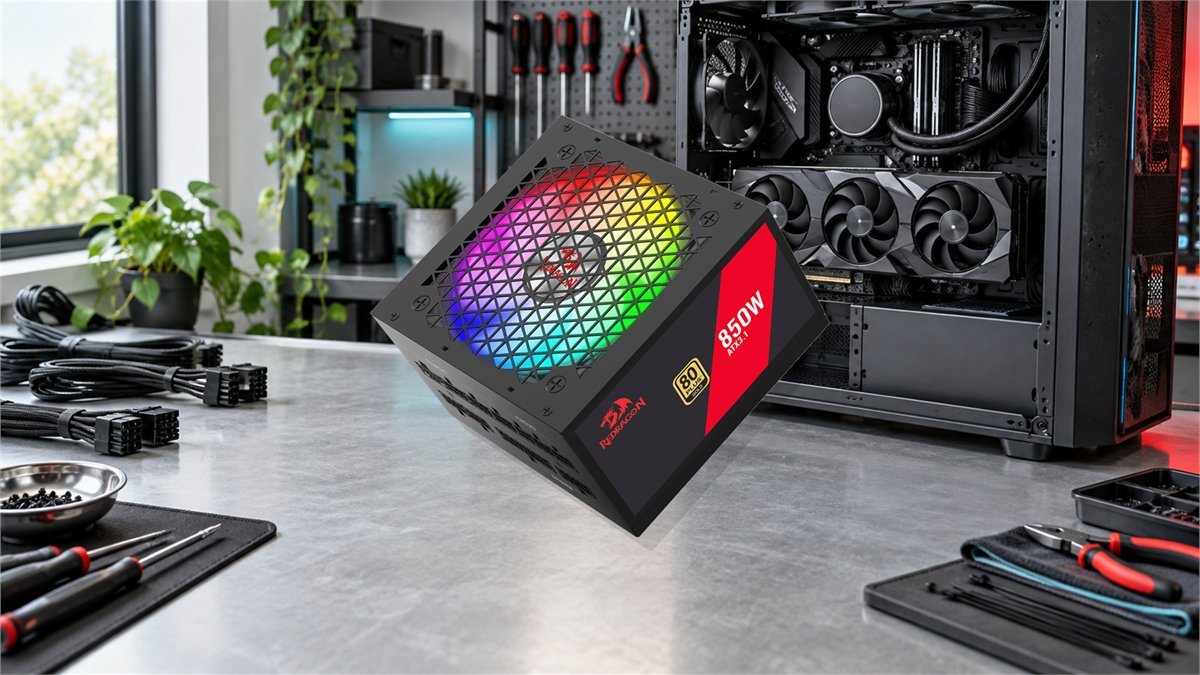
The Redragon RGMS-850W Air looks purpose-built for a modern graphics upgrade: 850W capacity, ATX 3.1, PCIe 5.1 and a native 12V-2×6 cable. Those labels put it in the right category for a GeForce RTX 5080, but they do not answer every important question. Cable rating, connector seating, CPU load, case clearance and the lack of an independent electrical review still matter.
Short answer: 850W is NVIDIA’s recommended system power for the RTX 5080, so the RGMS-850W Air has enough rated capacity for a sensible stock-clocked build. It is most convincing with an efficient gaming CPU and a properly rated native 12V-2×6 cable. A 1000W supply becomes the calmer choice for sustained CPU-and-GPU rendering, raised power limits, a large future upgrade or lower fan load. The unanswered issue is quality verification: this new Air revision has manufacturer specifications, but no independent teardown or electrical test yet.
Stock GPU, Ryzen X3D-class or similarly efficient CPU, no cable extensions, and no plan to move to a substantially higher-power graphics card.
High-core-count CPU at full load, overclocking, many drives and pumps, quiet-PSU priority, or a likely next-generation flagship GPU.
What is confirmed and what still needs proof
A power supply should be judged in layers. The specification sheet establishes compatibility and features. Certification can establish efficiency under a defined test. Only a competent independent review can show voltage regulation, ripple, transient response, hold-up time, protection behavior and fan acoustics on the exact retail platform.
| Item | RGMS-850W Air information | Why it matters for RTX 5080 | Status |
|---|---|---|---|
| Rated output | 850W | Matches NVIDIA’s recommended system power for the reference RTX 5080 configuration. | Confirmed |
| Power standard | ATX 3.1 and PCIe 5.1 | Designed around current GPU power excursions and the newer connector ecosystem. | Manufacturer-confirmed |
| GPU cable | Native 12V-2×6 cable | A direct cable removes the multi-plug adapter from the normal installation path. | Confirm the cable’s wattage marking |
| Topology | LLC resonant design with DC-to-DC conversion | A modern topology description is encouraging, but implementation quality cannot be inferred from the name. | No independent electrical test |
| Capacitors | Advertised with main Japanese capacitors | The wording applies to the main capacitors and should not be interpreted as an all-Japanese capacitor design. | Claim confirmed; parts list unknown |
| Cooling | 120mm fluid-dynamic-bearing RGB fan | Fan bearing type may help longevity, but there is no published noise curve or zero-RPM behavior. | Acoustics untested |
| Protections | OVP, OCP, OPP, OTP, UVP and SCP claimed | The right protection names are present; trip points and real-world operation require bench testing. | Function unverified independently |
| Warranty | Two years | Usable coverage, but shorter than warranties commonly attached to established premium 850W units. | Published term |
Is 850W really enough for an RTX 5080?
The RTX 5080 is rated at 360W Total Graphics Power. NVIDIA’s 850W recommendation was calculated around a high-end Ryzen 9 9950X system, not a low-power office processor. That makes 850W a reasonable target for a complete high-performance PC rather than a number that only works with an unusually modest build.
The recommendation is still not a promise for every combination. A processor running an unrestricted all-core workload can draw far more than it does in games. Pumps, fans, storage, USB-powered accessories and motherboard conversion losses also consume power. Overclocking or a raised GPU power limit narrows the reserve further.
| Planning scenario | GPU budget | CPU budget | Rest of system | Estimated combined range | 850W reserve |
|---|---|---|---|---|---|
| Efficient gaming build | Up to 360W | 90-140W | 60-90W | About 510-590W | About 260-340W |
| High-end CPU plus GPU workload | Up to 360W | 170-230W | 70-100W | About 600-690W | About 160-250W |
| Raised limits and heavy peripherals | Around 400W planning allowance | 220-260W | 80-110W | About 700-770W | About 80-150W |
These are conservative planning ranges, not measurements of the Redragon PSU or a promise of wall-power draw. Actual consumption depends on the exact CPU, GPU BIOS, workload, motherboard limits and peripheral count.
What RTX 5080 owners are reporting
Across four accessible RTX 5080 community threads with dozens of readable comments, the recurring pattern is straightforward: modern 850W ATX 3.x units are widely reported as sufficient for RTX 5080 gaming systems, including builds using Ryzen 7 9800X3D and Ryzen 9 9950X3D processors. Owners commonly describe whole-system consumption well below the PSU’s ceiling during games, although their meters, workloads and hardware differ.
The reasons owners choose 1000W are more nuanced than "850W cannot work." Extra capacity can keep the PSU fan in a quieter part of its curve, leave room for simultaneous rendering on a power-hungry CPU, tolerate raised power limits and reduce the chance of replacing the PSU during a later GPU upgrade. A smaller group reports shutdowns with older or questionable 850W units. Those anecdotes cannot diagnose the Redragon Air, but they underline why wattage alone is not enough.

12V-2×6 setup: the part that deserves the most attention
NVIDIA allows a single PCIe Gen 5 cable rated for at least 450W, or its adapter powered by three independent PCIe 8-pin cables. The RGMS-850W Air’s native 12V-2×6 cable is the cleaner route because it avoids the bulky adapter and three separate PSU-side cable runs. "Native" does not make installation foolproof, however. Connector seating and cable routing remain critical.
Why a native cable helps but does not eliminate risk
A direct 12V-2×6 cable reduces connection count and removes the need to feed an adapter with three separate 8-pin leads. That simplifies routing and makes it easier to see whether the GPU plug is seated. It does not make a partially inserted connector safe, and it cannot compensate for excessive side-panel pressure or an unsupported third-party extension.
The safest installation has a straight section immediately behind the plug, enough case width to close the panel without pressing on the cable, and no tension pulling the connector sideways. Install the cable before finalizing nearby fans or cable combs. If the case is narrow, measure the distance from the GPU power socket to the side panel rather than relying only on the graphics card’s advertised width.
Understanding the modular connector layout
The published rear-panel image appears to use a practical layout: split sockets for the 24-pin motherboard cable, three peripheral-power sockets, three CPU/PCI-E sockets and one dedicated 12V-2×6 connection. The labels describe the PSU-side ports, not permission to interchange the device ends of CPU and GPU cables.
| Panel group | Apparent quantity | Typical connection | Installation caution |
|---|---|---|---|
| Mainboard | Two linked sockets | The PSU side of the 24-pin ATX motherboard cable | Both modular plugs normally need to be connected for the motherboard cable to function correctly. |
| IDE/SATA | Three sockets | SATA drives, fan hubs, lighting controllers and legacy peripheral chains | Count required connectors and cable branches before mounting drives behind the motherboard tray. |
| CPU/PCI-E | Three sockets | EPS CPU leads and conventional PCIe GPU leads | The PSU-side family may be shared, but EPS and PCIe device-end pinouts are not interchangeable. |
| 12V-2×6 | One dedicated socket | Direct high-power cable to the RTX 5080 | Verify the included cable rating and fully seat both ends. Do not substitute a cable from another modular PSU. |
The 140mm, 150mm and 160mm size conflict
Compact dimensions are useful in a case crowded by a long RTX 5080, a front radiator or a lower drive cage. Redragon’s current information is inconsistent, though. One headline calls the unit a compact 140mm build, the accompanying sentence mentions a shorter 160mm depth, and the structured item dimensions convert to roughly 140 x 150 x 88mm.
This may be a difference between width, depth and an incorrect marketing value, but a buyer should not guess which number controls fit. Allow additional room for the modular plugs and the first bend of the cables. Even a 140mm-deep PSU can require substantially more installation space once stiff motherboard and GPU cables are connected.
Measure before ordering
- PSU bay depth to the nearest drive cage or radiator.
- Extra space needed for straight modular plugs.
- GPU length and any overlap with front-mounted cooling.
- Side-panel clearance around the RTX 5080 power cable.
Verify on the retail unit
- Exact enclosure depth, excluding protruding connectors.
- 12V-2×6 cable length and printed power rating.
- Number of EPS, PCIe and SATA cable branches.
- Whether the fan mode or RGB behavior can be controlled.
What 80 Plus Gold does and does not tell you
An 80 Plus Gold label addresses conversion efficiency at specified load points and input conditions. Better efficiency usually means less waste heat for a given DC load, but it does not grade ripple, transient response, protection trip points, component selection, cable quality or fan noise.
The public 80 PLUS database contains a Redragon model identified as RGMS-850W with a 2024 test report. That report records 91.26% typical efficiency and 88.39% at full load under its 115V test. The new retail product is identified more specifically as RGMS-850W Air with variant SKU RED-PSU850S-RBBK. Because the public report does not explicitly tie that retail revision to the tested sample, it should not be presented as independent certification of the Air unit without a matching label or certificate number.
This distinction is not proof that the Air lacks certification. It is a model-identity question worth checking on the retail label. A photograph of the label and its exact model code is more useful than relying on a family name shared by multiple revisions.
First-boot checklist for an RTX 5080 build
- Inspect the PSU and cables. Look for shipping damage, bent terminals, incomplete pin seating or cable labels that do not match the model.
- Connect the motherboard and CPU power. Use every EPS connector required by the motherboard manual, especially with a high-core-count processor.
- Use the native 12V-2×6 cable. Confirm its rating, route it without tension and seat both ends completely.
- Start without optional extensions. Remove an extra variable until the system has passed sustained testing.
- Check firmware and defaults. Load stable motherboard settings before applying CPU overclocking, memory tuning or a raised GPU power limit.
- Test gaming and combined load separately. A game can be stable while simultaneous CPU and GPU work reveals a power, cooling or cabling problem.
- Watch behavior, not only wattage. Unexpected restarts, black screens, electrical odor, connector heat or repeated protection shutdowns require immediate investigation.
If the PC restarts or loses video under load
A shutdown during a demanding game does not automatically mean 850W is insufficient. It can come from an incompletely seated GPU connector, an unstable CPU or memory profile, a bad cable, a failing unit, a driver problem, overheating or protection circuitry responding to a fault.
| Symptom | First check | Useful isolation step | What not to assume |
|---|---|---|---|
| Instant restart during GPU load | Both ends of the 12V-2×6 cable and the Windows event log | Return CPU, memory and GPU to stock settings; temporarily lower the GPU power limit for diagnosis | That the advertised 850W number alone rules the PSU in or out |
| Black screen while audio continues | GPU seating, display cable, driver and power connector | Test another display path and reinstall the GPU driver cleanly | That every black screen is over-power protection |
| Failure only in combined stress | CPU package power, temperatures and motherboard limits | Test CPU and GPU separately, then together at stock settings | That gaming stability proves an all-core rendering workload will also be stable |
| Hot, discolored or damaged plug | Stop using the system and disconnect AC power | Document the connector and contact the seller or manufacturer | That reseating a visibly damaged high-current connector makes it safe |
| Repeated click and immediate shutdown | Short circuit, misplaced standoff and modular cable identity | Disconnect nonessential devices and inspect the build before retrying | That repeatedly cycling power is harmless |
RGMS-850W Air or a proven 1000W model?
The Redragon makes the strongest paper case when its compact layout, native cable and current price matter more than premium warranty length. For a stock RTX 5080 gaming machine, 850W is a defensible capacity and aligns with NVIDIA’s recommendation. The model becomes harder to judge when the buyer wants evidence about noise, ripple, transient response or protection behavior, because those results do not yet exist for the Air revision.
| Priority | RGMS-850W Air at 850W | Established 1000W alternative |
|---|---|---|
| Stock RTX 5080 gaming | Rated capacity is appropriate | More capacity than normally required |
| High-end CPU rendering with GPU load | Likely workable with careful power budgeting | More thermal and electrical reserve |
| Native current-generation GPU cable | 12V-2×6 is advertised | Must be checked model by model |
| Independent electrical evidence | Not available for the Air revision yet | Can be selected from models with full bench reviews |
| Warranty | Two years | Often longer in the premium segment |
| Future flagship GPU | Limited upgrade reserve | More flexibility, though connector and platform quality still matter |
Bottom line: the RGMS-850W Air is specified correctly for an RTX 5080 build, and its native 12V-2×6 connection is preferable to starting with a three-cable adapter. The sensible reservation is not the 850W rating; it is the absence of exact-model electrical and acoustic testing. Verify the cable rating, physical dimensions, retail model code and box contents. Buyers who need proven low noise, a long warranty or substantial upgrade margin should compare it with a well-tested 1000W unit before deciding.
Current pricing can change independently of the technical fit. Compare Redragon coupons, active deals and tracked product prices before choosing the PSU, then make the final decision from cable compatibility, case clearance and the return policy rather than discount size alone.
Frequently asked questions
Is 850W enough for an RTX 5080?
Yes for a typical stock-clocked RTX 5080 gaming build. NVIDIA recommends 850W system power and bases that guidance on a Ryzen 9 9950X configuration. Heavy simultaneous CPU and GPU workloads, raised power limits or a future flagship upgrade can justify 1000W.
Does the Redragon RGMS-850W Air include a native 12V-2×6 cable?
The current product specification advertises a native 12V-2×6 cable. Before installation, confirm that the cable supplied with the exact retail unit is marked for at least 450W, as required by NVIDIA for a single-cable RTX 5080 connection.
Can a CPU cable be connected to a CPU/PCI-E modular socket?
The PSU-side sockets may share a label, but CPU EPS and GPU PCIe device ends are not interchangeable. Follow the cable labels and use only the modular cables supplied for this exact PSU.
Does 80 Plus Gold prove that the PSU is safe and high quality?
No. 80 Plus evaluates conversion efficiency under specified test conditions. It does not replace independent measurements of ripple, voltage regulation, transient response, protection behavior, hold-up time, component quality or noise.
Should an RTX 5080 build use 850W or 1000W?
Choose a good 850W ATX 3.x unit for a calculated stock gaming build. Consider 1000W for a power-hungry CPU under sustained all-core load, overclocking, quieter PSU operation, many peripherals or a planned higher-power GPU upgrade.
How deep is the RGMS-850W Air?
The current product information is inconsistent: it refers to a 140mm compact build, mentions 160mm depth in the same description and lists dimensions equivalent to roughly 140 x 150 x 88mm. Verify the physical depth of the retail unit and leave additional room for modular cable plugs.
Technical references and owner discussions
- NVIDIA GeForce RTX 5080 specifications and system-power recommendation
- NVIDIA GeForce RTX 5080 quick-start guide and power-connector instructions
- PCI-SIG 12V-2×6 connector update
- 80 PLUS public Redragon certification index
- RTX 5080 owner discussion about 850W stability and measured system draw
- RTX 5080 community discussion comparing 850W and 1000W choices
- Ryzen 9 9950X3D and RTX 5080 power-budget discussion
- Recent RTX 5080 owner reports on real-world 850W headroom